An agentic browser is safe to sanction only where an administrator can switch the agent off, scope the sites it may act on, bind sign-in to corporate identity, and pull a log. As of 23 October 2026 that describes two of three. Microsoft Edge Copilot Mode has a named policy for each control, with its agent (browsing with Copilot) off by default, in preview, and limited to Microsoft 365 Copilot licenses outside the European Economic Area. Perplexity Comet for Enterprise has per-domain agent permissions and audit logs, but the logs sit behind 50 Enterprise Pro seats or one Enterprise Max seat. OpenAI has retired ChatGPT Atlas: its help center scheduled the shutdown for 9 August 2026 and now states that the browser no longer receives updates, so the only posture for it is block and remove.
Our Comet post covered the attack record and the sanction, restrict or block call for one browser; it is useful here because this post assumes that reasoning and does not repeat it. What follows is the admin control matrix, with "not documented" wherever the vendor's own pages are silent.
Last verified: 23 October 2026. OpenAI's "ChatGPT Atlas for Enterprise" article, its Atlas retirement article and the Atlas launch post were read from Internet Archive copies (snapshots of 10 March, 25 July and 13 January 2026) because help.openai.com and openai.com returned HTTP 403 to our fetcher. Perplexity's help center, Microsoft Learn and Microsoft's Edge for Business page were read live; Brave and Cyberhaven are secondary.
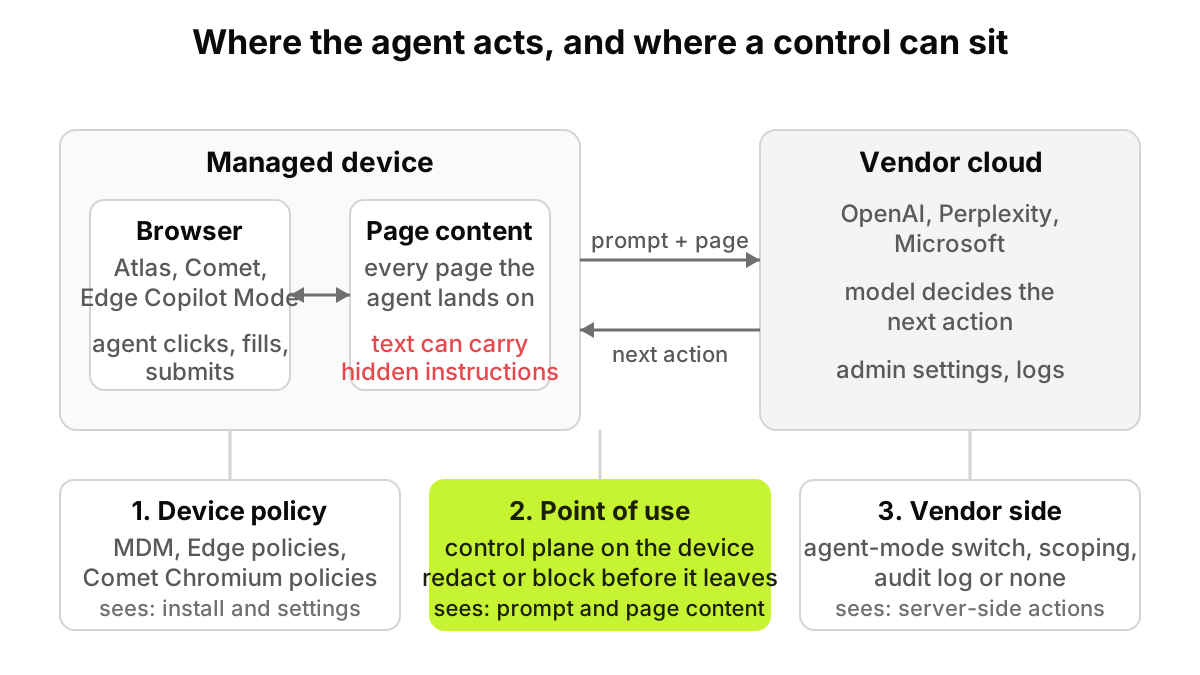
What makes an agentic browser different from a browser with a chatbot?
A chatbot in a sidebar reads a page when you ask it to. An agent navigates, clicks, fills forms and submits them, and reads every page it lands on along the way, so text on a page stops being data and becomes a candidate instruction.
Brave's security team showed this on Comet in August 2025, hiding instructions in a Reddit comment that led the assistant to send a user's email address and a one-time code to an attacker. In October 2025 they hid near-invisible text in images and called indirect prompt injection "a systemic challenge facing the entire category of AI-powered browsers". OpenAI's Atlas launch post said its safeguards "will not stop every attack that emerges as AI agents grow in popularity".
That is why the matrix has a row for scoping where the agent may act, separate from the row for switching it off.
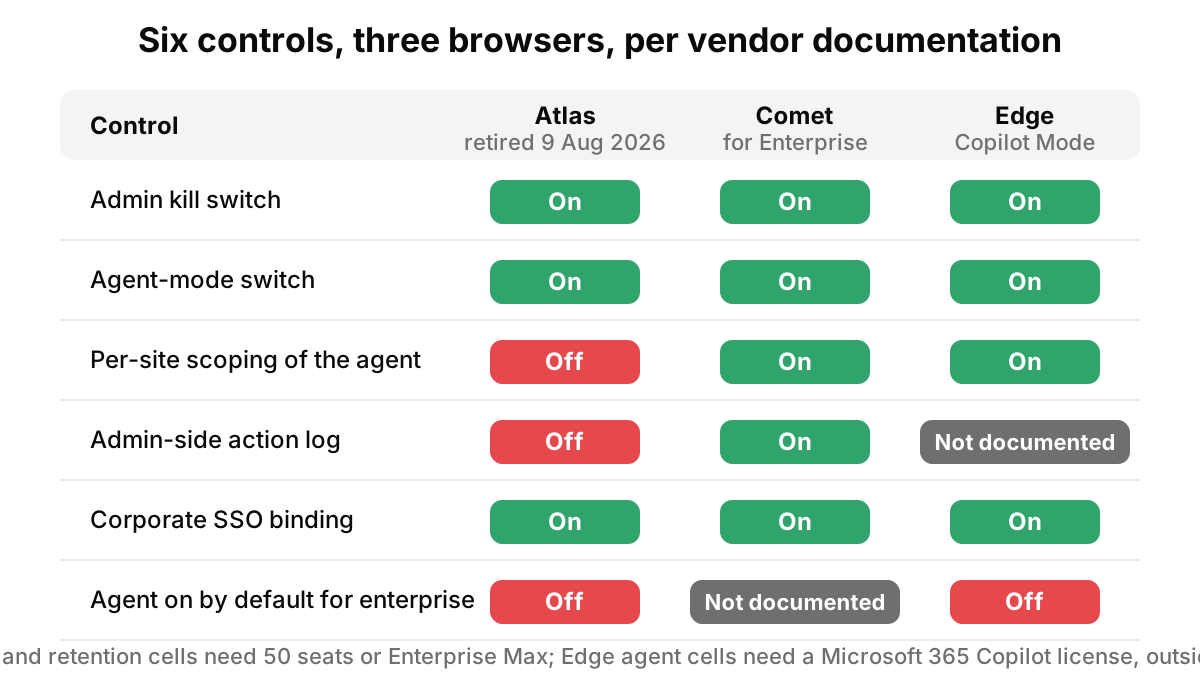
The control matrix: Atlas vs Comet vs Edge Copilot Mode
Every cell comes from the vendor's own documentation; Atlas entries are what OpenAI documented in March 2026, before retirement.
| Control | ChatGPT Atlas (retired 9 August 2026) | Perplexity Comet for Enterprise | Edge Copilot Mode (Edge for Business) |
|---|---|---|---|
| Default state in a managed enterprise | Enterprise: off by default, owner toggle. Business: on by default | Not documented; admins pick "Enable for specific members" | Copilot icon shows; page context on by default outside the EU, off in EU regions; browsing with Copilot off by default |
| Admin on/off switch | Workspace settings toggle; until enabled, Enterprise credentials cannot sign in | Comet setup in Organization Settings; disabled users see "Your organization has not approved you to use Comet with this account" | Microsoft365CopilotChatIconEnabled (Edge 139+) |
| Agent mode (acts on pages) on/off | "Agent mode" toggle in workspace permissions, shared with ChatGPT | Browser control on/off; "Always Allow" on/off; per domain Browser Control, Read Only or No Access | AllowBrowsingWithCopilot (Edge 148+) plus allow list; CopilotCoworkToolActionsEnabled (Edge 152+) for Cowork |
| Memory and retention controls | User toggles for Memories; browsing data, memories and agent activity "may not be covered" by Enterprise retention or deletion | Admins can disable Memory org-wide; session retention windows need 50 seats or Enterprise Max; Comet browsing data retention not documented | Prompts and responses stored in Microsoft 365, retention set in Purview; CopilotPageContext and EdgeEntraCopilotPageContext govern page and history access |
| SSO and identity binding | Workspace SSO applies to sign-in; "No Atlas-specific SSO enforcement or SCIM" | SSO with Enterprise Pro at organization level; no Comet-specific SSO control documented | Policies apply only to Microsoft Entra ID profiles, not Microsoft account profiles |
| Logging available to admins | None: "does not emit Compliance API logs and does not integrate with SIEM or eDiscovery" | Audit Logs (50+ Enterprise Pro seats or one Enterprise Max seat) via webhook, with a comet_agent_action event | Purview CopilotInteraction records with AppHost "Edge" and an XPIADetected flag; browsing-with-Copilot actions not documented |
| Data used for training | No: "does not use Business or Enterprise content to train OpenAI models" | No: "no data is ever logged or used to train AI models"; third-party providers barred by contract | No: prompts, responses and Graph data "aren't used to train foundation LLMs" |
| Platforms | macOS on Apple silicon, 14.2 or later; Windows, iOS and Android "coming soon" at launch, shipping not confirmed | macOS and Windows | Windows and macOS; Android and iOS "Not supported" |
| What a DLP or control plane sees at the point of use | Prompts and page content leaving the device, no vendor log to reconcile against | Prompts and page content leaving to Perplexity, reconcilable with the audit webhook | Page content leaving to Microsoft when page context is allowed; DLP-protected pages excluded |
ChatGPT Atlas: what OpenAI documented, and why it no longer matters
OpenAI's enterprise article was candid. Enterprise access was off by default, and until a workspace owner enabled it "Enterprise users are blocked from signing in with Enterprise credentials". Agent mode had its own toggle, shared with ChatGPT. The "what is not covered yet" list ran long: no Atlas-specific RBAC, blocklists or allowlists; no IP allowlists; out of scope for OpenAI's SOC 2 and ISO attestations; and the line that settled most risk reviews, "Atlas does not emit Compliance API logs and does not integrate with SIEM or eDiscovery".
The same help center article, read on 23 October 2026 under the title "ChatGPT Atlas retirement", now says that "ChatGPT Atlas has been retired and no longer receives updates." It gives no date, so we rely on the July article for the 9 August 2026 shutdown.
Then OpenAI retired it. The help center says "Atlas is scheduled to stop working on August 9, 2026", gives the planned announcement date as 9 July, and tells workspace admins to review whether members are using Atlas and "remind users to handle cookie and session files as sensitive data". Browser-based agent work moves into the ChatGPT desktop app and Codex.
Two things survive. The install base: Cyberhaven reported in October 2025 that 27.7% of enterprises had at least one employee who downloaded Atlas. And the cookie export, a credential file in a Downloads folder.
Perplexity Comet for Enterprise: the richest admin surface, gated by seat count
Comet's agent controls are the most granular of the three. Admins can turn browser control off for the whole organization, turn off "Always Allow" so every action needs a confirmation, and override both per domain with Browser Control, Read Only ("Can only view content on the specified domain – cannot perform any actions") or No Access. A user hitting a restricted site sees "Your organization restricts Comet from controlling the browser on this domain".
The gate is seats. Audit Logs, which include a comet_agent_action event for each automated action and are delivered to a webhook, require "50 or more Enterprise Pro seats, or at least one Enterprise Max seat". The same threshold applies to session retention windows. Below it you get Comet Telemetry, an inventory of users, device IDs, browser versions and extension counts, not an action log. Perplexity does not state whether Comet is on or off by default once an organization has Enterprise seats, and its pages no longer use the phrase "answer-only mode" from our earlier post; the equivalent today is Read Only per domain.
Edge Copilot Mode: policy names that exist, and the one that does not
Microsoft Learn describes "Copilot Mode in Microsoft Edge" for commercial use as a bundle of Edge management service toggles: browser context, the Copilot icon, the search box, AI text generation, the new tab page, and browsing with Copilot. There is no policy named Copilot Mode, and the one that sounds like a master switch, EdgeCopilotEnabled, is "Not supported" on Windows and macOS.
The agent is browsing with Copilot: "Copilot can browse websites on a user's behalf, following their instructions to complete multi-step workflows". It is in preview, requires a Microsoft 365 Copilot license, and "only tenants outside of the European Economic Area may participate at this time". AllowBrowsingWithCopilot (Windows and macOS 148 or later) turns it on or off; unconfigured, it is "off by default, and users can turn it on". Allow and block list policies scope it: "If no domains are configured in the allow list, browsing with Copilot is effectively disabled." Copilot "requests user input for steps requiring authentication, and final saving and submitting actions".
CopilotPageContext (Edge 124+) and EdgeEntraCopilotPageContext (Edge 130+) control whether Copilot in the side pane can read page content, browsing history and video transcripts for Entra ID profiles. Unconfigured, access "is enabled by default in non-EU regions" and "disabled by default in EU regions", and users can flip it. Copilot cannot read DLP-protected pages regardless. CopilotCoworkToolActionsEnabled (Edge 152+) controls whether "Cowork" may take actions on the user's behalf; the page does not define Cowork. Logging runs through Purview, where sidebar interactions appear as CopilotInteraction records with AppHost "Edge" and an XPIADetected flag; whether browsing-with-Copilot actions on third-party sites produce records is not documented.
Sanction, restrict or block?
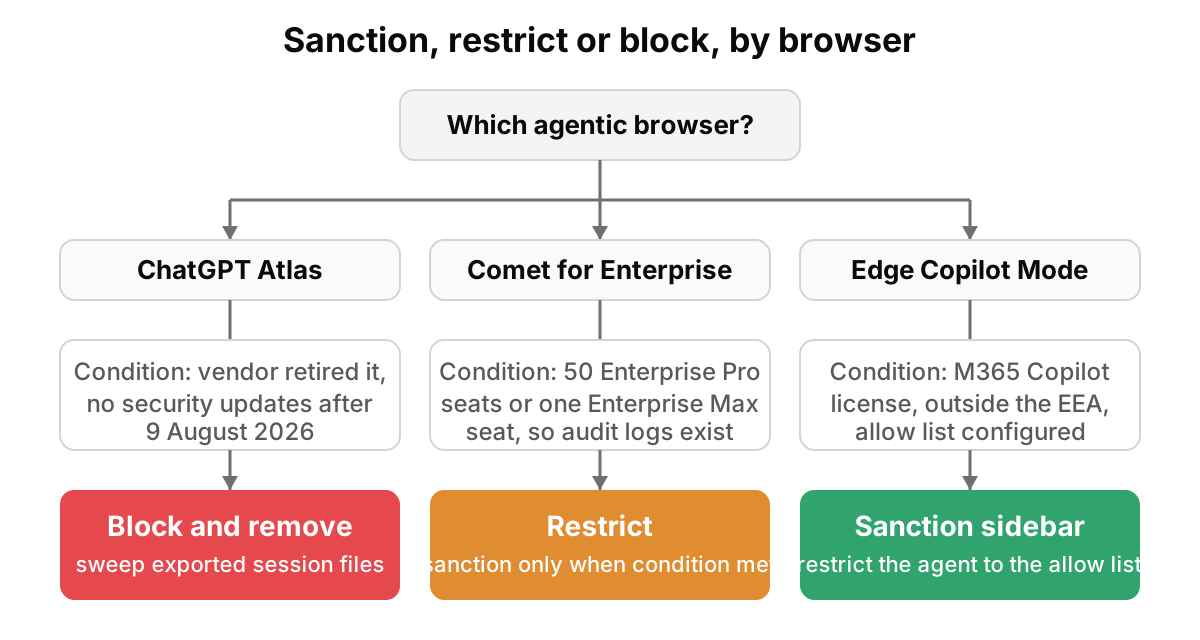
- Atlas: block and remove. The vendor stopped supporting it. Blocklist it in MDM, find remaining installs, and sweep for exported cookie or session files.
- OpenAI Help Center, "ChatGPT Atlas retirement" (live page, read 23 October 2026 through a text proxy because the site refuses automated fetches)
- Comet: restrict, and sanction only above the seat threshold. Restrict means MDM-deployed, browser control off globally or Read Only outside an approved domain list, "Always Allow" off, and an expiry date. Sanction more broadly only with 50 Enterprise Pro seats or an Enterprise Max seat, so that audit logs reach your SIEM. A browser whose agent acts without a log is a block.
- Edge Copilot Mode: sanction the sidebar deliberately, restrict the agent. Decide CopilotPageContext and EdgeEntraCopilotPageContext explicitly rather than inheriting the regional default, and set AllowBrowsingWithCopilot explicitly, since unconfigured means users can turn it on. The allow list is the control: start from Microsoft's commonly used sites list and remove anything that holds customer data.
Whichever you choose, write it down.
The AUP clause
Our AI acceptable-use policy template is useful here because it already has a section for AI tools that take actions, and the clause below slots into it. This is a template, not legal advice.
Template clause. Agentic browsers, meaning any browser whose assistant can navigate, click, fill or submit on a user's behalf, may be used on managed devices only when IT has deployed and configured them, and personal installs are not permitted. The agent may act only on sites IT has approved, with confirmation prompts left on, and must not be used while signed in to systems holding data classified Confidential or above, nor with stored passwords or payment details. Exported cookie, session or password files from any browser are handled as credentials and deleted after use. Any agentic browser the vendor has retired must be removed within 30 days of the end-of-support date.
What should a security team do now?
- Inventory the three. Query MDM and endpoint discovery for com.openai.atlas.web, ai.perplexity.comet and Edge profiles with Copilot features on.
- Remove Atlas. Block, uninstall, and sweep for exported session files.
- Set the Edge policies explicitly. Microsoft365CopilotChatIconEnabled, CopilotPageContext, EdgeEntraCopilotPageContext and AllowBrowsingWithCopilot should each be Enabled or Disabled, never unconfigured.
- Decide the Comet tier. Under the seat threshold, treat Comet as a pilot with browser control off, or block it. Over it, configure the audit webhook into your SIEM before the first user signs in.
- Scope the agent per domain. Comet's domain permissions and Edge's allow list do the same job; keep customer-data systems off both.
- Publish the clause and put a control at the point of use. Our Copilot and ChatGPT Enterprise control matrix covers the chat products these browsers sit beside.
What software can and cannot do about agentic browsers
No tool decides whether an agent may act on your CRM, or whether a vendor's retirement notice reached the right people.
What software can carry is the device side of the matrix. A control plane that enforces at the point of use sees the prompt and the page content leaving the device, including what agent mode reads on the user's behalf, and can redact or block it before it reaches the vendor. AccuroAI does this without TLS interception, discovers 1,400+ AI tools, including personal browser installs, and inspects what leaves with 40+ data classifiers. What it cannot do is stop the vendor's own server-side actions: once a prompt and a page have reached the model, the vendor's agent-mode controls and logs are the only controls left. The endpoint AI governance page describes the device side; the AI control plane hub explains where it sits next to CASB and DLP.
Frequently asked questions
Is ChatGPT Atlas still available for enterprises?
No. OpenAI's help center says Atlas was scheduled to stop working on 9 August 2026, with browser-based agent capabilities moving into ChatGPT and Codex.
Is Edge Copilot Mode the same thing as browsing with Copilot?
Not quite. Copilot Mode for commercial use is a bundle of Edge management service toggles; browsing with Copilot is the agent inside it, governed by AllowBrowsingWithCopilot and its allow list.
Can we get Comet audit logs with a small deployment?
Not under Perplexity's documented thresholds: 50 or more Enterprise Pro seats or at least one Enterprise Max seat. Comet Telemetry is available to any MDM deployment, but it is an inventory, not an action log.
Can our proxy or CASB tell an agent's click from a user's click?
Not from the network flow; both are the same browser talking TLS to the same endpoints. The distinction exists only in the agent-mode toggles, per-domain scoping, vendor audit events and a device control that sees the prompt.
This is not legal advice. Vendor documentation changes often; confirm each policy and threshold on the vendor's current page before relying on it.
Sources
- OpenAI Help Center, ChatGPT Atlas for Enterprise (Internet Archive, 10 March 2026) and Evolving Atlas into ChatGPT for browser-based agentic work (Internet Archive, 25 July 2026); OpenAI, Introducing ChatGPT Atlas, 21 October 2025
- Perplexity Help Center, Comet for Enterprise, Managing Comet Assistant permissions, My organization has restricted Comet, Audit Logs, Comet Telemetry, Data Retention, Memory, SSO
- Microsoft Learn, AllowBrowsingWithCopilot, CopilotPageContext, EdgeEntraCopilotPageContext, Microsoft365CopilotChatIconEnabled, CopilotCoworkToolActionsEnabled, EdgeCopilotEnabled, Configuring Copilot Features, Configure browsing with Copilot, Audit logs for Copilot, Data, Privacy, and Security for Microsoft Copilot
- Microsoft, Edge for Business: AI browsing
- Brave, Comet prompt injection, 20 August 2025, and Unseeable prompt injections, 21 October 2025
- Cyberhaven, Browser agent security risk: ChatGPT Atlas, 28 October 2025