How to Lock Down Claude Code in the Enterprise: Managed Settings, Permissions and MCP Controls
To lock down Claude Code, deploy a managed settings file that IT controls, add deny and ask rules for secrets, network tools and destructive commands, turn off bypass permissions mode, and allow only approved MCP servers. We verified every key against Anthropic's documentation, show a baseline file, and list what a settings file cannot do: other agents, device inventory and commands a pattern misses.
D
Dr. Marcus Chen
Principal Security Researcher
Nov 4, 2026
To lock down Claude Code, deploy a managed settings file that IT controls, add deny and ask rules for secrets, network tools and destructive commands, turn off bypass permissions mode, and allow only approved MCP servers. Then cover what the file cannot reach: other agents on the same laptop, a device inventory, and commands a pattern misses.
Only the managed layer is a real control. Everything else is a preference.
Our August security review of Claude Code and Cowork covered the risks. This post is the hands-on part: which file wins, a baseline you can push through MDM, every control with what it stops and misses, the limits of a settings file, and a rollout order.
Last verified: 4 November 2026, against Anthropic's own Claude Code documentation at code.claude.com (the settings, managed settings, server-managed settings, permissions, managed MCP, hooks, sandboxing, authentication, monitoring, data usage and HIPAA setup pages) and Anthropic's inference hooks announcement on claude.com. All were read at the source. Key names and behavior are as of November 2026, per Anthropic's documentation; the example values and the rollout sequence are our own.
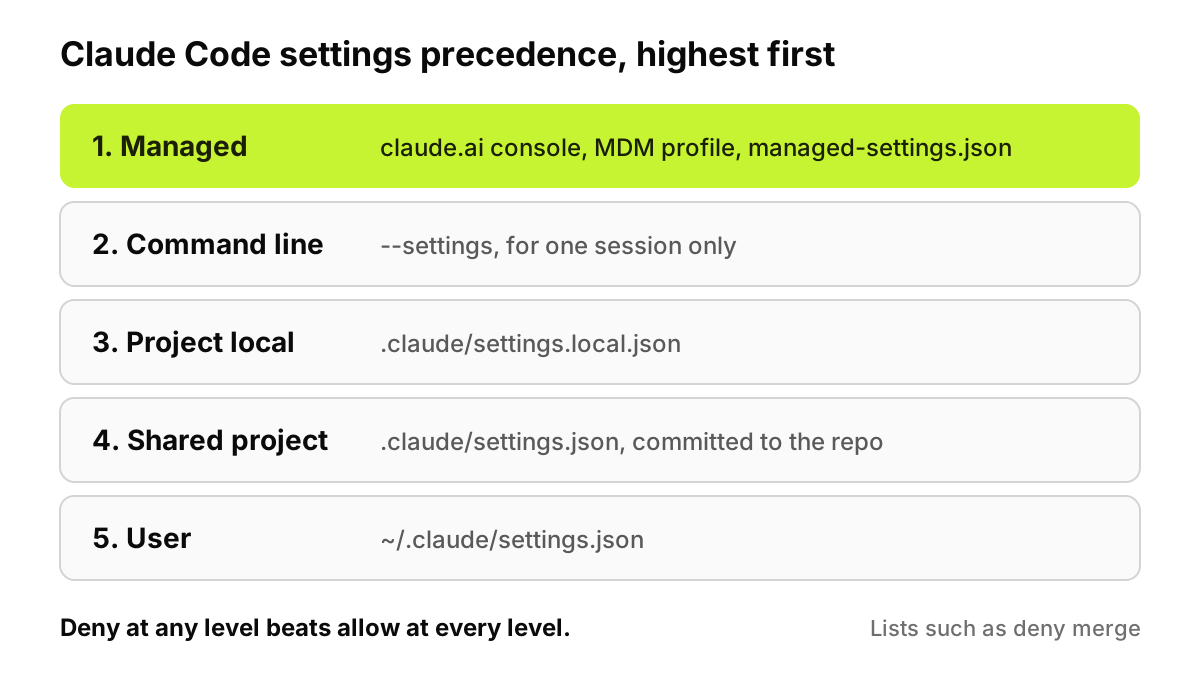
Figure 1. Managed settings sit above everything a developer controls, including the command line. Lists merge across levels, so a lower file can add rules but not remove yours.
Which Claude Code setting wins when files disagree?
When the same key appears in more than one place, Claude Code uses the value from the highest level that sets it. Anthropic's settings documentation lists five levels, highest first: managed settings, the command line (JSON passed with --settings), project local (.claude/settings.local.json), shared project (.claude/settings.json) and user (~/.claude/settings.json). Nothing in a developer's own files or --settings overrides a managed key.
Permission rules add a second rule. If a tool is denied at any level, no other level can allow it, and list keys such as permissions.deny merge across files rather than replacing each other.
That is why only the managed layer counts. The user and local files belong to the developer, and the shared project file is whatever sits in the repository. Anthropic lists a few security-sensitive keys where a stricter lower value beats managed, such as disableClaudeAiConnectors set to true, but none lets a developer loosen your policy.
Server-managed settings from the claude.ai admin console, on Claude for Teams and Enterprise, edited by an Owner or Primary Owner and polled hourly.
MDM or OS policy: a macOS profile in the com.anthropic.claudecode domain, or a Windows registry value named Settings under HKLM\SOFTWARE\Policies\ClaudeCode, checked every 30 minutes.
A file:managed-settings.json in /Library/Application Support/ClaudeCode/ on macOS, /etc/claude-code/ on Linux and WSL, or C:\Program Files\ClaudeCode\ on Windows.
The HKCU registry, which is user-writable and used only when no admin source is present.
By default, Claude Code applies only the highest-ranked managed source that delivers a policy key (remote, then MDM, then file) and skips the rest without a warning, apart from a short list of keys it reads from every source. If your baseline lives in a deployed file and an Owner later saves one console setting, the console policy wins. On a test machine, /status shows a Setting sources line and a Skipped sources line. Setting managedSourcesBehavior to "merge" combines them, on v2.1.242 or later.
What goes in a baseline managed settings file?
Start deny-first and small. Every key here comes from Anthropic's documentation; the server URL and command are placeholders:
Read(**/.env) and Read(**/.env.*) block Claude's file tools from any .env file under the working directory. A Read deny also blocks the Edit and Write tools on that path.
Read(secrets/**) matches a secrets directory at any depth, since single-directory deny patterns cover nested copies.
Read(~/.ssh/**) and Read(~/.aws/**) anchor at the home directory, so they hold in every project.
Bash(curl *) and Bash(wget *) deny two download tools as Claude writes them. Bash(curl:*) is an equivalent spelling.
Bash(rm *) and Bash(git push *) in ask force a human prompt when any subcommand matches, even in auto mode.
disableBypassPermissionsMode makes Claude Code reject --dangerously-skip-permissions and ignore subagent definitions that ask for bypass. Auto mode has its own key, permissions.disableAutoMode.
allowedMcpServers with allowManagedMcpServersOnly admits only listed servers and ignores allowlists in developers' files. Remote servers match on serverUrl, local ones on the exact serverCommand array.
One key is missing on purpose. allowManagedPermissionRulesOnly makes managed settings the only source of permission rules, so Claude Code ignores developers' own rules, hides the "always allow" choices and stops saving new ones. That means many more prompts, so we would add it after the pilot. The rules above hold without it, because a lower-level allow never beats a managed deny or ask.
Test on one machine first. A managed file that isn't valid JSON stops Claude Code from starting; when it loads, /status shows Enterprise managed settings (file).
Which control stops what?
Each row is one documented control with its honest gap. "MDM" means a profile, registry policy or managed file pushed by your device management tool.
Control
Setting or mechanism
What it stops
What it doesn't stop
How to deliver it
Managed settings
Console policy, MDM profile, registry value or managed-settings.json
Developer files and --settings overriding policy
A local admin editing the managed source; other tools
MDM or file; console for unmanaged devices
Deny rules
permissions.deny
Matching calls; no lower level or --allowedTools can allow them
Other spellings, such as /usr/bin/curl; scripts that open files themselves
MDM
Ask rules
permissions.ask
Unattended runs of matching commands
A developer who approves without reading
MDM
Bypass disabled
permissions.disableBypassPermissionsMode
--dangerously-skip-permissions
Auto mode, which has its own key
MDM
MCP allowlist
allowedMcpServers plus allowManagedMcpServersOnly, or managed-mcp.json
Unlisted servers loading in Claude Code
Servers in other AI clients; serverName entries, which are not a security control
MDM or console; managed-mcp.json by MDM or file only
File tools, WebFetch, MCP servers and hooks; native Windows
MDM, split by OS
Authentication
forceLoginMethod, forceLoginOrgUUID
claude.ai logins outside your organization; API key credentials
Organization checks on Claude Console logins
MDM; console settings arrive only after first login
Provider and model
allowedProviders, availableModels
Unapproved providers or models
Clients older than v2.1.285, for allowedProviders
MDM
Telemetry
OpenTelemetry variables in the managed env block
Repositories redirecting export
Unreached devices; prompt text, redacted by default
MDM or console
Hooks turn rules into alerts. A PreToolUse hook runs before the permission prompt, and Anthropic's hooks reference says a command hook exiting with code 2 blocks the call. An HTTP hook posts the event as JSON to a URL you run, which can log it, alert, or answer with a deny decision:
Know the failure mode. A timeout or non-2xx response is a non-blocking error, so the call goes ahead unless you set onFailure to "block" (v2.1.295 or later).
The remaining keys can sit in the same file. This block pins logins, allows one provider, requires the sandbox with a fixed network allowlist, and sends telemetry to your collector:
The sandbox runs on macOS, Linux and WSL2 but not native Windows, so with failIfUnavailable set, Claude Code won't start on Windows hosts; deliver this part by operating system. With allowUnsandboxedCommands at false, Claude can't retry a failed command outside the sandbox, though a command a developer types at the ! prompt still runs unsandboxed in most sessions.
If protected health information is in scope, Anthropic documents a HIPAA configuration for Claude Enterprise organizations with a BAA. It covers Claude Code and Cowork in local mode, not the VS Code or JetBrains extensions.
What can't a managed settings file do?
Five things, and Anthropic is candid about most of them.
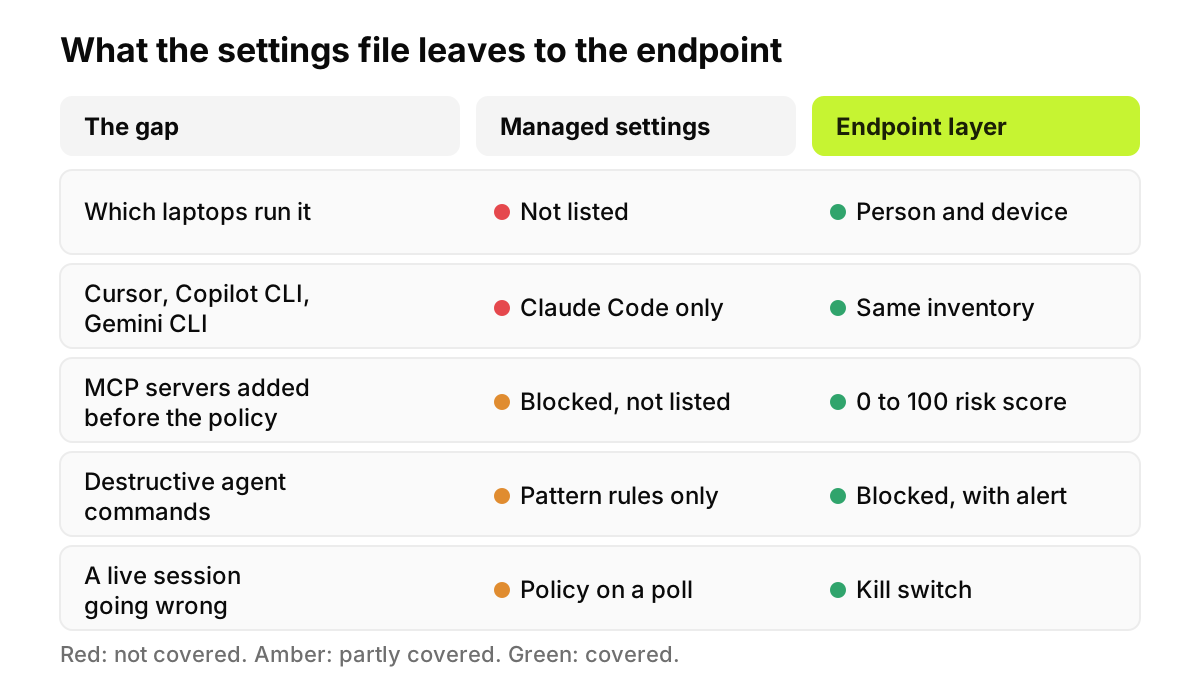
It governs Claude Code and nothing else. Anthropic's guide says managed settings bind Claude Code only, and a developer who calls the API from another tool isn't under them. Cursor, Copilot CLI and Gemini CLI on the same laptop read none of it.
A local administrator can change it. The same guide says a developer with admin rights can edit the managed source itself, which is why MDM tools redeploy on a schedule. Anthropic's server-managed settings page calls console delivery a client-side control, not a security boundary, which a user on an unmanaged device can bypass without admin or sudo access. Exporting a provider variable such as CLAUDE_CODE_USE_BEDROCK skips the console fetch, so Anthropic points MDM-enrolled fleets to device-delivered settings, which the OS can protect from user changes.
Rules match text, not intent. Anthropic's permissions documentation says a Bash rule "isn't a security boundary around the program." Bash(curl *) doesn't stop /usr/bin/curl or sh -c 'curl ...', and Bash(rm *) doesn't stop /bin/rm -rf build/. Read denies miss a Python script that opens files itself. The sandbox closes part of that gap, for shell commands only.
It doesn't tell you what's out there. No setting reports which laptops run Claude Code. Anthropic's managed MCP page says allowlists "aren't a registry," and a newly blocked server just disappears from /mcp. Telemetry with OTEL_LOG_TOOL_DETAILS=1 records which MCP servers people invoke, but only on machines your policy already reached.
It doesn't inspect prompts. No settings key looks at what a developer pastes. Anthropic's inference hooks, a Claude Enterprise beta announced on 5 August 2026, return an allow or deny verdict on prompts, but an administrator enables them for the organization, not in a settings file.
Figure 2. The settings file and the endpoint layer answer different questions. You need both, and neither one writes the other.
Where does the endpoint layer fit?
AccuroAI works at the endpoint, alongside the managed settings file. It doesn't write, deploy or replace managed-settings.json or managed-mcp.json; your MDM and the claude.ai console still do that.
The endpoint agent inventories AI coding agents and CLI agents (Claude Code, Cursor, Copilot CLI, Gemini CLI), desktop AI apps and MCP servers on every managed device, tied to the person and the device. Each MCP server gets a 0 to 100 risk score with capability tags and findings such as a read-plus-exfiltrate combination or an unpinned package version, which is the raw material for your allowedMcpServers entries. Then it acts: policies block destructive agent commands, such as rm -rf, and risky MCP servers, and each block sends an immediate alert to email, Slack or Microsoft Teams. A kill switch stops or quarantines a running agent session, while a settings change reaches that session only on its delivery schedule. See endpoint AI governance for how it fits together.
It can't make Claude Code's own rules stricter. Keep both layers, and keep a person on anything high-risk.
How should you roll out the lockdown?
In this order, inventory first.
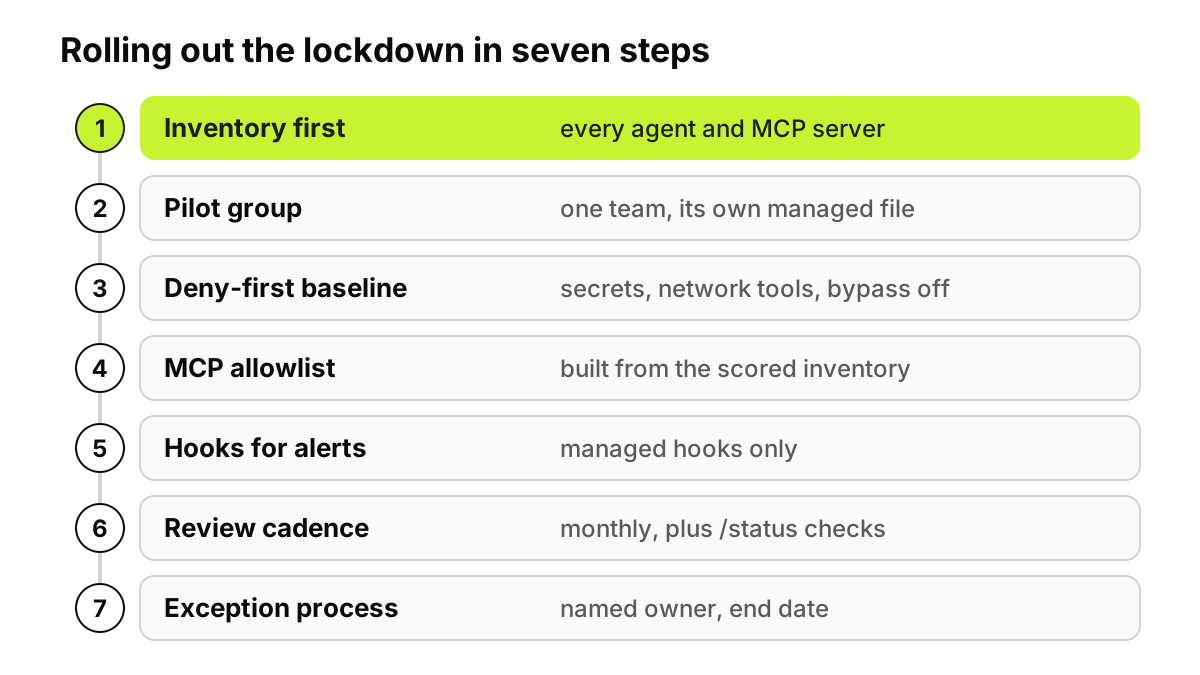
Figure 3. Inventory comes before any rule, because an allowlist written blind blocks servers people rely on and misses the ones that matter.
Inventory first. Find every laptop running Claude Code, the agents beside it, and every MCP server in ~/.claude.json, .mcp.json files and plugins. Our guide to scoring every MCP server on employee laptops lists the config files.
Pick a pilot group. Console settings can't target a group yet, so give the pilot its own file or MDM profile.
Ship the deny-first baseline. Watch which denies fire and which prompts annoy people.
Build the MCP allowlist from the inventory. Our free MCP Server Risk Checklist helps here, because you can score each server before it goes on the allowlist. Use URLs and commands, never names alone.
Add hooks for alerts. Managed PreToolUse hooks pointed at an endpoint your security team watches.
Set a review cadence. Monthly: run /status and claude doctor on sample machines and compare telemetry against the inventory.
Write an exception process. A named approver, a reason, a separate file for those who need it, and an end date.
Not from their own files or the command line. Anthropic says nothing in user, project, local or --settings files overrides a managed key, apart from a few keys where a stricter lower value wins. Two caveats: a local administrator can edit the managed source, and a managed model is only a default.
Does this work on Windows?
Yes for settings. Deploy managed-settings.json to C:\Program Files\ClaudeCode\, or set a Settings value under HKLM\SOFTWARE\Policies\ClaudeCode through Group Policy or Intune. The sandbox doesn't run on native Windows, so Anthropic suggests WSL2 or a container there.
How do I allow only approved MCP servers?
In managed settings, list servers in allowedMcpServers, using serverUrl for remote servers and serverCommand for stdio servers, and set allowManagedMcpServersOnly to true. For a fixed set nobody can add to, deploy managed-mcp.json through MDM. Skip serverName entries, since anyone can name a server anything.
Does Claude Code send our code to Anthropic for training?
Not under commercial terms. Anthropic's data usage page says it does not train generative models on code or prompts sent to Claude Code under commercial terms (Team, Enterprise, API, third-party platforms, Claude Gov) unless the customer opts in. Consumer accounts follow each user's own setting, one reason to pin logins with forceLoginOrgUUID.
What about Cursor and other agents?
Claude Code's managed settings don't reach them. Configure each agent through its vendor's own admin controls; our Cursor security review covers that product's. Then use an endpoint inventory to see which agents actually run on each laptop.
Nothing here is legal advice, and no settings file makes an organization compliant on its own.
Before you write the first rule, see it on your own devices: a 72-hour pilot maps the AI already in use before any policy is enforced. Start a free pilot