Shadow IT vs Shadow AI: What Changed, and Which Controls Still Work
Shadow IT is about where company data ends up stored; shadow AI is about what people type, paste or upload into AI tools, under which account, and what agents do. Expense reviews, SaaS management tools and CASBs still find many AI apps, but depending on the product they may miss the prompt, the difference between a personal and a work account in the same app, and local agents and MCP servers. We compare the two dimension by dimension and set out six steps to extend the program you already run.
J
James Okafor
Field CISO
Nov 2, 2026
Shadow IT is software used at work without approval; its risk is where company data ends up stored. Shadow AI is AI tools and agents used without approval, and its risk is what people type, paste or upload, and what agents do. A shadow IT program still finds the apps. It rarely sees the prompt, the account or the agent.
So keep the program you have. Just don't assume it covers AI.
Below: what changed, which classic controls still help and where each runs out, and six steps to start this month.
Last verified: 2 November 2026, against Anthropic's Claude Help Center, Claude Code documentation and Claude pricing page, Microsoft Learn's Copilot Chat FAQ, the Model Context Protocol documentation and specification, and the Cloud Security Alliance's survey page, all read at the source. OpenAI's help pages refused our requests, so no ChatGPT plan detail is stated as fact. The definitions and the control comparison are our own.
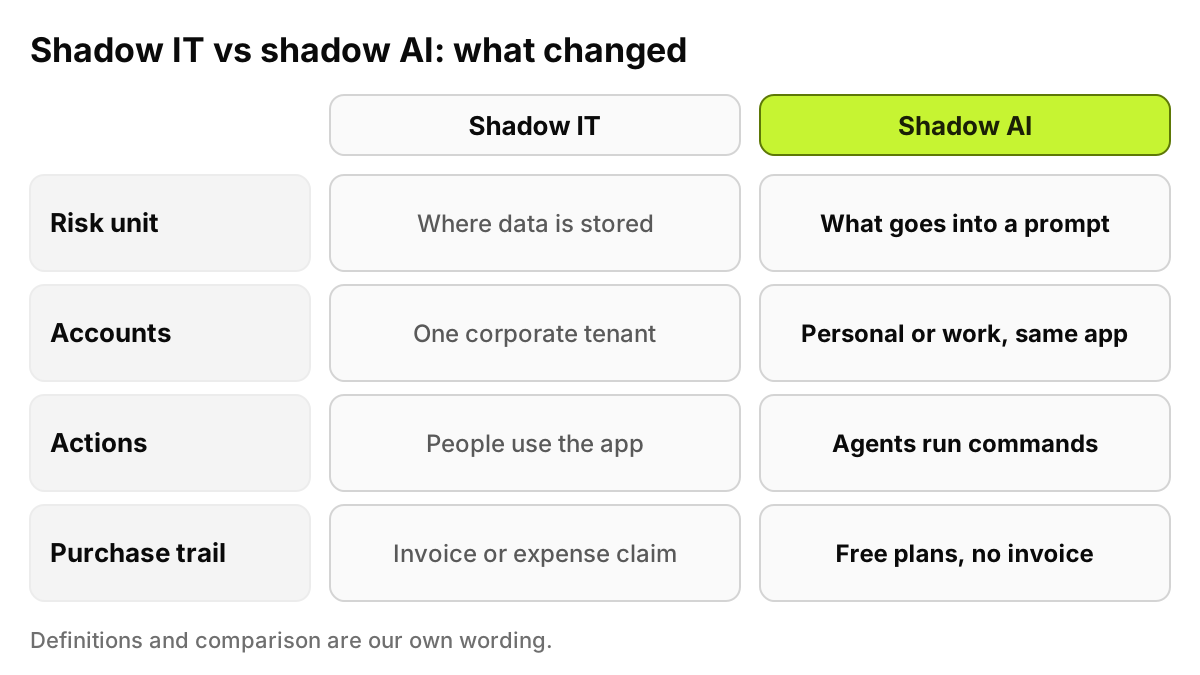
Figure 1. The same instinct, four different facts. Each row is a place where a shadow IT control has to be extended, not replaced.
What is the difference between shadow IT and shadow AI?
We did not find a "shadow IT" entry in NIST's online glossary, and we will not borrow an analyst firm's wording. Both definitions below are our own.
Shadow IT is any app, service or device used for work without the approval of IT or security. The classic case is a team that buys a file-sharing tool on a corporate card. The question is where the data now lives and whether a contract covers it.
Shadow AI is any AI tool, AI feature or AI agent used for work without that approval. It covers chat assistants, AI features switched on inside software you already bought, browser extensions, desktop apps, coding agents and the MCP servers that connect agents to other systems. The question is what went into the model, under which account, and what the AI did next.
Six things, each breaking an assumption a shadow IT control relies on.
The risk unit moved from the store to the prompt
With shadow IT, the worry is the copy of data that now sits in someone else's system. With shadow AI, the worry is the single act of sending it. Emily Carter in finance pastes a vendor contract into a chat assistant to ask about the termination clause. Nothing was synced or shared. The exposure is that one paste, gone the moment she presses Enter. Our post on shadow AI data leakage walks through the categories that turn up most in those pastes.
The same app, two accounts
Anthropic's help center says a person "may have both a personal account and an organization account tied to the same email address", and can switch between them by clicking their initials or name in the lower left corner of the screen. The same app, the same person, a different set of terms. Microsoft also ties its protections to the account: its Copilot Chat FAQ says Copilot Chat offers enterprise data protection to users signed in with a Microsoft Entra account.
A rule written against an app name or a domain cannot tell those two sessions apart. To allow one and stop the other, the control has to know which account is signed in, at the moment of use.
AI arrives inside apps you already approved
Shadow IT usually meant a new vendor. Much of shadow AI arrives as a feature inside an existing one. Microsoft's FAQ says Copilot Chat "is automatically included and available to organizations that have a Microsoft 365 subscription", and that it is pinned by default in the navigation bar of the Microsoft Copilot app, Teams and Outlook for most eligible users. Admins can remove that access, but someone has to decide to, inside an app your SaaS review approved years ago.
Copilot is one example. Your original vendor reviews may predate every AI feature now switched on.
Browser extensions and desktop apps
An AI extension with permission to read pages can see whatever the open page shows: a CRM record, a support ticket, an internal wiki. Desktop apps add another path. Claude Code, for example, runs in the terminal, in IDEs, in a desktop app and in the browser, according to Anthropic's documentation. A sign-in log misses a tool that never touches single sign-on.
Agents act, they don't just answer
This is the change shadow IT has no real precedent for. Anthropic describes Claude Code as "an agentic coding tool that reads your codebase, edits files, runs commands, and integrates with your development tools." When David Kim, a developer, asks it to fix a failing test, it can run shell commands on his laptop with his permissions.
MCP extends the reach. The Model Context Protocol documentation calls it "an open-source standard for connecting AI applications to external systems", including data sources such as local files and databases. One of its two standard transports, stdio, runs the server as a subprocess the client launches on the same machine, per the specification. Such a server can hand an agent the files on that laptop, and its exchanges with the client never touch the network.
Speed, and no purchase trail
New AI tools ship faster than any review board meets, and many cost nothing to start: Anthropic's pricing page lists a Free plan at "$0". A free sign-up leaves no invoice and no procurement ticket.
Which shadow IT controls still work for shadow AI?
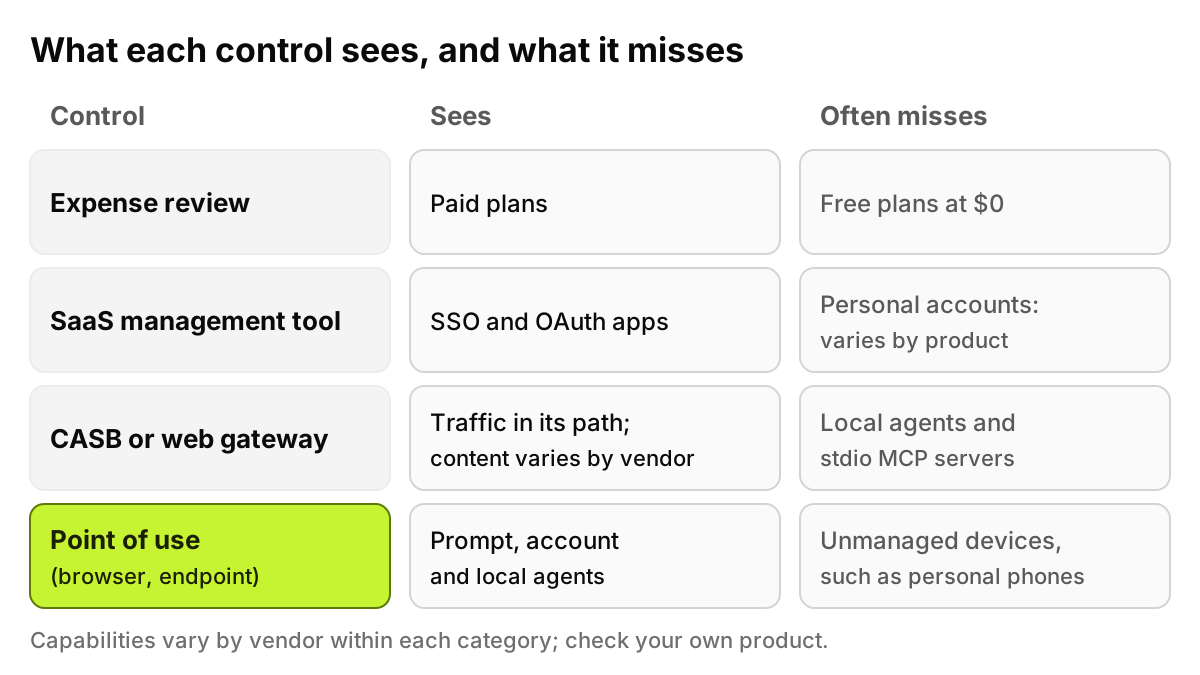
Most help with part of the problem. Capabilities vary between vendors in each category, so read the fourth column as what the category typically offers, and check your own product.
Dimension
Shadow IT
Shadow AI
Classic control that still helps
The gap
Discovery source
Invoices, expense claims, SSO and OAuth logs, network logs
Browser tabs, extensions, desktop apps, agent config files on the laptop
Expense review and SaaS management for paid or SSO-connected tools; a CASB or gateway for traffic in its path
Free plans, personal sign-ins and local agents can produce none of those signals
Unit of risk
The app, and where data is stored
The prompt, paste or upload, and the agent's action
DLP rules in a CASB or gateway, where the product inspects that app's traffic (varies by vendor)
Free text and screenshots are harder to classify than labeled files, and each AI app formats its traffic differently
Account type
Usually one corporate tenant per app
Personal and work accounts in the same app, often the same email
Tenant or instance controls, which some CASBs and gateways offer (varies by vendor)
Needs the signed-in account at the moment of use; a domain block cannot separate the two
Data in motion
File sync, sharing links, uploads to storage
Copy and paste, file uploads, screenshots
Web DLP where it is deployed and the traffic is decrypted
Depends on TLS decryption, which teams often limit for privacy or app compatibility
Actions taken
People read and edit data in the app
Agents run shell commands and call tools through MCP servers
Endpoint security and least-privilege accounts
A local stdio MCP server talks to its client on the same machine, off the network
Purchase trail
Invoices, card statements, procurement tickets
Often none: free plans, personal cards
Expense review, for paid plans
A $0 plan leaves no line item
Typical fix
Approve, migrate or block the app
Allow, redact or block per app, account type and data type, plus an approved tool
The app approval process
Blocking the whole domain also blocks the licensed version people need
In fairness to each category:
Expense review remains the cheapest signal you have. It finds the paid team plans that someone expensed, and those are often your best candidates for an approved tool. It sees nothing that was free.
A SaaS management tool typically builds its inventory from sign-in records, OAuth grants, finance data and, in some products, a browser extension. That catches many AI tools, especially those tied to corporate identity. How much it sees of personal accounts and of what is typed into a page depends on the product and on how it is deployed. Ask your vendor directly.
A CASB is good at the apps it knows and the tenants it can tell apart, and some products now carry AI app categories and DLP rules for uploads. Its view of a prompt depends on whether the traffic passes through it decrypted and whether it parses that app's format. It cannot see the exchange between an agent and a stdio MCP server, because that stays on the laptop.
A secure web gateway sees what crosses the network path it controls. Off that path, or for local processes, it sees less.
Keep these controls. They answer "which apps?" well. Shadow AI adds "which account, what data, what action?", which is best answered where the AI is used: in the browser and on the device.
Figure 2. Each control has a blind spot. The layer at the point of use fills the account and agent gaps, and has a blind spot of its own: devices you don't manage.
What should you do now?
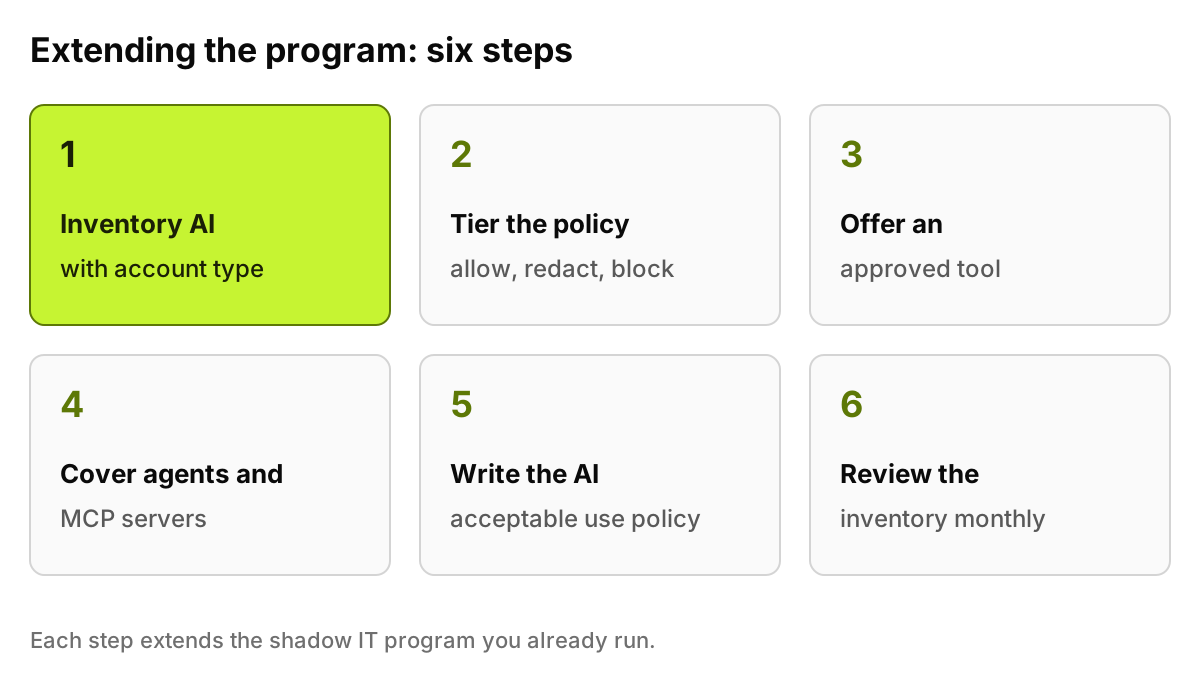
Start from the program you already run. These six steps extend it rather than replace it.
Extend the inventory to AI, with the account type. For every AI tool in use, record who uses it, from which device, and whether they were signed in with a personal or a work account. "ChatGPT: 400 users" is not an inventory. "310 on the company workspace, 90 on personal accounts, 12 in finance" is.
Tier the policy instead of banning. Use three outcomes: allow, redact, block. Allow the licensed tool. Redact sensitive data before it reaches a tool you tolerate. Block uploads of customer data to personal accounts. A blanket ban on a domain also stops the version you pay for.
Give people an approved alternative. Most shadow AI is someone trying to work faster. If the approved tool is worse, the shadow one wins. Announce which tools are licensed, and make them easy to reach.
Cover agents and MCP servers on endpoints. List the coding agents and desktop AI apps on managed laptops, and the MCP servers each one is configured to run. Then score them. Our post on how to score MCP server risk gives a method you can run in a spreadsheet.
Write the AI acceptable use policy. Say which tools are approved, which data may go into which tool, and what happens with agents. Our AI acceptable use policy template helps here because it already separates approved tools, account types and data classes, which is exactly where shadow IT policies tend to be silent.
Review the inventory monthly. New tools, new features inside old tools, new MCP servers. Approve or block what moved, and update the policy when a pattern shows up twice.
Sarah Mitchell, running this for the first time, may find that her biggest finding is not an unknown app. It is a known one, on personal accounts, in the team with the most sensitive data. Step 2 is built for that.
The shadow AI hub collects our other posts on discovery and controls if you want to go deeper on any step.
Figure 3. The order matters. Policy written before the inventory tends to ban what people don't use and miss what they do.
What can software do, and what can't it?
Discovery is only as good as where it runs. Point-of-use discovery sees managed browsers and managed devices. It does not see an employee's personal phone, a home computer, or a browser the company does not manage. If someone photographs a screen and asks a phone app about it, no company-side tool will know. Policy, training and a good approved tool reach that case.
Software also cannot set your risk appetite. Whether marketing may paste draft copy into a free tool, whether developers may run agents with shell access on production repositories, whether a personal account is ever acceptable: those are decisions for security, legal and the business, written down in the policy. A tool can enforce the decision and log what happened. It should not make the decision for you.
How does AccuroAI help?
AccuroAI discovers AI where it is used: in the browser and on managed devices through the endpoint agent, with no TLS interception. It recognizes 1,400+ AI tools, and for each one records the signed-in account, personal or business, and the plan. Policies can allow, redact or block per app, account type and data type, so the licensed tool and a personal account in the same app can get different rules. The workforce AI governance page shows how those pieces fit.
FAQ
What is shadow AI?
Shadow AI is the use of AI tools, AI features or AI agents for work without approval from IT or security. It includes chat assistants on personal accounts, AI features switched on inside approved software, browser extensions, desktop AI apps, coding agents and MCP servers. This definition is our own wording, not a standards body's.
Is shadow AI just shadow IT with a new name?
It is a subset, with different facts. Shadow IT asks where data is stored. Shadow AI asks what was typed or uploaded, under which account, and what an agent did next. The same discovery instinct applies, but the controls need to see the account and the action, not only the app.
Can a CASB detect shadow AI?
Partly. A CASB can usually identify known AI apps in the traffic it handles, and some can tell tenants apart or apply DLP to uploads. Depth varies by vendor and by whether traffic is decrypted. It cannot see the exchange between a local agent and a stdio MCP server, which stays on the device.
Should we ban unapproved AI tools?
Blanket bans tend to push use to personal devices, where you see nothing. A tiered policy works better: allow the licensed tools, redact sensitive data before it reaches tolerated ones, and block specific combinations, such as customer data uploaded to a personal account. Pair it with an approved tool people actually want to use.
This post is security guidance for practitioners, not legal or audit advice.
If you want the first inventory without building it by hand, see it on your own devices: a 72-hour pilot maps the AI already in use before any policy is enforced. Start a free pilot