AccuroAI
Book a demo
AccuroAI/Feature

See every SaaS app your employees use.

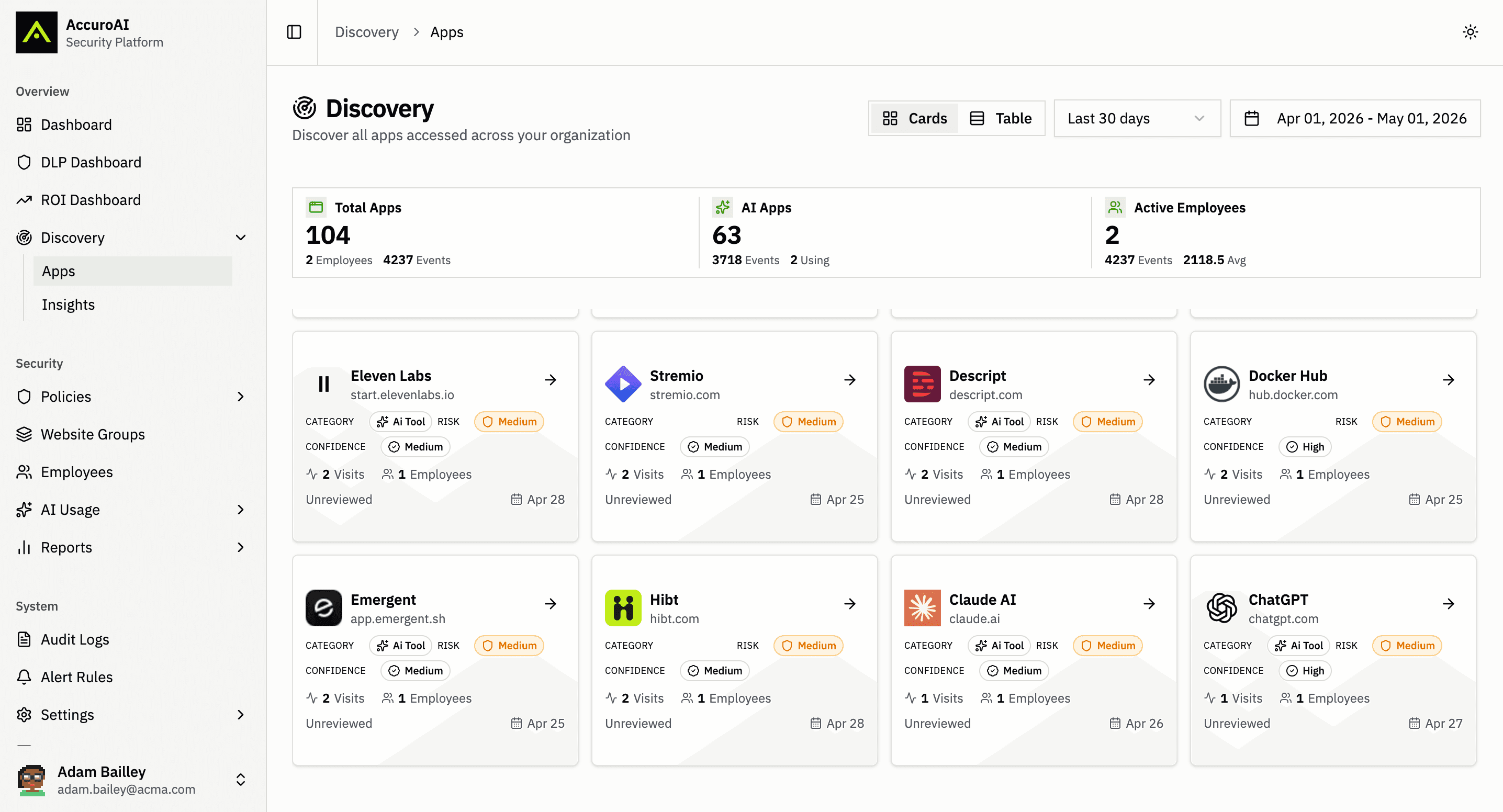
SaaS discovery finds every app employees actually use, approved or not. AccuroAI lists every app opened in the browser or run on the device, AI and non-AI, with AI apps flagged, a 0 to 100 risk score and the employees behind each one.
app.accuroai.co
Live
Feature · SaaS Discovery — AccuroAI dashboard
Sound familiar?

The problems this exists to solve.

The SaaS list lives in expense reports
Shadow IT shows up in card statements and renewal emails, months after employees started putting company data into it. By then nobody remembers who signed up or why.
Network logs miss the laptop at home
Firewall and proxy logs only see traffic that passes through them. Remote work, home networks and hotspots fall outside, and a log line cannot tell a personal account from a company one.
Shadow AI and shadow IT live in separate lists
AI tools get tracked in one spreadsheet and SaaS apps in another, while new apps ship AI features every month. The gaps between the two lists are where data walks out.
SaaS discovery

Every app employees open, AI apps flagged.

The browser extension and the Desktop App report every app employees open, from Gmail and Outlook to a file-sharing site nobody approved. Each one gets a 0 to 100 risk score, a review status and the employees using it. Because discovery runs on the device instead of in network logs, it works on and off the corporate network and sees the account each employee is signed in with.
Discovery · acme-corp
Browser extension + Desktop App · no TLS interception
Export
Total apps
412
opened in the last 30 days
AI apps
163
flagged in the same list
Protected apps
58
34 by policy · 24 by AI config
Active employees
1,284
on Chrome, Edge and desktop
Risk: AllStatus: AllGovernance: AllCategory: AllDepartment: AllLast 30 days
Unknown file-sharing app
Unrecognized domain
88Critical
Category
File sharing
Confidence
Medium
Governance
None
Visits
37
Employees
4
Last seen
3h ago
● Needs review
Social ads toolAI
AI ad copy and images
76High
Category
Marketing
Confidence
High
Governance
None
Visits
1,240
Employees
23
Last seen
18m ago
● Needs review
ChatGPTAI
chatgpt.com
64Medium
Category
AI assistant
Confidence
High
Governance
Policy + AI config
Visits
22,415
Employees
486
Last seen
1m ago
Reviewed
ClaudeAI
claude.ai
47Medium
Category
AI assistant
Confidence
High
Governance
AI config
Visits
9,870
Employees
212
Last seen
4m ago
Reviewed
NotionAI
notion.so
41Medium
Category
Productivity
Confidence
High
Governance
Policy
Visits
18,905
Employees
377
Last seen
2m ago
Reviewed
LinkedIn
linkedin.com
27Low
Category
Social
Confidence
High
Governance
None
Visits
14,320
Employees
640
Last seen
1m ago
Reviewed
Gmail
mail.google.com
18Low
Category
Email
Confidence
High
Governance
None
Visits
48,210
Employees
1,102
Last seen
Just now
Reviewed
Outlook
outlook.office.com
12Low
Category
Email
Confidence
High
Governance
None
Visits
61,840
Employees
1,190
Last seen
Just now
Reviewed
On the device, not in network logsOn and off the corporate networkSigned-in account on every AI app< 30 min to deploy through MDM
Example data for a sample tenant.
Capabilities

Built for enterprise AI.

Every app, AI apps flagged
Discovery lists every app employees open in the browser, from Gmail, Outlook and LinkedIn to the AWS console and file-sharing sites nobody approved. AI apps are matched against the 1,400+ tool catalog and flagged in the same list, so shadow IT and shadow AI share one inventory.
A risk score and status for each app
Each app shows its category, a 0 to 100 risk score banded Low, Medium, High or Critical, detection confidence, review status and governance: none, protected by policy, redacted by an AI config, or both. Visits, the number of employees using it and when it was last seen complete the row.
Insights that set the review queue
Insights shows the new apps this week, including new AI apps against last week, how many high-risk apps need review, and apps by risk level and by category with coverage. Filter by app or by department to see where unreviewed apps cluster.
Seen from the device, not the network
The Chrome and Edge extension and the Desktop App report what employees open, with no firewall, proxy or DNS logs and no TLS interception. Discovery works on and off the corporate network and sees the account each employee is signed in with.
In practice

How it works for your team, day to day.

01

Every app, with the facts to decide

The app list covers everything employees open, AI and non-AI, with the AI apps flagged. Each app carries its category, a 0 to 100 risk score, detection confidence, review status, governance, visits, employees and last seen. Switch between cards and a table, filter by risk, status, governance or category, sort by most used or highest risk, set a date range and export the list.

AI and non-AI apps in one list, AI apps flagged
Risk score, Low to Critical, with detection confidence
Cards or table, filters, sorting, date range and export
02

Insights for the weekly review

Insights turns the list into a queue. It counts the new apps this week and the new AI apps against last week, shows how many high-risk apps still need review, and breaks apps down by risk level and by category with coverage. Protected apps are split into those protected by policy and those redacted by an AI config, so coverage gaps are easy to spot.

New apps and new AI apps this week, against last week
"N high-risk apps need review"
Apps by risk level and by category, filterable by department
03

Discovery from the device, on any network

The Chrome and Edge extension and the Desktop App deploy through Intune, Jamf, Workspace ONE or ManageEngine in under 30 minutes, or without MDM for a pilot, with no TLS interception. Because discovery runs on the device, it sees apps used at home and on the road, plus the signed-in account. Users import from Okta, Microsoft Entra ID or Google Workspace, so every app ties back to a person, a department and a per-employee inventory page.

No firewall, proxy or DNS logs, and no TLS interception
Works on and off the corporate network
Per-employee inventory of browser apps, AI accounts and desktop apps
FAQ

The questions we hear most.

What is SaaS discovery?

SaaS discovery is the process of finding every software-as-a-service app employees use, including the ones IT never approved. AccuroAI does it from the browser extension and Desktop App on each device, listing every app employees open with its category, a 0 to 100 risk score, the employees using it and whether it is an AI app.

How does AccuroAI discover the SaaS apps employees use?

Through the Chrome and Edge extension and the Desktop App, deployed by MDM or directly for a pilot. Each device reports the apps employees open. There is no firewall, proxy or DNS log collection and no TLS interception, so discovery works on and off the corporate network and shows the account each employee is signed in with.

Does SaaS discovery cover shadow AI and shadow IT together?

Yes. One list holds every app, AI and non-AI, with the AI apps flagged. Gmail, Outlook, LinkedIn and the AWS console sit next to ChatGPT, Claude and AI tools nobody approved, so shadow IT and shadow AI share one review queue and one set of policies.

What does AccuroAI show for each discovered app?

The category, a 0 to 100 risk score banded Low, Medium, High or Critical, detection confidence, an AI flag, review status and governance status: none, protected by policy, redacted by an AI config, or both. Each app also shows visits, the number of employees using it and when it was last seen.

Can we export our SaaS app inventory?

Yes. Filter the app list by risk, status, governance, category or date range, sort by most used or highest risk, and export it. You can also export the AI inventory for all employees, one person or a group, for your risk register, GRC platform or auditors.

Related
Feature
Find every unsanctioned AI tool in use.
Employees adopt AI faster than IT can track it. AccuroAI lists every app employees open in the browser or run on their device, flags the AI apps with a 0 to 100 risk score, and maps the desktop AI, agents and MCP servers on each machine to the person who uses them.
Learn more →
Feature
Prioritize AI exposure by actual risk level.
Not every AI tool carries the same risk. AccuroAI gives every app employees use and every MCP server on their devices a 0 to 100 risk score, shows which high-risk apps still need review, and turns the answer into a policy.
Learn more →
Feature
Risk-scored catalog of 1,400+ AI tools.
Stop researching AI vendors one ticket at a time. AccuroAI matches every app your employees use against a catalog of 1,400+ AI tools, each with a 0 to 100 risk score, and turns your decision into an enforced policy.
Learn more →
Stop guessing. Start governing.

Most teams cannot produce a list of the AI actually running in their business. A 30-minute demo shows you yours: every tool, every user, every risk, on your own estate.

Book a demoTake the free AI readiness assessment

15 enterprises secured · under 38ms p99 · Deployed in under 30 minutes · 72-hour pilot