How to Block Personal ChatGPT, Claude, Copilot and Gemini Accounts (Without Breaking Enterprise)
To block personal ChatGPT accounts and keep the company one, use each vendor's control: an allow-list header your proxy injects for OpenAI, Anthropic and Google, or Entra Tenant Restrictions v2 for Microsoft Copilot. These work only where a TLS-inspecting proxy or Microsoft's client sees the traffic. We compare all four from the vendors' own docs and set out what enforcing by signed-in account adds.
J
James Okafor
Field CISO
Oct 25, 2026
To block personal ChatGPT accounts and keep the company one, use each vendor's control: an allow-list header your proxy injects (OpenAI, Anthropic, Google) or Entra Tenant Restrictions v2 (Microsoft). These work only where a TLS-inspecting proxy, or Microsoft's own client, sees the traffic. To cover every laptop, enforce by the signed-in account in the browser and desktop app.
The native controls are worth turning on. They are also narrower than most people assume.
Last verified: 25 October 2026, against the vendors' own pages: OpenAI's ChatGPT Enterprise network controls article (read through the r.jina.ai text reader, because the help center blocks direct fetches), Anthropic's Tenant Restrictions article and Claude Code settings reference, Google's consumer-account and Gemini app admin pages, and Microsoft Learn's Tenant Restrictions v2 and Copilot app pages. One admin blog on what blocked Copilot users see is secondary and named where used.
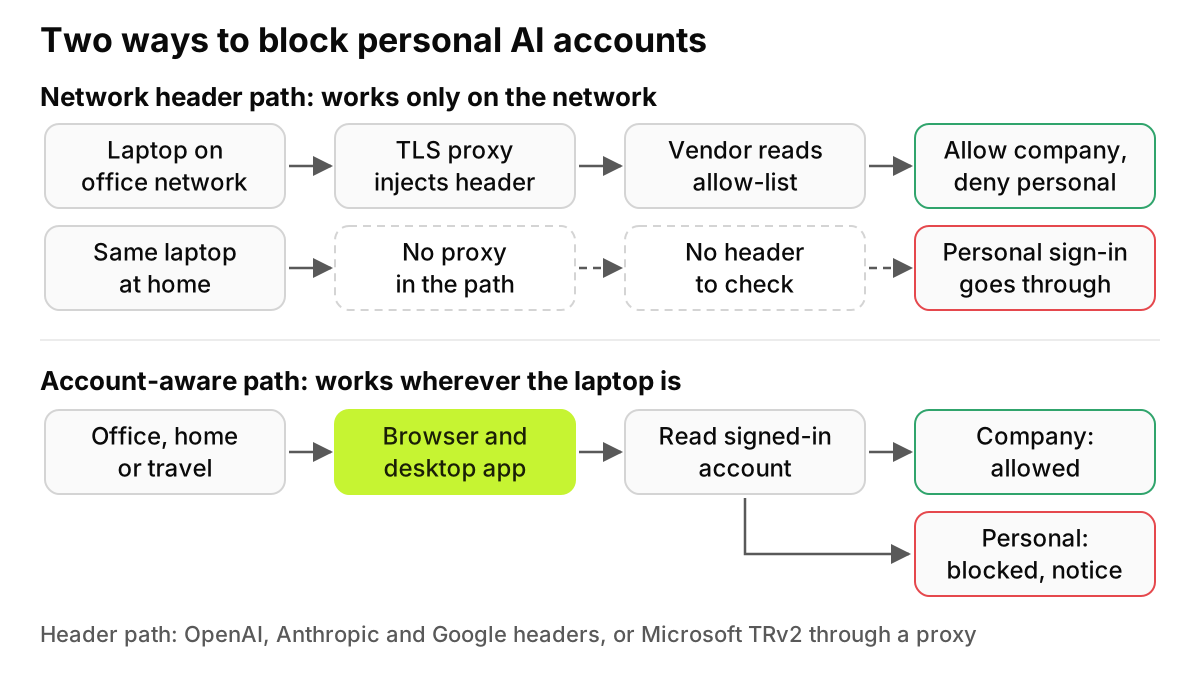
Figure 1. The header path depends on where the laptop is. The account-aware path depends only on which account is signed in.
Why can't you just block chatgpt.com?
Because the company account and the personal account use the same address. Block the domain and you lose the ChatGPT Enterprise licenses you paid for. Leave it open and anyone can sign in with a personal login.
The vendors say so themselves. Google's help page says URL filtering "won't work in this case," because a managed Google Account's traffic goes to the same URL as the traffic you want to stop. Microsoft tells admins not to block copilot.cloud.microsoft to stop personal accounts, and to use tenant restrictions instead. OpenAI warns that blocking its app domains stops everyone, "regardless of whether they are using a personal or an Enterprise account."
So the question is never which site. It is which account.
How does OpenAI's ChatGPT-Allowed-Workspace-Id header work?
OpenAI calls the feature Workspace Blocking, and its help article offers it to "ChatGPT Enterprise customers." Your network adds a custom HTTP header, ChatGPT-Allowed-Workspace-Id, holding one or more workspace UUIDs separated by commas with no spaces, on requests to https://chatgpt.com/*. OpenAI expects most companies to do this through their SASE partner, and it states that SSL inspection is "required to implement the above network controls."
Workspaces not in the header, personal ones included, are filtered out. If the user keeps at least one allowed workspace, that happens silently. If nothing is left, they get a 403 Forbidden error saying they are not authorized. A malformed header fails every request that carries it with 400 Bad Request. Logged-out use needs one more rule: block URLs starting with https://chatgpt.com/backend-anon/.
The desktop and mobile apps are the catch. OpenAI says they implement certificate pinning, so under SSL inspection you must add your own certificates to the pin list and distribute them through MDM.
How do Claude tenant restrictions work, and do they cover Claude Code?
Anthropic's Tenant Restrictions use a header named anthropic-allowed-org-ids, carrying a comma-delimited list of organization UUIDs. The article says the feature is "available for members of Enterprise plans and Console organizations." Your proxy injects the header for claude.ai, api.anthropic.com, claude.com and anthropic.com, and Anthropic's example rule reads "TLS Inspection: Required." Large lists can span up to 10 header lines and 500 organization UUIDs.
A blocked user gets a 403 reading "Access restricted by network policy. Contact IT Administrator." The supported methods listed are web access, desktop or app access, API keys and OAuth tokens. Claude Code is not named. The article also says standard authentication continues for unmanaged networks.
For Claude Code, Anthropic documents a separate device-side setting. The Claude Code settings reference describes forceLoginOrgUUID, which, set from a managed source, requires claude.ai logins to belong to your organization or a list of them. It reaches the terminal, but it is a sign-in lock for one product, not a rule that allows one feature and blocks another.
How do you block personal Copilot with Tenant Restrictions v2?
Start with what changed. Microsoft's Copilot app page says the Microsoft 365 Copilot app "is now called Microsoft Copilot," one client serving "both personal and work or school experiences." An account switcher moves between the personal Microsoft account and the Entra ID work account, and Microsoft says data does not flow between them. Personal Copilot and Microsoft 365 Copilot now share one app and one URL.
Microsoft's answer is Tenant Restrictions v2, which requires Microsoft Entra ID P1 or P2. You block the consumer Microsoft account tenant, and the rule then covers every Microsoft account, because user-level assignment isn't available for it; app-level exceptions are. The policy acts only when a signal reaches Microsoft, sent one of three ways:
Corporate proxy. The proxy adds sec-Restrict-Tenant-Access-Policy on the sign-in domains. This needs decryption of sign-in requests and protects only the authentication plane.
Universal tenant restrictions. Global Secure Access tags traffic on any operating system or browser, with no proxy, through its client or a remote network.
Windows device policy (preview). Managed Windows devices enforce it locally. Microsoft calls this "a partial solution" that doesn't protect the .NET stack, Chrome or Firefox without extra App Control and firewall rules.
Microsoft Learn doesn't show what a blocked personal account sees in Copilot. According to Adam Fowler's testing, published 21 August 2026, blocked personal sign-ins produced authentication loops and generic sign-in errors rather than a clear message. That is one admin's result, so test it in your own tenant.
How do you block consumer Gemini accounts?
Google's control predates Gemini. Its consumer-account page says to route *.google.com through a web proxy with SSL interception, make clients trust the proxy's root certificate, and add X-GoogApps-Allowed-Domains with your Workspace domains. The page names no Workspace edition. ChromeOS devices also have a browser setting that limits sign-in to listed domains.
Gemini fits because of where it lives. Google's Gemini app admin page puts the web app at gemini.google.com, inside the traffic the header covers. The consumer-account page doesn't mention Gemini, or say whether the header reaches the Gemini apps for Mac and Windows. It matters: users without a qualifying Workspace edition fall under the Google Terms of Service, and their chats "may be reviewed by human reviewers."
The blocked screen is the clearest of the four. It names the unauthorized account, lists the allowed domains and suggests contacting a network administrator.
How do the four native controls compare?
Vendor
Control
Plan required (vendor's wording)
Needs a TLS-inspecting proxy
Works off the corporate network
Covers desktop apps
User experience when blocked
Granularity
OpenAI ChatGPT
ChatGPT-Allowed-Workspace-Id header
ChatGPT Enterprise
Yes
No
Only with pinning exceptions pushed by MDM
Silent filtering, or 403 Forbidden
Workspace; sign-in only
Anthropic Claude
anthropic-allowed-org-ids header
Enterprise plans and Console organizations
Yes
No
Desktop app listed; Claude Code not named
403 "Access restricted by network policy"
Organization; sign-in only
Microsoft Copilot
Entra Tenant Restrictions v2
Microsoft Entra ID P1 or P2
Proxy option only
With Global Secure Access client or Windows policy
Partial
Not documented; one admin reports sign-in loops
Tenant, user, group, app; not per user for personal accounts
Google Gemini
X-GoogApps-Allowed-Domains header
No edition named
Yes
No (ChromeOS setting aside)
Not stated
Page naming the account and allowed domains
Domain; sign-in only
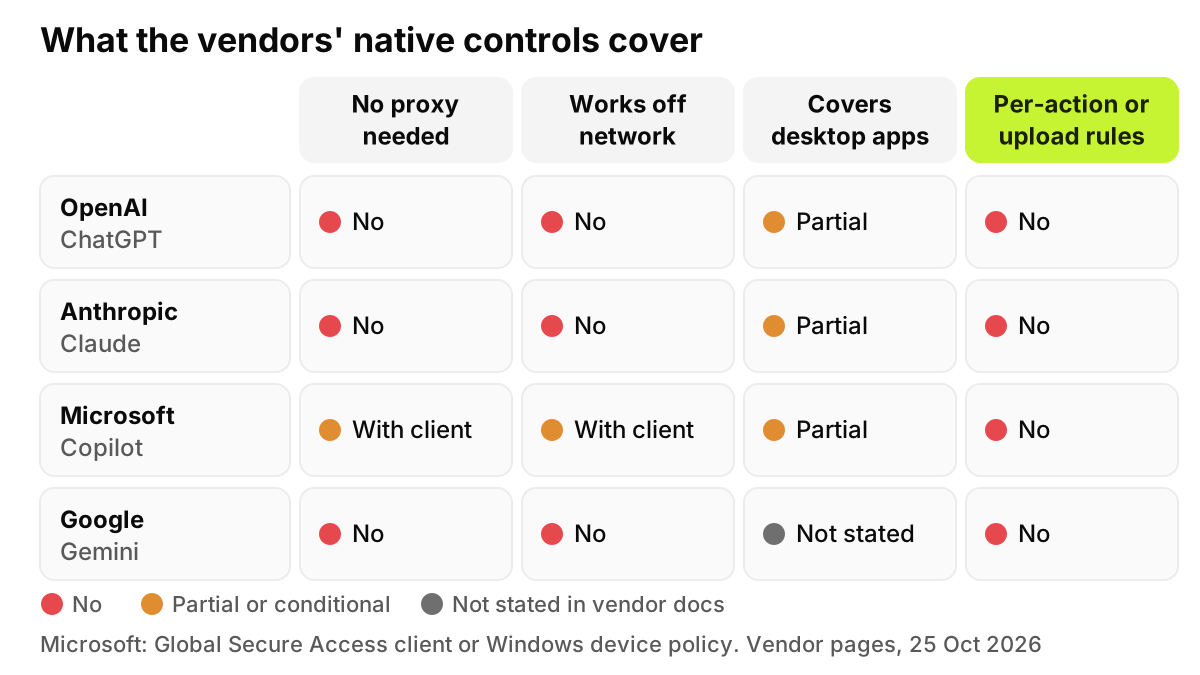
Each control answers one question, "may this account sign in here?", and only where your network or Microsoft's client can attach the signal. None of the four pages inspects what the user types or uploads once inside.
That is a fair design for the job, and you should use these controls wherever you already inspect TLS. The gaps below are about what they were not built to do.
Figure 2. Microsoft is the only vendor with an off-network option, and it relies on its own client or Windows policy. No vendor offers per-action or upload rules.
What do the native controls leave open?
BYOD and unmanaged devices. A header exists only on traffic through your proxy. Anthropic says standard authentication continues on unmanaged networks, and Microsoft's device option needs managed Windows. An employee's own laptop is outside all four.
Laptops off the network. A managed laptop on hotel Wi-Fi with no tunnel to your proxy sends no header. Microsoft's universal option is the exception, because it is a client on the device.
Phones. OpenAI covers its iOS and Android apps only on managed devices with pinning exceptions from MDM. Personal phones are out of reach.
Desktop apps with certificate pinning. Pinning exists to reject interception, so an inspecting proxy breaks the ChatGPT desktop app until you push your certificates into its pin list. The other vendors' pages don't say whether their desktop apps pin, so we don't claim it.
Personal accounts inside sanctioned apps. One Copilot app now serves both account types. Allowing the app is not allowing the account, so a rule keyed to the application name can't tell them apart.
Uploads. The headers are all or nothing per account, and each covers only its own vendor. None of the pages documents a way to send files only to the licensed tenant while blocking them everywhere else, and AI sites with no header at all sit outside every control.
Agent modes. No page describes keeping chat open on a personal account while blocking an agent feature. forceLoginOrgUUID comes closest, and it locks a whole product.
The message. A 403 or a sign-in loop doesn't tell anyone what to use instead, and people who don't know why they were blocked tend to find another route.
What does account-aware enforcement look like?
The control has to sit where the account is visible: in the browser session and in the desktop app on the device, wherever the laptop is. A good setup includes:
An allowlist of company workspaces, organizations and tenants, the same IDs you would put in the headers.
File uploads only to the licensed tenant signed in with the corporate identity.
Agent modes off for personal accounts, with chat left alone where policy allows.
An on-screen reason for the user, pointing to the approved tool.
An audit log of every allow, block and exception.
This is where AccuroAI fits. It enforces by the signed-in account, not only the app, so personal ChatGPT is blocked while the company's ChatGPT Enterprise keeps working. File uploads are allowed to the licensed tool signed in with the corporate identity, such as the company's Microsoft 365 Copilot, and blocked to personal or public AI. Agent modes can be blocked on personal accounts while chat stays available (Claude chat allowed, Claude Code blocked), with an on-screen notice explaining why. It doesn't use TLS interception; it enforces at the point of use. See Workforce AI Governance for detail, and our case for redacting instead of blocking when a block is too blunt.
What should you do now?
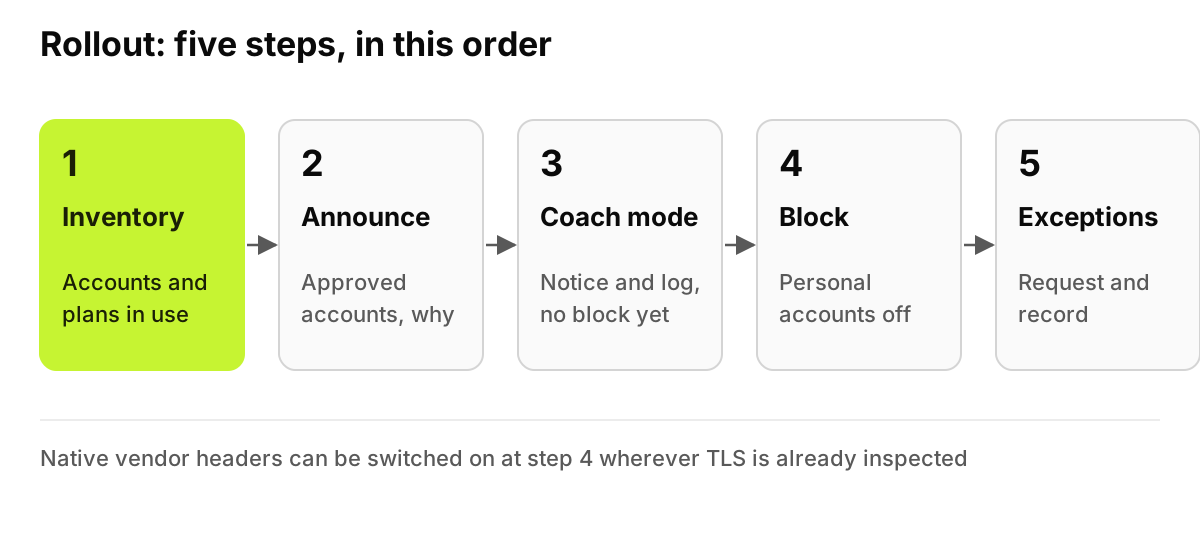
Inventory first. Learn which AI tools are in use, on which accounts. See it on your own devices: a 72-hour pilot maps the AI already in use before any policy is enforced. You can't write a workspace allowlist until you know which accounts are signed in.
Announce. Tell people which accounts are approved and why. Our AI acceptable use policy template helps here because it gives you the written rule on personal accounts that every later block points back to.
Coach mode. Show the notice and log the event without blocking.
Then block. Turn on account-aware blocking, plus the vendor headers wherever you already inspect TLS.
Exceptions process. Give teams a fast way to request a workspace, partner tenant or tool, and record who approved it.
Order matters more than speed. Our account of the first 72 hours of an AI governance pilot shows what an inventory usually turns up before a single rule is switched on, which is why it comes first.
Figure 3. Each step feeds the next: the inventory shapes the announcement, and coaching shows what the block will break.
What can't software fix?
No control on a company laptop stops someone from using a personal phone, taking a screenshot or retyping a paragraph at home.
What narrows that gap is a sanctioned tool that is easier than the personal one, a policy people have read, and training that explains why. If the approved route is worse, the personal account wins. Our comparison of Microsoft 365 Copilot and ChatGPT Enterprise can help you pick the tool to steer people toward.
FAQ
Can I block personal ChatGPT without a proxy?
Not with OpenAI's own control. Workspace Blocking relies on a header your network injects, and OpenAI says SSL inspection is required to apply it. Without a proxy, your options are blocking ChatGPT entirely, which also blocks Enterprise, or a control in the browser and desktop app that reads the signed-in account.
Does this work on Macs?
Partly, depending on the vendor. Microsoft says its proxy option supports macOS and universal tenant restrictions cover any operating system, while its device-side option is Windows only. OpenAI says its macOS app works under inspection only once MDM has deployed certificate pinning exceptions. Test each app on a managed Mac first.
What about contractors?
All four controls accept more than one approved tenant. OpenAI and Anthropic headers take several IDs, Google takes a list of domains, and Microsoft supports partner tenant policies. That covers a contractor using your accounts on your network. A contractor on their own laptop and network is outside every one of these controls.
Will it break the Enterprise SSO sign-in?
It shouldn't if your own workspace, organization or tenant is on the allowlist. The risk is configuration: OpenAI returns 400 Bad Request for a malformed header, Anthropic rejects duplicated headers, and Microsoft warns against blocking copilot.cloud.microsoft. Pilot with a small group and confirm company sign-in works before widening.
Is blocking legal under employee privacy rules?
Restricting which accounts work on company devices is usually an ordinary security control. The inspection some methods need, and the logs any method keeps, can raise workplace privacy duties. Tell employees what is controlled and logged, keep only what you need, and ask employment counsel about works councils or local monitoring rules first.
This is not legal advice. It describes vendor documentation as published on 25 October 2026; confirm current terms with each vendor and your own counsel.