Governing Desktop AI Apps on Employee Laptops, With or Without MDM: A Rollout Guide
Network proxies and browser extensions miss most of what happens inside desktop AI apps, local models and coding agents. Governing them takes a component on the laptop that discovers installed AI apps and agents and enforces policy at the point of use. This guide compares what each control layer sees and lays out the rollout through MDM, or directly on devices for a pilot, with a one-week plan.
D
Dr. Marcus Chen
Principal Security Researcher
Oct 25, 2026
Network proxies and browser extensions miss most of what happens inside desktop AI apps, local models and coding agents. Governing them takes a component on the laptop that discovers installed AI apps and agents and enforces policy at the point of use. It rolls out through the MDM you already run, or directly on devices for a pilot.
Four kinds of tool can claim a share of this job: a secure web gateway or CASB proxy, a browser extension, endpoint DLP, and a device agent built to recognize AI apps. Only the last sits where every AI surface on the machine runs, so the real question becomes deployment: how to get one more component onto hundreds of laptops without a quarter of tickets.
Last verified: 25 October 2026, against vendor documentation from OpenAI, Anthropic, Microsoft, Cursor, Ollama, LM Studio, Netskope and Apple, and the Model Context Protocol guide and specification. Pages were read through a text-rendering service because some block direct fetches. No Jamf documentation page could be opened, so no Jamf-specific steps are given.
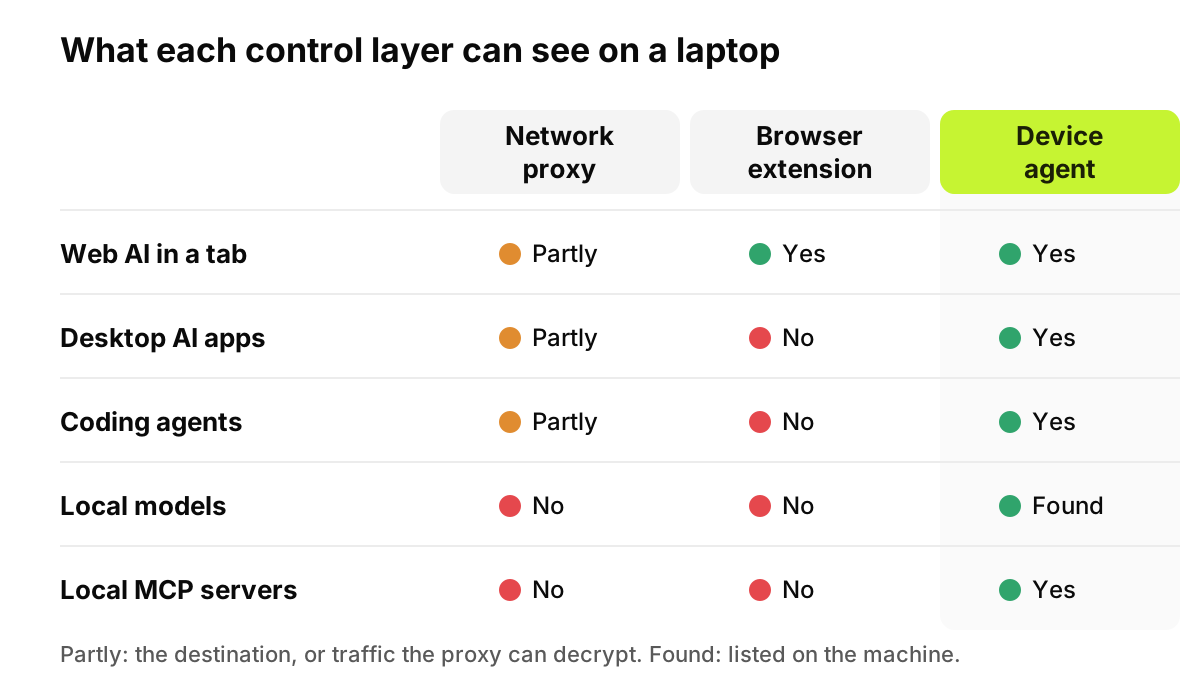
Figure 1. The further a surface sits from the browser tab, the fewer layers can see it. Local models and stdio MCP servers make no network request to inspect.
What AI is actually installed on an employee laptop?
More than the proxy logs suggest. Six kinds of AI software now sit outside the browser tab.
The ChatGPT desktop app
OpenAI's help center says that as of July 9 the new ChatGPT desktop app combines Chat, Work and Codex on macOS and Windows; the previous macOS app is now called ChatGPT Classic. It is a native app, so a browser extension never sees what is typed into it.
Claude Desktop
Anthropic lists Claude Desktop for macOS, Windows and Linux (beta). On paid plans the same app runs Claude Code and Cowork, and Anthropic says Cowork can "access your local files directly without manual uploads." Its macOS deployment guide recommends a .pkg for MDM, and notes the app can live in the user's own Applications folder, where users can update it without administrator privileges. It can reach a laptop without IT ever touching it.
The Microsoft Copilot app
Microsoft says the Copilot app should already be installed on new Windows 11 PCs. Users sign in with a work or school account or a personal Microsoft account, and the app can read files on the device, including .docx, .xlsx, .pdf and .json, or capture part of the screen and upload it. Same app, two kinds of account, local file access: the governance problem in miniature.
Coding agents in the terminal and IDE
Anthropic describes Claude Code as a tool that "reads your codebase, edits files, runs commands", in the terminal, IDEs, a desktop app and the browser. OpenAI's Codex CLI documentation says it can "inspect files, make edits, and run the tools already installed on your machine." Cursor, an AI code editor, runs local MCP servers as shell commands it manages. All three run under the developer's own account, not in a browser.
Local model runners
Ollama's API documentation puts its local server on localhost port 11434. LM Studio says it can operate entirely offline once model files are on the machine, and that nothing entered when chatting with a downloaded model leaves the device. One wrinkle: Ollama also documents calling cloud models through that same local server after sign-in, so a local runner is not always local.
MCP servers configured on the machine
The MCP local servers guide calls them "programs that run on your computer" and warns that a server "runs with your user account permissions." Claude Desktop lists them in claude_desktop_config.json, under ~/Library/Application Support/Claude on macOS or %APPDATA%\Claude on Windows. Cursor uses mcp.json. In the stdio transport, the MCP specification says, the client launches the server as a subprocess, so that exchange never touches the network.
Why a proxy can miss the desktop
Netskope's documentation defines certificate pinning as an app checking server certificates against ones hardcoded in it, and says predefined pinned applications bypass the Netskope cloud by default. It adds that developer tools "usually do not use the system's certificate store," which makes the inspection certificate ineffective without scripted setup. Netskope also documents decrypting some pinned apps, so the gap varies by app and product. Our August explainer on endpoint AI security covers pinning in more depth.
Which control layer sees which AI surface?
Surface
SWG or CASB proxy
Browser extension
Endpoint DLP
Device agent with AI awareness
Web AI in a tab
Covered where TLS inspection runs
Covered in managed Chrome or Edge
Partial: sensitive uploads and pastes to restricted domains
Covered, with the extension
Desktop AI apps
Partial: sees the destination; pinned apps may bypass inspection
Not covered: no tab
Partial: can stop a listed app opening protected files
Covered: the app and the signed-in account
Local models
Not covered: no network request when offline
Not covered
Partial: restricted-app rules on protected files
Found on the machine; ask what it inspects
Coding agents in the terminal
Partial: CLI tools often ignore the system certificate store
Not covered
Partial: file-centric rules only
Covered: agent processes on the machine
MCP configs
Not covered: stdio servers are local subprocesses
Not covered
Not covered: no MCP inventory
Covered: config files on disk
File uploads
Partial: only where decrypted
Covered in the browser
Covered for browser uploads to restricted domains
Covered at the point of use
Paste
Partial: only where decrypted
Covered in the browser
Covered in supported browsers (preview on macOS)
Covered at the point of use
Endpoint DLP deserves credit. Microsoft Purview Endpoint DLP runs on Windows 10 and 11 and the three latest macOS releases. It can audit or block uploads of sensitive files to restricted cloud domains, pastes to supported browsers, copies to USB, printing, and access to protected files by apps on a restricted list. That last one is its nearest reach into a desktop AI app. The documented list does not include text typed into a native app, or an inventory of AI apps, agents and MCP servers.
The vendors' own controls answer a narrower question: which workspace or tenant someone may sign in to. Anthropic's, on Enterprise plans, relies on your proxy injecting a header, and Anthropic says it covers desktop app access too. Google's consumer-account block needs a proxy with SSL interception. Microsoft's Tenant Restrictions v2 adds a Windows device option, in preview, that Microsoft calls a partial solution. Our companion guide on blocking personal ChatGPT, Claude, Copilot and Gemini accounts compares them.
Can DLP catch file uploads to ChatGPT and Claude, or only pasted text?
Both, in the browser, when the DLP runs on the device. Purview lists uploads to restricted domains and pastes to supported browsers as separate activities it can block. A network DLP sees either only where it can decrypt the traffic.
Desktop apps change the question. Cowork reads local files without an upload step, and the Copilot app reads files on the device. A control at the point of use sees the attached file and the pasted text in the same place, before the app encrypts and sends anything, along with the signed-in account that decides whether the upload should go through.
What does rolling out desktop AI governance across hundreds of laptops look like?
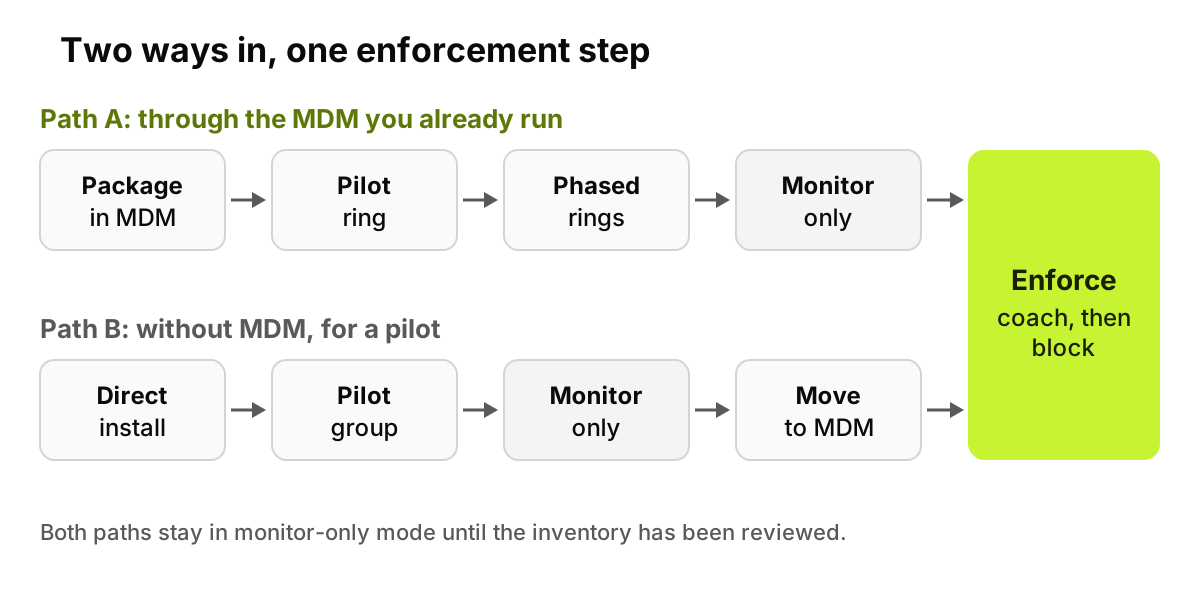
Like any agent rollout: package once, push in rings, watch before you block. There are two ways in, and they meet at enforcement.
Figure 2. The no-MDM path is a way to start, not a place to stay.
Path A: through the MDM you already run
Intune, Jamf, Workspace ONE or ManageEngine Endpoint Central push one package, and employees have nothing to click.
Package. Add the agent installer and the extension policy. Microsoft's Intune documentation describes adding a .pkg as a "macOS app (PKG)" and assigning it to groups as Required or Available. Chrome and Edge both offer ExtensionInstallForcelist; Microsoft says listed extensions "install silently, without user interaction" and users can't uninstall or turn them off.
Pilot ring. A small group that looks like the company: both operating systems, developers, finance, the help desk.
Phased rings. Widen by department or region, checking install status and tickets before each step.
Monitor-only first. Discovery and logging, so you learn what is installed before any rule fires.
Enforcement. Coach first, then block, one policy at a time.
Laptops that join the assigned group later receive the package too, so coverage follows hiring rather than a spreadsheet.
What about macOS permission prompts?
An MDM can approve in advance most of what would otherwise interrupt the user. Apple's Platform Deployment guide says a device management service can let a specific system extension, or every extension from one developer, load without user interaction; without that, loading one brings up a dialog that needs an administrator. Apple's Privacy Preferences Policy Control payload, installed only by a device management service, manages the Privacy pane settings, including access to all files. Ask your vendor which approvals its agent needs, and ship those profiles before the package.
Path B: without MDM, for a pilot
Sometimes the MDM team has not granted access yet, or security wants evidence before asking. Install directly on a pilot group's devices, prove the value, then move to Path A.
The trade-offs are real. Someone installs on each machine, usually with local admin rights, and on a Mac a system extension approval falls back to the administrator dialog. Until the components are managed, they are less tamper-resistant: an extension that was not force-installed can be removed by the user, and nothing redeploys a deleted agent. Fine for twenty laptops for a week, not for five hundred.
What does the first week look like?
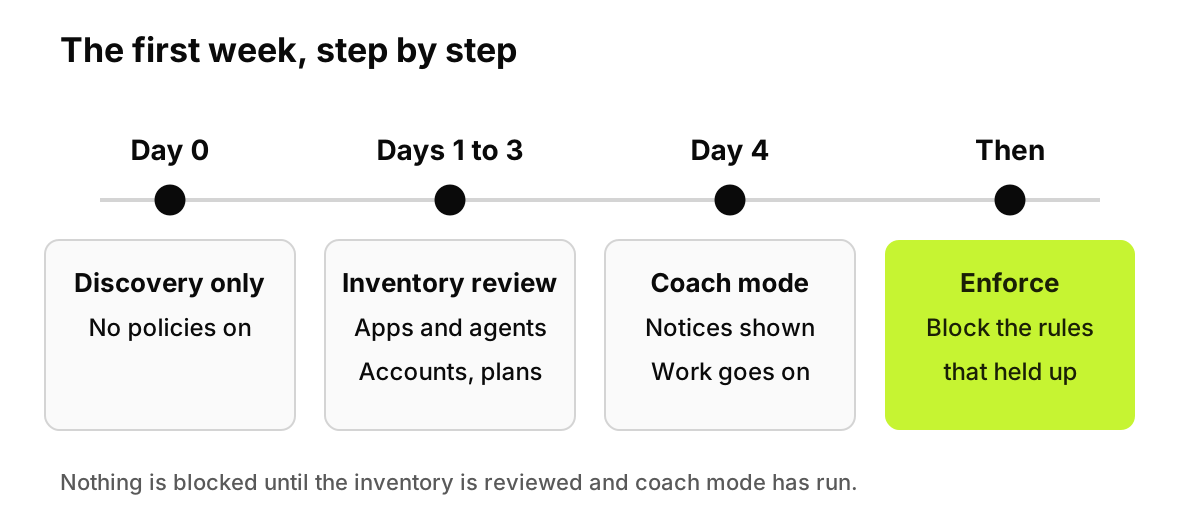
Deliberately quiet for employees until day four.
Figure 3. Nothing is blocked until the inventory has been reviewed and employees have seen coach mode.
Day 0: discovery only. Components go out, nothing is enforced, the inventory fills.
Days 1 to 3: inventory review. Go machine by machine through installed AI apps and agents, then signed-in accounts and plans: which desktop apps run on personal accounts, who runs local models, which MCP servers point at production. Our post on the first 72 hours of a governance pilot shows what that review tends to surface; for MCP configs, read how coding agents leak secrets before setting policy.
Day 4: policies in coach mode. Employees see a notice explaining the rule, but work goes on. Watch which rules fire and whether any are wrong.
Then: enforce. Block on the rules that held up, starting with the ones nobody argued with.
Where does AccuroAI fit?
AccuroAI ships two components: a browser extension for Chrome and Edge, and the AccuroAI Desktop App for desktop AI apps and agents. The Desktop App lists the installed AI apps and agents on each machine. Enforcement keys off the signed-in account, not only the app, so personal ChatGPT can be blocked while the company's ChatGPT Enterprise keeps working. It deploys through the MDM you already run, such as Intune, Jamf, Workspace ONE or ManageEngine Endpoint Central, in one push with nothing for employees to click, and new devices enroll automatically when the MDM script runs on them. It can also be installed directly on devices, which is how a pilot usually runs.
Write down what you can already see. Pull AI destinations from proxy logs as the baseline for the device inventory.
Decide the rule before the tool. Our AI acceptable use policy template is useful here because it already separates sanctioned tools, personal accounts and data classes, which is what device policy has to encode.
Pick a path. If the MDM team will give you a package slot this month, take Path A. If not, start Path B and book the MDM conversation for when the evidence is in.
Request the macOS profiles early. Extension allowlisting and privacy approvals often need their own review.
Run the week as planned, then push the sanctioned apps' own policy through the same MDM; Claude Code, for example, reads managed settings from a macOS configuration profile or a Windows HKLM registry value.
What can software not do here?
It cannot cover devices it is not on. Unmanaged personal laptops and phones stay outside any device agent, so policy has to say what is allowed there.
Network tools will never see a prompt to a model running fully offline, because nothing crosses the wire; the runner can be found on the machine, but inspection has to happen there too. And no tool stops someone retyping a document or photographing a screen with a personal phone. Training and a clear policy carry that part.
FAQ
Do I need MDM to govern desktop AI apps?
No. MDM is the easiest route for a whole fleet, because one push installs the components silently and macOS permissions can be approved in advance. For a pilot, or before the MDM team grants access, you can install directly on a pilot group's devices and move to the MDM push when you roll out.
Does a device agent read employees' files?
Ask any vendor, including us, five things: what it captures, when it stores content rather than metadata, who can view that content, how long it keeps it, and whether employees can see their own record. A tool scoped to AI apps and agents should answer each one precisely and in writing.
Can a proxy or CASB see the ChatGPT and Claude desktop apps?
Partly. A proxy can see where the traffic goes, but pinned apps may bypass inspection by default, as Netskope's documentation says of its predefined pinned apps, and command-line tools often ignore the system certificate store. A device agent sees the app and the signed-in account on the machine itself.
How do you find local models like Ollama and LM Studio on laptops?
On the device. LM Studio's documentation says it can run entirely offline once models are downloaded, so there is no traffic to log. Look for the installed runner and its local server; Ollama's documented default is localhost port 11434. A device inventory lists these per machine next to the other AI apps.
How long does a rollout to hundreds of laptops take?
The first week covers discovery, review and coach mode for the pilot ring. After that, your rings and change process set the pace. Most of the calendar goes to reviewing the inventory and agreeing on policy, so start those talks before the package is ready.
This is not legal advice. Employee monitoring rules differ by country and state, so check notice and consultation duties with counsel before monitoring begins.