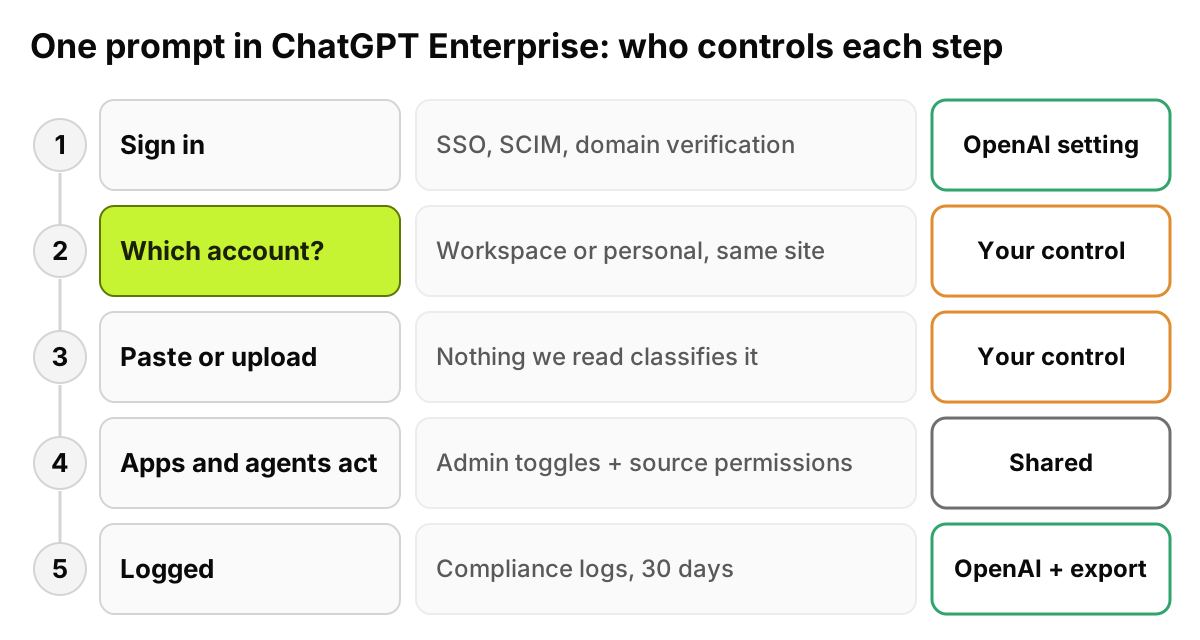
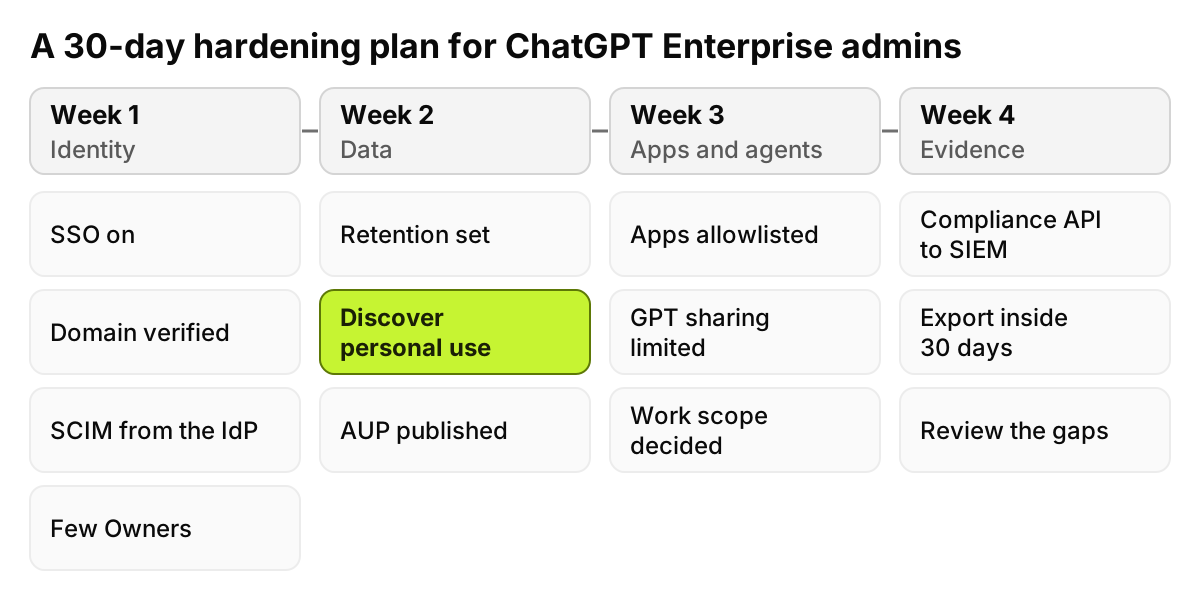
ChatGPT Enterprise security covers the workspace OpenAI runs: no training on business data by default, encryption in transit and at rest, SSO, SCIM, admin roles, a retention policy and a Compliance API. What it leaves to you is everything around the workspace: personal accounts, what people paste, what connected apps and agents reach, and every other AI tool.
So the license is a strong base. It is not the whole program.
Last verified: 6 November 2026, against OpenAI's ChatGPT admin documentation on learn.chatgpt.com, OpenAI's Trust Portal and an OpenAI Academy admin guide, all read at the source. OpenAI's main website and help center refused our requests that day, so details published only there, including residency regions, the migration flow for existing personal accounts and the defaults for shared links, are not stated as fact. The table and the checklist are our own.
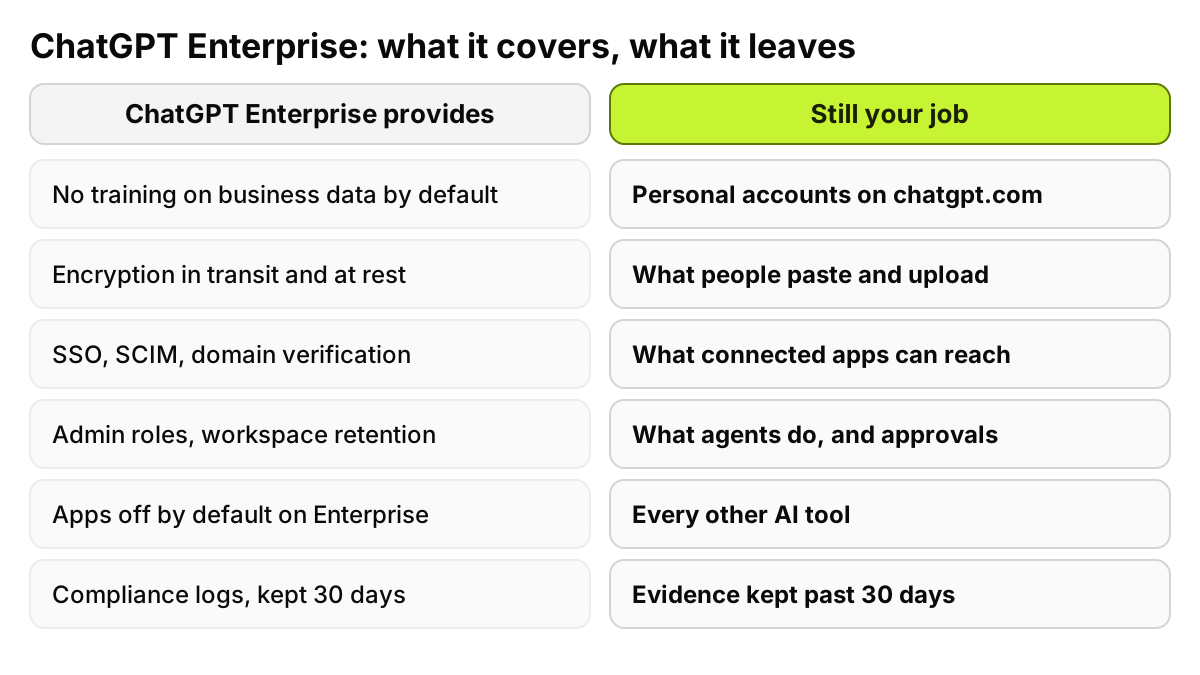
What does ChatGPT Enterprise security cover?
We looked up each item a security review asks about in OpenAI's own documentation. Where no primary page opened, we say so.
Training and encryption
OpenAI's admin FAQ for ChatGPT Work, which restates the workspace commitments, puts it in one sentence: "For ChatGPT Enterprise, this includes no training on business data by default, encryption in transit and at rest, workspace-level access controls, and supported audit logging." Those commitments are "subject to plan, configuration, surface, feature, and region," the page adds. The pages we could open name no encryption algorithms; if your standard needs them, ask for the audit report.
SOC 2 and other attestations
OpenAI's Trust Portal says its most recent SOC 2 report covers July 1, 2025 to June 30, 2026, against the Security, Availability, Confidentiality and Privacy criteria. The previous report, for January 1 to June 30, 2025, named ChatGPT Enterprise in scope alongside the API Platform, ChatGPT Edu and ChatGPT Team. The 2026 scope sits on a separate page that refused our request, so confirm Enterprise is listed when the report arrives. The portal also posts an ISO/IEC 27001:2022 certificate covering OpenAI's API, ChatGPT Enterprise and ChatGPT Edu services.
An attestation says controls were tested over a period. It says nothing about how your workspace is configured.
SSO, SCIM and domain verification
An OpenAI Academy admin guide, last updated on 17 September 2026, says SSO "lets users log in with corporate credentials," and that once the company domain is verified, "only users with that domain can join the workspace." OpenAI's user lifecycle guide lists SCIM directory synchronization for ChatGPT Enterprise, Edu and Healthcare, and warns: "Don't enable Automatic Account Creation and SCIM together." It also says to remove leavers in the identity provider, because a later synchronization can add a SCIM-managed employee back.
Admin roles
OpenAI's roles page describes four built-in roles: Owner, Admin, Member and Analytics Viewer. Owners can create custom roles for role-based access control. One rule shapes the design: "Ordinary role permissions combine additively." A feature set to On in one role stays allowed even if another role sets it to Off, so you restrict by withholding grants, not by adding a deny role.
Retention, key management and residency
"For Enterprise and Edu workspaces, chats, files, and canvas documents follow the configured workspace retention policy," says the lifecycle guide, which adds that removing access "isn't the same as deleting content." On keys and location the Work FAQ is brief: EKM "covers supported stored content in eligible workspaces," and residency covers "only eligible content and supported workloads, regions, and configurations." The region list lives on pages that refused us. Treat "eligible" as a question for your account team, answered in writing.
Compliance API and audit logs
The Academy guide says "ChatGPT Enterprise also supports audit logging via the Compliance API for conversations." The Work FAQ gives the number to plan around: "The Compliance Logs Platform retains data for 30 days." Export continuously if you need longer. Our comparison of the Claude and OpenAI compliance feeds covers event types and key permissions.
Connectors, GPTs and agents
OpenAI's docs now group connectors under plugins and apps. The ChatGPT Work overview says: "For Enterprise and Edu workspaces, plugins and their underlying apps are off by default." Where an app supports it, admins can restrict it to read-only or approved actions, and the plugin controls page lets them choose when ChatGPT asks before using it. For GPTs, admins can "Control who can create GPTs and whether they can be shared with specific people, groups, or the entire workspace," per the GPTs and sharing page, and limit GPT actions to approved domains.
Agents break the off-by-default pattern. For eligible Enterprise and Edu workspaces, "the default workspace role includes Work unless an authorized administrator turns it off." Local computer access is a separate opt-in.
What does ChatGPT Enterprise leave to you?
Seven things.
Personal accounts on the same domain
The licensed workspace and a personal account both live on chatgpt.com. For staff already on Free, Plus or Pro with a work email, the Academy guide tells admins to "decide whether to have them merge their account into the new workspace or keep it separate." That is a choice, not a default. It also reaches only accounts on your domain; a personal account opened with a private email, on the same laptop, sits outside the workspace entirely.
Rachel Torres in finance has the company workspace in one tab and her own Plus account in another. Same site, same browser, two sets of terms. Our post on shadow IT versus shadow AI explains why a rule written against the domain can't tell those tabs apart.
What people paste and upload
The license governs how OpenAI handles data. It does not decide what is appropriate to send. When Michael Brooks in support pastes a ticket containing a customer's Social Security number into the workspace, the commitments hold, and the number is still stored in a chat and visible in the compliance feed. None of the OpenAI pages we read describe the workspace classifying prompt content before it is sent. Approved tool is not approved data.
Connected apps that pull data
"An app can only use the information and actions allowed by its settings and the connected account's permissions," says OpenAI's plugin controls page. That cuts both ways: if a Drive folder or a repository is overshared at the source, the app reaches it. A shared or agent-owned connection, the Work overview adds, uses permissions that "can differ from the requesting user's permissions." Connected services also keep their own retention and logging.
GPTs and what gets shared
We could not confirm at a primary OpenAI page whether workspace GPTs or chat links can be shared outside the workspace, or what the defaults are. Check your own admin console before rollout.
Agents that take actions
Work's cloud browser can "enter information into supported public forms." By default ChatGPT asks before visiting a new website, but users can pick Always allow unless an admin limits it. And OpenAI says compliance records "don't establish a complete audit trail for every hosted file operation, shell command, browser interaction, tool invocation, or approval." Settle the approval posture before agents reach the default role.
The other AI tools
Your ChatGPT admin console governs ChatGPT. Claude, Gemini, Microsoft Copilot, a coding agent or an AI browser extension each need their own answer. If you run Copilot too, our control matrix for Copilot and ChatGPT Enterprise together covers the seams.
Evidence for auditors across all AI
The Compliance API records one vendor's workspace for 30 days. An auditor asks something wider: what did this person, or this dataset, touch in any AI tool during the review period, and what did you do about it? That needs a record of each policy decision across every tool, kept for the whole period.