Endpoint vs Browser vs Proxy: Where to Enforce AI Security Controls
Yes, there are controls that monitor AI at the device level instead of the network layer: an endpoint agent sees desktop AI apps, CLI coding agents, local models and stdio MCP servers that never cross a proxy. We compare five enforcement points (proxy, SSE or CASB; browser extension; endpoint agent; identity provider; API gateway) by what each sees, what it misses, what it costs and what it asks of privacy, then show how to combine them.
J
James Okafor
Field CISO
Nov 13, 2026
On this page
Yes. An endpoint agent runs on the laptop itself, so it sees AI activity before anything reaches the network: the desktop AI apps and CLI coding agents installed on the machine, local models that never send a packet, and the MCP servers those agents launch. A browser extension covers web AI at the moment someone types, pastes or uploads. A network proxy, SSE platform or CASB sees only the traffic that crosses its path, and reads the content only where it decrypts TLS. No single enforcement point sees everything, so the practical answer is to put a control where your AI use actually happens and let the layers you already own cover the rest.
Most security teams already run two or three of these layers. The real question is which gaps are left.
Below, five enforcement points compared by category: what each sees, what it misses, what it costs and what it asks of employee privacy. Capabilities vary by vendor inside every category, so the position of a control matters more than the brand.
Last verified: 13 November 2026, against the Model Context Protocol specification (version 2026-07-28, the transports and stdio pages), the Ollama FAQ, Anthropic's Claude Code enterprise network configuration page, Microsoft's Edge policy reference for ExtensionInstallForcelist, Google's Workspace admin help on app access, CISA alert TA17-075A, the OWASP Pinning Cheat Sheet and the Cloud Security Alliance survey page, all read at the source. The category descriptions and the comparison table are our own assessment, so check your own products against them.
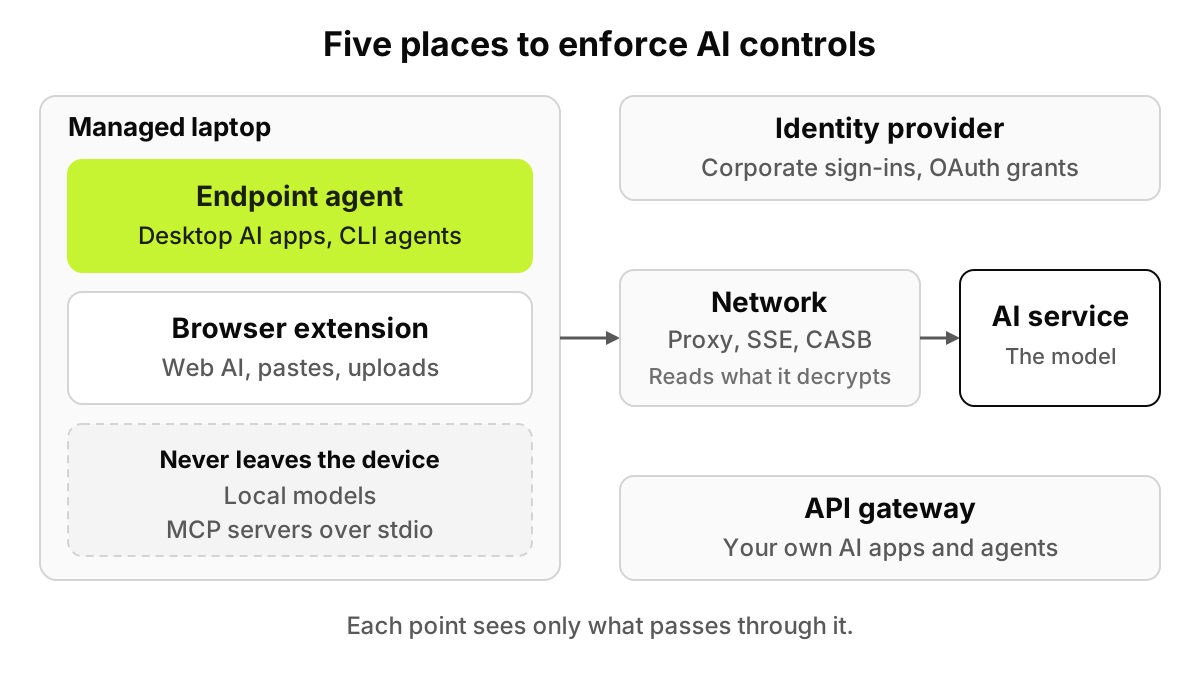
Figure 1. Each point sees only what passes through it. Two kinds of AI activity never leave the laptop at all.
What are the five places you can enforce AI controls?
Every AI interaction follows a path. A person signs in, works in a browser or an app on a device, the request crosses a network, and it reaches a model. A control can sit at any of those points, and it sees what passes through that point and nothing else.
Network proxy, SSE or CASB
The network layer sits in the traffic path, usually as a cloud service. It can block a domain for everyone with one rule, which is still the cheapest way to shut off a tool you never want used. To read a prompt or an uploaded file, though, an inline proxy has to decrypt TLS. That means a corporate root certificate on every device and a list of exemptions for apps that refuse it. Some CASB products also read data at rest through a SaaS provider's APIs, which is useful but not real time.
Browser extension or enterprise browser
A browser control sees the page itself: text typed into a chat box, a paste, a file picked for upload, and in many products the account that is signed in. Deployment is a browser policy. Microsoft's Edge policy reference says ExtensionInstallForcelist lists extensions "that install silently, without user interaction," and that users "can't uninstall or turn off this setting." The same page says the policy does not apply to InPrivate mode, and that users with developer tools can alter an extension's source code unless an admin restricts those tools.
Those are the edges of browser coverage. Private windows, unmanaged browsers, and anything that is not a browser at all.
Endpoint agent
An endpoint agent is software installed on the device, usually pushed by MDM. It can see what is installed, which processes run and which configuration files exist. It is the only position that observes AI with no network traffic. Ollama's own FAQ says "Ollama runs locally," that it binds 127.0.0.1 port 11434 by default, and "We don't see your prompts or data when you run locally." A prompt to that model travels from one process on the laptop to another. The cost is coverage, because an agent sees only the devices it is installed on.
Identity provider and OAuth grants
Your identity provider sees corporate sign-ins, and OAuth settings show which third-party apps users have let into company data. Google's Workspace admin help, for example, describes an "Accessed apps" view and three access settings for an app (trusted, limited or blocked), where blocked means the "App can't access any Google data." Its blind spot is structural: a personal account opened with a personal email never touches your identity provider.
API gateway for internal apps
If you build AI apps or agents, a gateway in front of them can check each prompt, retrieval and tool call before it runs. It covers your own software well and the AI your employees use not at all.
What does each enforcement point see, and what does it miss?
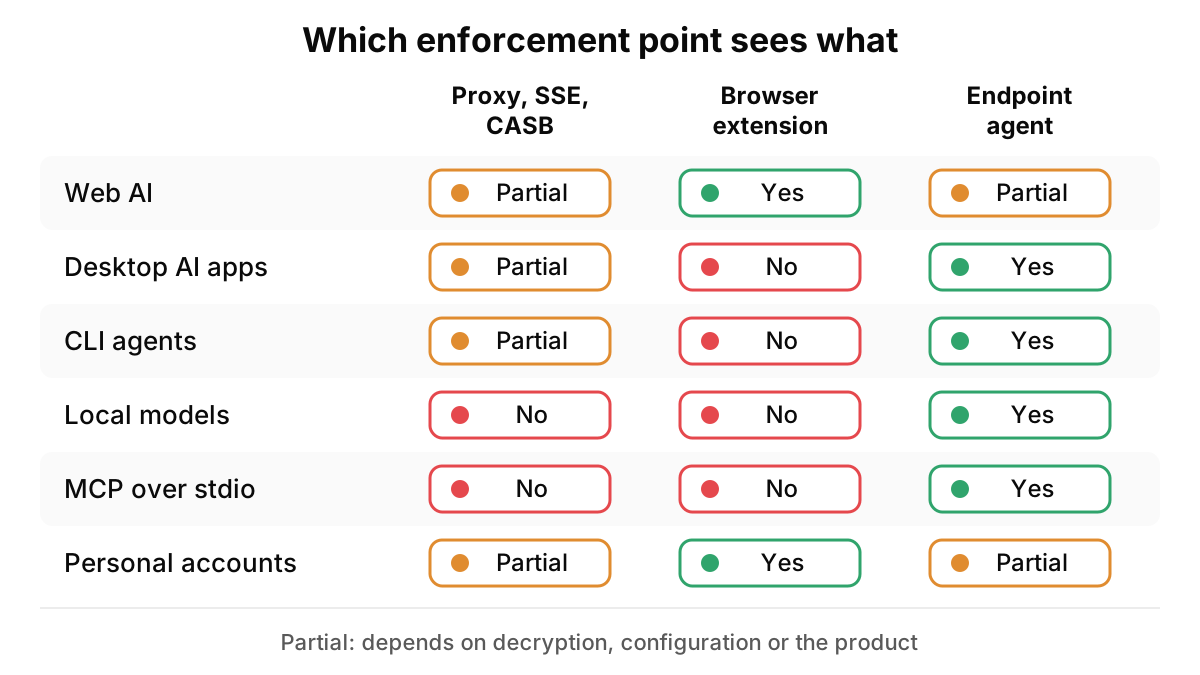
Read the table by row. "Partial" means the answer depends on decryption, configuration or the product, so test yours.
AI surface
Proxy, SSE or CASB
Browser extension
Endpoint agent
Identity provider and OAuth
API gateway
Web AI in a managed browser
Partial: content only where TLS is decrypted
Yes, at the point of typing
Partial: needs a browser component
Corporate sign-ins only
No
Desktop AI apps
Partial: pinned apps are usually exempted
No
Yes: installed apps, versions, processes
Corporate sign-ins only
No
CLI coding agents
Partial: depends on proxy settings and the CA store
No
Yes
Corporate sign-ins only
Only if routed through it
Local models
No: nothing leaves the device
No
Yes: the process and its local port
No
No
MCP servers over stdio
No: a subprocess on the same machine
No
Yes: config files and processes
No
No
Personal accounts
Partial: the domain; tenant controls in some products
Yes: the account signed in on the page
Partial: depends on the product
No: personal sign-ins never reach it
No
File uploads
Partial: where decrypted
Yes
Partial: needs a browser component
No
Internal apps only
Screenshots and scans
Partial: needs decryption and OCR
Yes when uploaded, if it reads images
Partial
No
Internal apps only
Deployment cost
Root certificate on every device; exemption list
Force-install policy per browser; private windows stay open
Agent pushed by MDM to each managed device
Low, if SSO is in place
A code change in each internal app
Privacy trade-off
Decrypts all traffic in its path unless exempted
Reads pages in the managed browser
Device-level access; scope what it records
Metadata only
Sees only your own apps' traffic
The proxy and endpoint columns are close to mirror images. The proxy is strongest for web traffic it can decrypt; the endpoint agent is strongest for local activity and blind on any device it is not on.
Why can't a proxy see a local model or an MCP server?
Because there is no traffic to see. The Model Context Protocol specification defines two standard transports, and in the stdio one "the client launches the MCP server as a subprocess." The server "reads JSON-RPC messages from stdin and writes JSON-RPC messages to stdout." A coding agent that starts a filesystem server this way trades every tool call with it inside the laptop.
Desktop apps and CLI agents that do use the network raise a second problem: whether they accept your inspection certificate at all. The OWASP Pinning Cheat Sheet defines pinning as "the process of associating a host with their expected X509 certificate or public key," and it tells app developers not to allow-list interception proxies. A pinned app refuses the substituted certificate. The usual fix is an exemption, and an exempted app is an uninspected one.
Even without pinning, trust is set per runtime. Anthropic's network configuration page says Claude Code trusts its bundled Mozilla CA certificates and the operating system's store by default, but reading the OS store needs a runtime that supports it: "the native installer always has it, and npm installs need Node 22.15 or later." Two developers on the same tool can behave differently behind the same proxy, depending on how each one installed it.
Figure 2. Partial means it depends on decryption, configuration or the product. The browser and endpoint columns together cover every row.
Which asks for more trust: a device agent or a decrypting proxy?
Both ask for trust, in different places.
A decrypting proxy asks for trust in the network. CISA's alert TA17-075A, "HTTPS Interception Weakens TLS Security," explains that once interception is in place "the client can only verify the connection between itself and the HTTPS interception product," and that "many HTTPS inspection products do not properly verify the certificate chain of the server." On privacy, it can read everything that passes through it, AI or not, and every exemption you carve out is also a place it does not inspect.
An endpoint agent asks for trust on the device. It runs with enough access to see installed software and process activity, so the questions move: what it records, where that data goes and who can read it. A sound design records metadata by default and captures content only when a policy fires. It does not touch certificates, so it does not break pinned apps or weaken TLS for the rest of the device's traffic.
Coverage cuts both ways. A proxy covers any device whose traffic you route through it, including some you do not manage. An endpoint agent covers only managed devices, but on any network: at home, on hotel Wi-Fi, in the office.
If your AI use is mostly web chat in managed browsers, either layer can work. If it includes coding agents, desktop apps and local models, only the device layer sees them.
How should you combine the layers?
Not by buying all five. Give each layer the job its position is good at.
Identity provider: require SSO for every licensed AI tool and review OAuth grants to company data.
Network: keep coarse domain blocks for tools you never want used, and rely on it for devices you do not manage.
Browser: govern web AI where it is typed, covering which account is signed in, what is pasted and what is uploaded.
Endpoint: inventory and control desktop AI apps, CLI agents, local models and MCP servers on managed laptops, on and off the corporate network.
API gateway: put inline checks in front of the AI apps and agents your own teams build.
The browser and the device are where the account, the prompt and the agent's action are all visible at once, which is why those two layers close most of the AI-specific rows in the table. Our shadow IT vs shadow AI guide goes through which classic controls still help and where each runs out.
What should you do now?
Six steps, in order.
List your AI surfaces. Web chat, desktop apps, CLI agents, local models, MCP servers, internal AI apps. Ask engineering leads which agents their teams run.
Map each surface to the layer that sees it. Use the table and mark every "No" in a row that matters to you.
Read your proxy's decryption exemptions. That list is also a list of places your inline DLP does not run.
Pilot the device layer on one team. Developers are a good first group, since they carry the most local AI. Our desktop AI rollout guide covers the MDM and non-MDM paths.
Write down what the agent records before rollout. Say what is collected and who can see it, and tell employees.
Re-run the map every quarter. New tools, new agent features and new MCP servers move rows from one column to another.
Expect surprises in the first inventory. In a Cloud Security Alliance and Token Security survey published on 20 April 2026, 82% of organizations had discovered previously unknown AI agents in the past year.
What can software do here, and where does it stop?
A device-level control sees managed devices. It does not see a personal phone, a home computer or a photo of a screen, and no company-side tool will. Neither layer replaces a clear policy, an approved tool people want to use, and training on what may go into which tool.
Software also cannot set your risk appetite. Whether developers may run agents with shell access on production repositories, or whether a personal account is ever acceptable, is a decision for security, legal and the business. A control enforces that decision and logs what happened. It should not make it for you.
Where does AccuroAI sit?
AccuroAI works at the browser and device layers. A Chrome and Edge extension and the AccuroAI Desktop App discover AI in the browser and on managed devices with no TLS interception, recognizing 1,400+ AI tools, each with the signed-in account (personal or business) and the plan. Policies allow, redact or block per app, account type and data type, so a licensed workspace keeps working while a personal account in the same tool is stopped. Rollout through MDM takes under 30 minutes. It does not read proxy, firewall or DNS logs, so it runs alongside your network controls rather than replacing them.
What are the security tradeoffs of endpoint AI monitoring versus a proxy?
A decrypting proxy needs a root certificate on every device, weakens end-to-end TLS, and has to exempt pinned apps, but it covers any device routed through it. An endpoint agent needs installing on each managed device and careful scoping of what it records, but it sees local AI and leaves TLS alone.
Can a CASB detect shadow AI?
Partly. A CASB usually identifies known AI apps in the traffic it handles, and some products tell tenants apart or apply DLP to uploads where traffic is decrypted. It cannot see local models or MCP servers that talk over stdio, because that activity never leaves the laptop.
Can EDR detect shadow AI?
Partly. EDR records process, file and network activity to detect threats, so it can often show that a process such as Ollama or Claude Code ran. It is built to flag malicious behavior, not to read what went into a prompt, tell a personal account from a business one, or apply allow, redact or block rules to AI use. Treat its process data as one discovery input.
Do I need AI usage control if I already have a CASB?
If your AI use is web chat on managed browsers with decrypted traffic, your CASB may cover much of it. If people use desktop AI apps, coding agents, local models or personal accounts, you need a control at the browser and device, where the account and the prompt are visible.