AI Meeting Notetaker Security: A Checklist for SSO, Audit Logs, Retention and Bots
Two AI notetakers we checked document an audit API a SIEM can pull: Fireflies (Audit Events API, beta, Enterprise) and Granola (Audit API, Enterprise). Granola, Fireflies and Fathom document SAML SSO with SCIM deprovisioning, and Read AI lists SAML and SCIM on Enterprise+. This checklist adds a product table, the vendor questions, good answers and red flags, and a six-step plan for the notetakers already in use.
P
Priya Sundaram
Head of Vendor & Procurement Research
Nov 10, 2026
On this page
Which AI notetakers expose an audit API your SIEM can pull? Of the products we checked on 13 November 2026, two document one: Fireflies has an Audit Events API, in beta, on its Enterprise plan for team admins, with events in the OCSF v1.5.0 format, and Granola has an Audit API on Enterprise that serves the last year of events. Google Meet's audit events come through the Workspace Reports API. Read AI and Fathom did not document an audit API on the pages that opened for us.
Which support SAML SSO with Okta or Microsoft Entra ID plus SCIM deprovisioning for leavers? Granola's Enterprise plan names Okta SAML and Entra ID, and when a synced user is deactivated or removed from the directory, "Granola removes their workspace membership." Fireflies publishes SAML guides for Okta and Azure AD, and its SCIM setting deactivates accounts removed from your IdP. Fathom supports SAML with any identity provider on Enterprise and deactivates users when they are deactivated in Okta. Read AI lists SAML and SCIM on Enterprise+ only.
Beyond the product answers, AI notetaker security comes down to four controls: who can sign in (SAML SSO and SCIM), what the vendor logs and sends to your SIEM, how long audio and transcripts are kept and where they go, and which bots may join your meetings. The first three are vendor questions; the fourth is a Teams, Zoom or Google Meet setting.
The usual starting point: someone signed up for a free notetaker with a work email, and now a bot nobody approved sits in on client calls. This checklist is for the security or IT lead asked to write the review standard.
Last verified: 13 November 2026 for the two answers above and the product table, against each vendor's own help center, pricing, trust or API pages (Fireflies, Read AI, Fathom, Granola, Zoom, Microsoft Learn and Google Workspace). The rest of the post was verified 10 November 2026 against Microsoft Learn's external-bot and Set-CsTeamsMeetingPolicy pages, Zoom's article on blocking bots, Google's Meet access page, 18 U.S.C. 2511 on GovInfo (2023 edition), Washington RCW 9.73.030, and two notetaker vendors' own pages. Some vendor help pages refused our requests; where a fact sat only on those pages, the table says "not documented."
Which AI notetakers support SSO, SCIM and an audit API?
Each row is the plan that carries the product's admin controls. "Not documented" means we could not confirm the fact on a vendor page that opened for us, not that the feature is missing, so ask for it in writing.
Product and plan
SAML SSO
SCIM
Audit log or API
Retention
Training use
BAA
Fireflies Enterprise
Yes; setup guides for Okta and Azure AD
Yes, including deprovisioning; SSO must be set up first
Audit Events API (beta), Enterprise plan, team admins; OCSF format
Workspace auto-delete from 1 week to 2 years, or custom days; future meetings only
Meeting data not used to train AI models; AI vendors contractually barred
Yes, on Enterprise with Private Storage
Read AI Enterprise+
Yes, Enterprise+ only
Yes, Enterprise+ only; deprovisioning not documented
Not documented
Auto-delete meeting reports after a set number of days
Model improvement off by default
On request; HIPAA compliance listed on Enterprise+
Fathom Enterprise
Yes, any SAML identity provider; enabled by Fathom's team
Yes, through Okta; users deactivated when deactivated in Okta
Not documented (a general public API is listed)
One account-wide policy, set through support
De-identified data may be used, with an opt-out; third-party AI providers may not train on it
Standard BAA listed; custom BAA eligibility on Enterprise
Granola Enterprise
Yes, 50+ users; Okta SAML, Entra ID, Google Workspace SAML
Yes, including removal when deactivated
Audit API with the last year of events
Transcript auto-delete from 1 day to 1 year; notes are kept
Training off by default on Enterprise
Enterprise via sales; desktop and laptop apps only
Zoom AI Companion
Yes, Business or Education account with a vanity URL
Yes, from Microsoft Entra, with a vanity URL and associated domain
Admin activity logs with export; audit API not confirmed
Transcripts can be turned off or kept 0 days; custom periods for some content
Customer communications content not used to train Zoom's or third-party models
Business, Business Plus and Enterprise through Sales; some AI features may be unavailable
Microsoft Teams Premium intelligent recap
Not documented on the recap pages (tenant sign-in)
Not documented on the recap pages
Not documented for recap specifically
Follows the meeting recording retention policy
Customer data not used for AI model training
Microsoft Teams is in Microsoft's HIPAA scope; recap not named
Google Meet "Take notes for me"
Workspace SSO, SAML or OIDC
Not documented for provisioning into Workspace
Meet audit events through the Reports API, kept 6 months; note events not named
Vault Meet or Drive rules cover notes taken by Gemini
Not used for model training outside your domain without permission
Google Meet and Gemini in Workspace listed; note-taking not named
Where the vendors name a plan, these controls sit on the top tier: Enterprise for Fireflies' audit API and auto-delete, Fathom's SSO and Granola's SSO, SCIM and Audit API, and Enterprise+ for Read AI. Retention rarely means everything, either. Fireflies' auto-delete applies only to future meetings, Granola's removes transcripts but leaves notes, and Fathom sets one policy for the whole account through support.
Our free Enterprise AI Tool Controls Matrix is useful here because it puts these notetakers on one sheet with ChatGPT, Claude, Microsoft 365 Copilot, Gemini, GitHub Copilot and Cursor, plan by plan, with the source page and date for every cell, so procurement can compare the notetaker against the assistants it already approved.
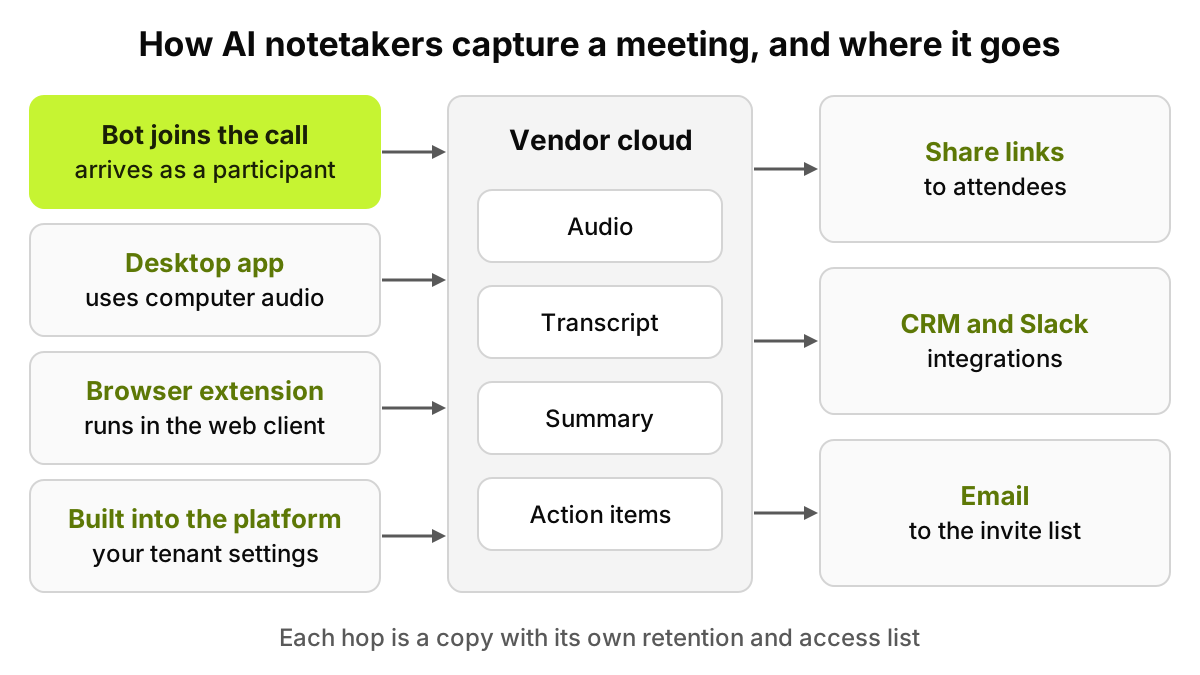
Figure 1. Meeting-platform bot controls act on the first capture method only; the others need tenant or device controls.
How do AI meeting notetakers work, and where does the data go?
Notetakers come in four broad designs:
Bots that join the call. The tool sends a participant into the meeting, often from a connected calendar. Fireflies' help guide, for example, describes a setting that lets its notetaker join and record "your calendar events," with "All meetings" shown as the default choice and an option to join only when invited.
Desktop apps that use the device's audio. No participant appears. Granola's home page says it "uses your computer audio, so doesn't invite a bot."
Browser extensions that sit on top of a web meeting client.
Notetaking built into the meeting platform itself, governed by the tenant settings you already manage.
The capture method matters less than what happens next. Audio becomes a transcript, then a summary and action items, and then the content leaves again: a share link, a CRM sync, a Slack post, an email to the invite list. Each hop is a copy with its own retention and access list. When a vendor calls a third-party model provider to write the summary, the transcript leaves the vendor as well.
Then there is account sprawl. In our fictional example, Rachel Torres, an account executive, signs up for a free plan with her work address on Monday. By Friday her bot has attended eleven calls, four with customers, and the transcripts sit in a personal workspace your admins cannot see or delete. A work email does not make an account corporate, a gap our post on shadow IT and shadow AI works through.
What should an AI notetaker security review check?
Ask every vendor the same questions and score the written answers. The "good answer" and "red flag" columns are our assessment, so tune them with your privacy and legal teams.
Control
What to ask the vendor
What a good answer looks like
Red flags
SAML SSO
Which plans support SAML, and can we enforce it?
Enforced SSO on your plan, password login off
SSO only on a tier above your quote
SCIM
Do you support SCIM provisioning and deprovisioning?
Leavers lose access, and their bots stop, the same day
Manual removal by an admin
Domain capture
Can we claim existing accounts that use our email domain?
Personal sign-ups on your domain move into your workspace
No way to find or claim them
Workspace controls
Which settings can admins set and lock for everyone?
Lockable defaults for recording, sharing and integrations
Every setting is per user
Auto-join policy
Can admins restrict which meetings the bot joins?
Off by default, or internal meetings only, set centrally
Joins every calendar event with a link
External meetings
How does the bot behave when outsiders attend?
Admin rule to skip or announce in meetings with external guests
No distinction between internal and external
Audit events
Which admin and workspace events are logged?
Sign-ins, settings, shares, exports, deletions, with actor and time
Only a usage dashboard
Audit API and SIEM
Can we pull audit events by API or stream them?
A documented API or SIEM connector, stated retention
CSV on request through support
Retention and deletion
How long are audio, transcripts and summaries kept?
Admin-set periods per data type, backups included
"Kept until you delete it"
Training use
Is our content used to train your models or your provider's?
No training, stated in the contract
An opt-out in user settings only
Residency
Where are audio and transcripts processed and stored?
Named regions, chosen by you
"Globally distributed"
Subprocessors and model providers
Who transcribes and who writes the summary?
A named, current list, with notice before changes
"Leading AI providers"
Encryption
How is data encrypted in transit and at rest?
Both, with key management described
No written answer
Public links
Can admins disable public share links?
Off by default, or limited to signed-in members
Open links admins cannot disable
Integrations
Which integrations push content out?
An allowlist for CRM, chat and email pushes
Users connect anything themselves
Consent features
How are participants told, and can they object?
Visible bot name, chat notice, easy to stop
Silent capture
DPA and BAA
Will you sign our DPA, and a BAA if PHI is involved?
Yes, covering the exact product and plan
BAA only for a different tier
Breach notice
How fast will you notify us of an incident?
A window in days, with a named contact
"As required by law"
Three rows carry most of the weight. Domain capture decides whether accounts opened before your review can be brought under control at all. Our SAML SSO, SCIM and SIEM buyer's guide explains why SSO answers who signed in, not what happened after.
The audit row decides whether you ever see a share, export or deletion. Ask for API documentation, not a screenshot, and check how long events are kept. Our guide to piping AI audit trails into your SIEM covers building your own archive.
Subprocessors are the third: a speech engine, a language model and storage may be three companies, and your contract reaches one.
Do you need consent to record a meeting with an AI notetaker?
It depends on where participants are, and vendor settings cannot settle it. Federal law, 18 U.S.C. 2511(2)(d), says it is not unlawful "for a person not acting under color of law to intercept a wire, oral, or electronic communication where such person is a party to the communication or where one of the parties to the communication has given prior consent to such interception," unless the purpose is "committing any criminal or tortious act."
Some states ask for more. Washington's RCW 9.73.030(1)(b) bars recording a private conversation "without first obtaining the consent of all the persons engaged in the conversation." Subsection (3) counts consent as obtained when one party announces to everyone, "in any reasonably effective manner," that recording is about to start, and if the conversation is recorded, the announcement must be recorded too. Other states have rules we have not summarized.
Is a bot sent by one attendee "a party," or a tool of the person who invited it? Whose law applies when a client in another state joins? Take both to counsel. Meanwhile, a visible bot name, a notice at the start and a rule that the bot leaves when anyone objects are cheap habits.
This section is general information about recording laws, not legal advice. Ask counsel how federal and state rules apply to your meetings.
What can Teams, Zoom and Google Meet do about notetaker bots?
All three can keep unapproved bots out. None can see a notetaker that never joins.
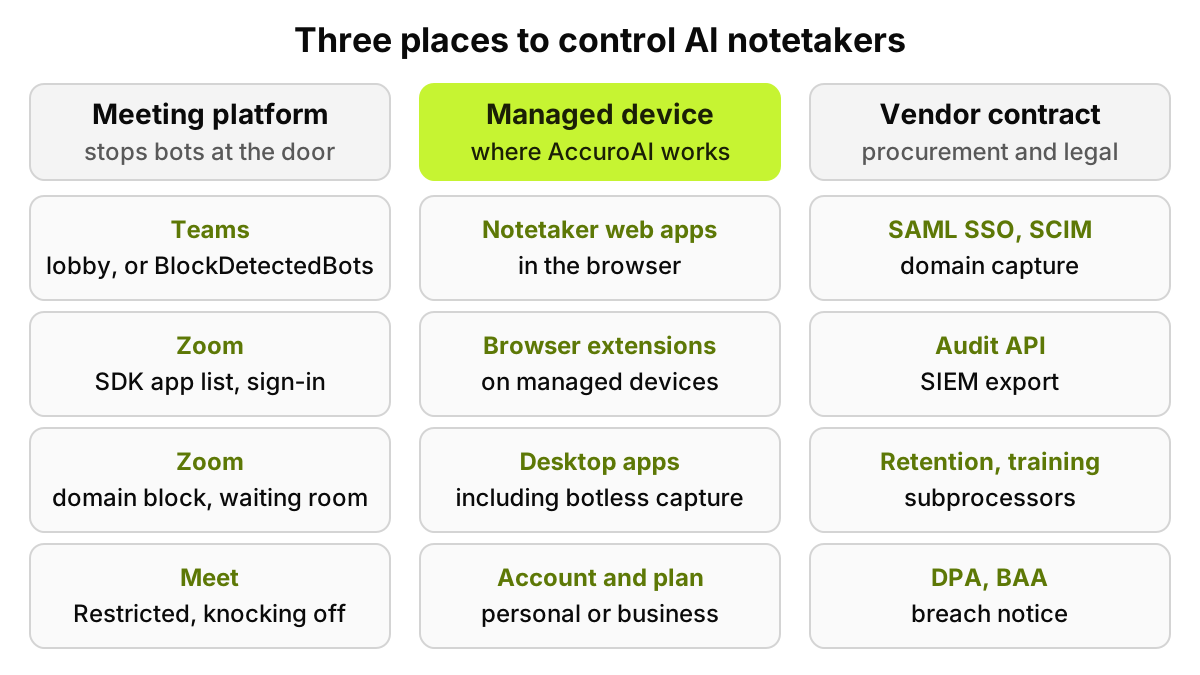
Microsoft Teams. Microsoft's page on managing external bots warns that such tools may "record or transcribe meetings without participant awareness." The control is a meeting policy setting, "Manage external bots and their access to meetings," in the Meeting join and lobby section. By default, detected bots go to the lobby "irrespective of the lobby configuration," and an organizer must admit them. The Set-CsTeamsMeetingPolicy reference lists three values for ExternalBotAccessMode: AllowAllBots, RequireApprovalWhenDetected (the default) and BlockDetectedBots, which blocks detected bots from meetings hosted in your organization. The how-to page showed only the first two when we read it, so check your tenant. Microsoft is candid about the limits: "Some external bots may not be detected," and people are occasionally flagged as bots.
Zoom. Zoom's article on blocking bots from meetings and webinars names AI notetakers among the bots that join as participants. It lists a block and allow list for Meeting SDK apps published on its Marketplace, Web App bot protection that "can't be turned off," required sign-in, blocking of specific email domains, a waiting room for guests who are not signed in, and a dashboard of apps that tried to join, joined or were blocked.
Google Meet. Google's meeting access tips describe three access types. Open lets "anyone with a meeting link" join; Trusted admits people in the host's organization without knocking; Restricted admits only people invited through Calendar or by a host, and is "not available for consumer users." For Trusted and Restricted meetings, unchecking "Anyone can ask to join" turns knocking off, and "anonymous users or third-party bots, like note takers, that attempt to use 'Ask to join' are automatically denied access." A bot whose address is already on the invite is a different case, so test it.
Figure 2. No single owner covers all three. Platform settings miss botless capture, and device controls cannot see inside a meeting.
Platform settings protect meetings your organization hosts. In a client's meeting, the client's policy applies. And a desktop notetaker using the computer's audio never knocks, so lobby rules and bot detection have nothing to act on. That control has to sit on the device.
How do you handle the notetakers already in use?
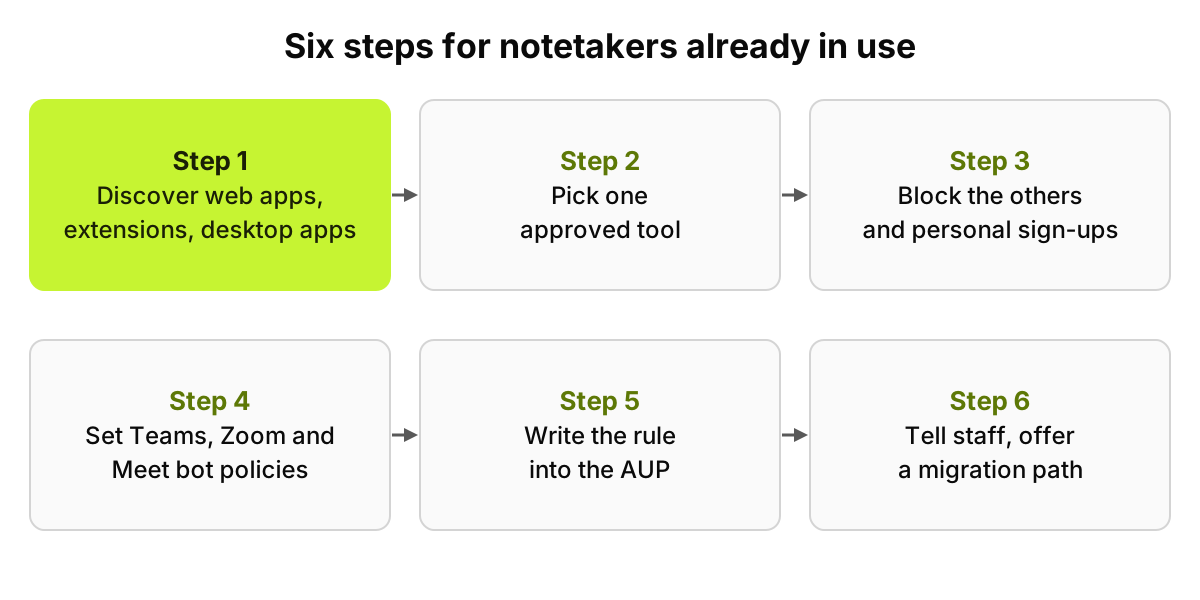
Discover them. List every notetaker web app, extension and desktop app on managed devices, with the account behind each (personal or company) and the plan.
Pick an approved tool. Run the checklist above on two or three candidates and choose one, or confirm the notetaking built into your meeting platform is enough.
Block or limit the others. Block unapproved notetakers on managed devices, and block personal sign-ups to the approved one, so content lands in the workspace your admins control.
Set meeting-platform policies. Teams bot detection or blocking, Zoom sign-in, domain and SDK app controls, Meet access types. Decide what happens in meetings with external guests.
Write the rule into your AUP. Which tool, which meetings, the notice wording, and what never gets recorded, such as HR, legal and board sessions.
Tell staff. Say what changed, why, and how to request an exception or migrate old transcripts.
Order matters. Michael Brooks, a fictional IT lead, did step 3 on a Monday with no replacement in place; by Wednesday the same notetaker was running on personal laptops.
Healthcare adds a layer. If a notetaker will hear patient information on behalf of a covered entity, the vendor needs a BAA that covers the exact product and plan, and the audio, transcript and summary can each hold PHI, with their own retention questions. Our AI medical scribe security checklist covers the clinical version, including EHR write-back.
Figure 3. Steps 1 and 2 come before any blocking, or the tools move to devices you cannot see.
Which parts can a device-level tool handle?
The vendor review, the DPA and the consent policy are people work. The meeting platform decides who gets in. A device-level tool answers a narrower question: which notetakers are installed or opened on company machines, under which accounts.
AccuroAI recognizes 1,400+ AI tools in the browser and on managed devices, notetaker web apps, browser extensions and desktop apps among them, each with the signed-in account (personal or business) and the plan. It can block unapproved AI apps with an on-screen notice. Policies allow, redact or block per app, account type and data type, so a personal sign-up can be blocked while the approved notetaker workspace keeps working. SaaS discovery gives each app a 0 to 100 risk score.
Our limits, stated plainly. AccuroAI does not process, record or inspect meeting audio, recordings or transcripts, inside a notetaker vendor or anywhere else. It does not join meetings, detect bots inside them or remove a bot from a call; Teams, Zoom and Meet settings do that. And no product makes an organization compliant with recording laws.
FAQ
Can we block AI notetakers from joining our Teams meetings?
Yes, for meetings your organization hosts. Microsoft's Set-CsTeamsMeetingPolicy reference lists a BlockDetectedBots value for ExternalBotAccessMode, and the default sends detected bots to the lobby for approval. Microsoft says some bots may not be detected, and notetakers that capture laptop audio never join at all.
Is SSO enough to secure an AI notetaker?
No. SSO controls who signs in to the company workspace. It does nothing about personal accounts on the same product, retention, model providers or public links. Pair it with SCIM, domain capture and audit events you can pull into your SIEM.
Does federal law allow recording a meeting with one person's consent?
Generally, 18 U.S.C. 2511(2)(d) permits interception by a party to the communication or with one party's prior consent, unless the purpose is criminal or tortious. Some states, such as Washington, require the consent of all persons in a private conversation. Ask counsel which rules reach your participants.
Can AccuroAI see what a notetaker recorded?
No. AccuroAI does not process or inspect meeting audio, recordings or transcripts. It discovers notetaker web apps, extensions and desktop apps on managed devices, with the signed-in account and plan, and can block unapproved ones or personal sign-ups while the approved tool keeps working.
Which AI notetakers have an audit API for a SIEM?
Of the products we checked on 13 November 2026, Fireflies documents an Audit Events API (beta, Enterprise plan, team admins) with OCSF-formatted events, and Granola documents an Audit API on Enterprise covering the last year. Google Meet events come through the Workspace Reports API. For any other vendor, ask for the API documentation and the event retention in writing.
What should an AI notetaker audit log include?
At minimum: sign-ins, admin setting changes, share link creation, exports, integration connections and deletions, each with the actor, time and object. Ask for an API or SIEM connector rather than a support-ticket export, and find out how long the vendor keeps events so you can archive them before they expire.
This checklist is general security guidance, not legal advice; confirm recording consent and contract terms with counsel.
Before procurement signs off on one notetaker, see it on your own devices: a 72-hour pilot maps the AI already in use before any policy is enforced, so you start from the notetakers people actually run. Start a free pilot.