Can DLP Catch File Uploads, Screenshots and Pastes to ChatGPT, Claude and Copilot?
Yes, but not with one control. Endpoint DLP sees files and the clipboard, browser controls see the page, and a proxy sees only what it decrypts, so typed prompts, screenshots, desktop apps and coding agents fall into different gaps. We checked Purview, Zscaler, Chrome Enterprise, OpenAI and Anthropic documentation and give a ten-case test plan you can run in an afternoon.
D
Dr. Marcus Chen
Principal Security Researcher
Oct 28, 2026
Yes, but not with one control. A typed or pasted prompt is text in the page, a file upload is a multipart request, a pasted screenshot is an image upload, and a desktop app may never touch the browser. Proxy DLP sees what it decrypts, endpoint DLP sees files and the clipboard, and browser controls see the page.
Reading the words inside a screenshot is a separate problem.
It needs optical character recognition (OCR), and only some products document it. So a DLP agent on the device can usually catch both uploads and pastes in a managed browser. The gaps open elsewhere: a personal account in an unmanaged browser, a desktop app whose traffic the proxy cannot decrypt, an image nobody reads, and a coding agent that opens files on disk with no upload step at all.
Last verified: 28 October 2026, against Microsoft Learn (endpoint DLP, endpoint DLP settings, DLP in Edge for Business, DLP for Microsoft 365 Copilot, OCR, the U.S. SSN definition), the help centers of Zscaler, OpenAI and Anthropic (read through the r.jina.ai text reader), Google's Chrome Enterprise Premium article, Anthropic's Claude Code docs, AWS's IAM guide and the SSA. Zscaler's OCR claim comes from a 2022 Zscaler blog post, not its help center.
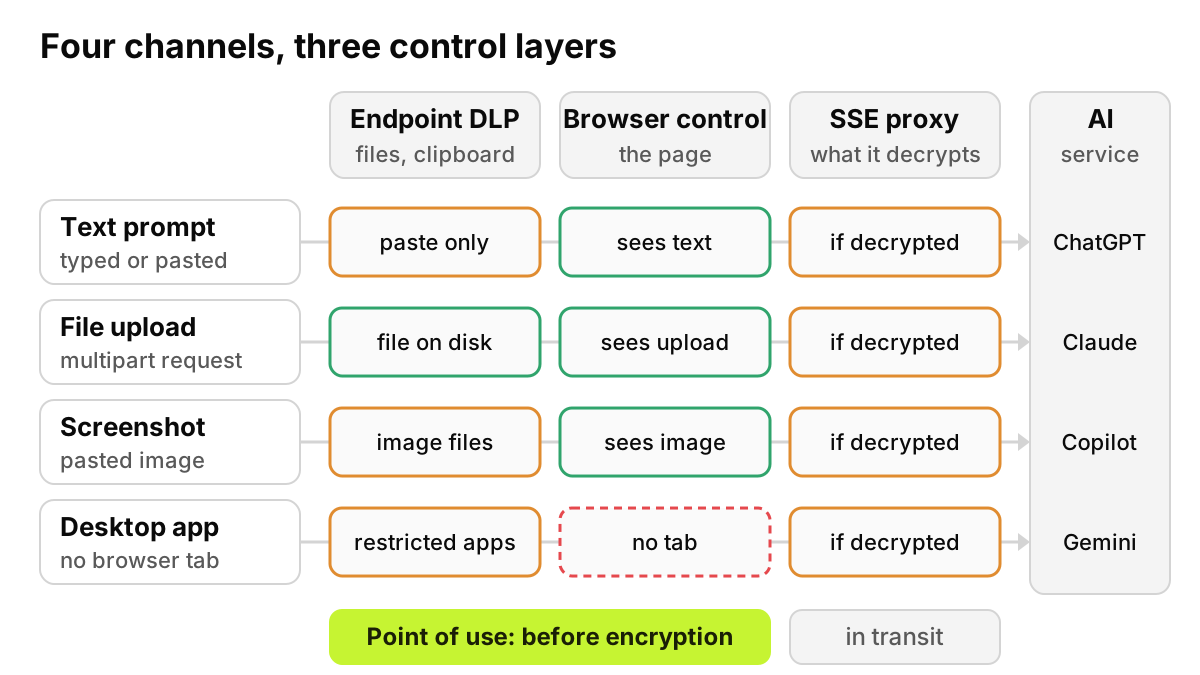
Figure 1. Each layer sees a different slice of the same action. The device and the page together form the point of use, where content is still in the clear.
What path does each channel take?
Typed prompt. No file and no clipboard event. Only the page, a browser control or a control inside the desktop app sees the text before it is sent; a proxy sees it later, if it can decrypt the session.
Pasted text. It arrives through the clipboard, and that paste event is something endpoint DLP and browser controls can evaluate.
File upload or drag and drop. The file sits on disk first, then leaves as a multipart request.
Screenshot paste. Image bytes come off the clipboard and go up as an attachment. Unless the user saved it, no file ever touched the disk.
Desktop app or agent. There is no tab. Anthropic describes Claude Code as a tool that "reads your codebase, edits files, runs commands", so file content can reach a model without anyone uploading anything.
Five paths, four control positions. Most coverage arguments are really about which position a vendor occupies.
What does Microsoft Purview catch, and where does it stop?
Endpoint DLP runs on onboarded Windows 10/11 and macOS devices. Microsoft's endpoint DLP overview lists "Upload to a restricted cloud service domain" (block, warn or audit) and "Paste to supported browsers", where "evaluation is performed on the content that is being pasted." Paste is supported on Windows and in preview on macOS. The settings page says sensitive service domain groups "contain a preconfigured group for Generative AI websites", that restricted actions include "upload or drag/drop a sensitive file" and "paste sensitive data", and that this works in Edge, or in Chrome and Firefox with the Purview extension. One limit matters later: "If data is never saved to a file on the local device, Endpoint DLP cannot scan or classify it."
DLP built into Edge for Business needs no device onboarding. Microsoft's page lists "Upload text" and "Upload file" activities with allow or block, on Intune-managed Windows 10 and 11, for 19 unmanaged apps including ChatGPT (consumer), Google Gemini and Microsoft Copilot 365 Chat. Claude is not on that list. Purview evaluates "up to 4 MB of content for uploadText, and files up to 3 MB for uploadFile," and warns that ChatGPT, Runway and Meta AI "might intermittently send content in encoded form or through dynamically generated endpoints."
DLP for Microsoft 365 Copilot can stop Copilot answering prompts that contain sensitive information types (in preview), block web searches on them, and exclude labeled files. On uploads, Microsoft's page is plain: "DLP can't scan the contents of files that you upload directly into prompts." Policy updates "can take up to four hours" to reach Copilot.
Does Zscaler block file uploads to ChatGPT, or just log them?
It can block them. Blocking or logging is a rule you write, not a product limit.
Zscaler's article on AI and ML application rules lists granular actions "which you can Allow or Block". For ChatGPT they are Chatting, Deleting, Downloading, Inviting, Login, Sharing and Uploading; Google Gemini, Microsoft Copilot, Perplexity and Poe also have Uploading. Claude is not among the apps with granular actions on that page. The condition: "For the granular actions to work as expected for an application, enable SSL/TLS Inspection for the application." A Capture Prompts option stores prompts "up to 2 KB in size" in Zscaler logs.
Zscaler's DLP content inspection page gives two actions, Allow and Block, and says the service "only monitors or blocks content according to the policy you configure." An Allow rule with a DLP engine attached is the "just log" setup; a Block rule stops the transaction.
What do Google, OpenAI and Anthropic offer?
Google's Chrome Enterprise Premium DLP article requires the add-on. Rules start from triggers such as "File uploaded" and "Content pasted" and end in Block, Allow with warning, or Audit only. Chrome scans "up to 10 MB of text content in a file," and a file type condition can match the Image category. OCR is not mentioned.
OpenAI's workspace settings article lists what Permissions & roles controls: models, GPT creation and sharing, canvas, projects, memory, link sharing and Work access. We found no file upload switch. Its Compliance Platform offers logs "that you can connect with your eDiscovery, DLP, or SIEM tools," kept for 30 days: review after the fact, not a gate.
Anthropic's Compliance API lets an organization "programmatically pull activity feed events, chat data, and file content," which for Enterprise includes "uploaded files". Only the Primary Owner can enable it. The "Code execution and file creation" toggle governs Claude creating files, not employees uploading them, and we found no upload switch.
Covered in supported browsers (Purview on macOS in preview)
Covered: paste is a trigger
Covered
File upload
Covered where decrypted, such as an Uploading action
Covered for files on disk to restricted domains
Covered, within size limits
Covered
Image or screenshot paste
Partial: can block the upload; reading it needs OCR
Partial: OCR covers image files, not unsaved clipboard data
Partial: can block by file type
Partial: blocks by policy, does not read the image
Drag and drop
Partial: same as an upload once sent
Covered: Purview names drag and drop
Partial: confirm it registers as an upload
Covered
Desktop app
Partial: only traffic it can decrypt
Partial: restricted-app rules on protected files
No: there is no tab
Covered with a desktop agent
Coding agent reading files
Partial: sees API calls it can decrypt
Partial: file-centric rules only
No
Partial: sees the agent; ask what it inspects
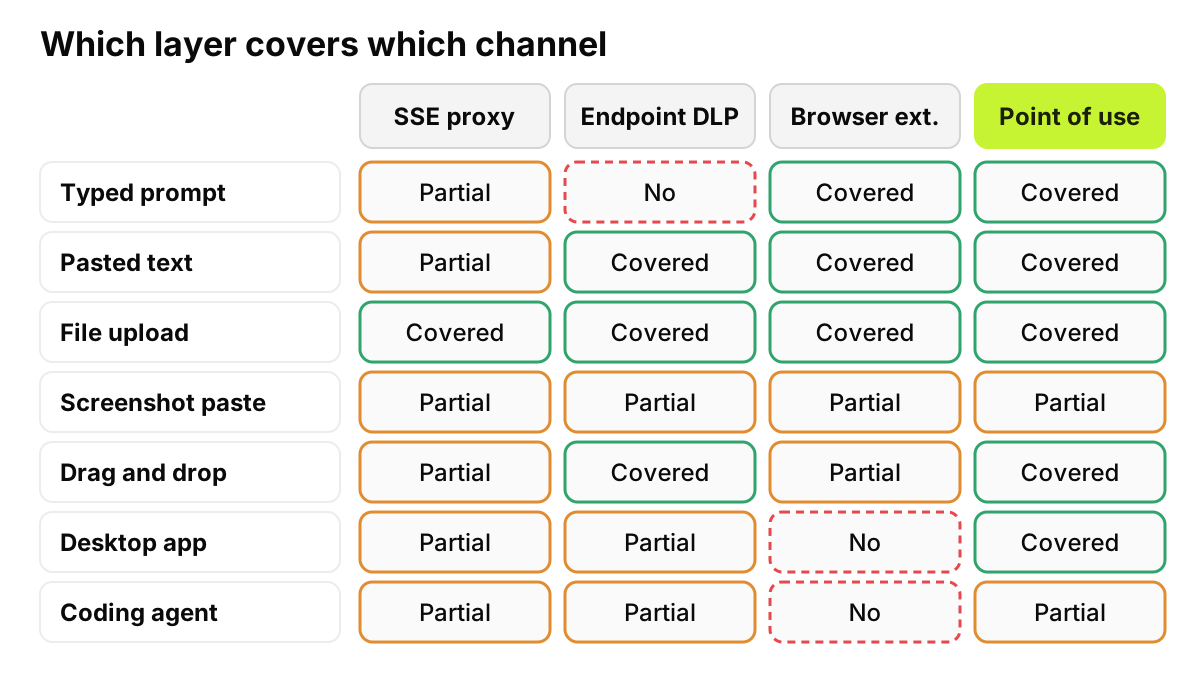
Read it by row. No layer covers every row, and the image row is partial everywhere.
The typed prompt is the commonest way data reaches a chatbot, and endpoint DLP cannot see it; Purview handles it through Edge instead. The coding agent row is partial in every column because the agent reads a file on disk the way an editor would. For desktop apps in depth, see governing desktop AI apps with or without MDM.
Figure 2. The simplified matrix. Point of use covers the most rows and still marks screenshots and coding agents as partial.
Can DLP read the text inside a screenshot?
Blocking an image is easy. Reading it is not.
Most controls above can stop an image upload by destination or file type. Reading the account number inside it takes OCR. Microsoft's OCR page documents it for Windows and macOS endpoints (JPEG, JPG, PNG, BMP, TIFF and image-only PDF). It is optional, billed pay-as-you-go per image, scans "only images uploaded after OCR is enabled," and pauses when a device hits its daily bandwidth limit, 1,024 MB by default. According to Zscaler's March 2022 blog post, its DLP "is complete with optical character recognition, or OCR." Google's article does not mention OCR.
We could not confirm, for any vendor, that a screenshot pasted straight from the clipboard gets OCR before it leaves. Treat that path as unread until your own test says otherwise.
Say Rachel Torres in accounts payable snaps a vendor's bank details and pastes the image into a chat. A policy that blocks image uploads to every AI tool except the licensed one stops that without reading a pixel.
What does good look like?
Policy per channel, by account. The same paste is fine in the company tenant and a leak in a personal one.
Redact text inline rather than block. Removing an SSN keeps the employee working; a hard block teaches them to use a phone. See redact, don't block.
Allow uploads only to the licensed tenant. Files and images go to the tool the company pays for, signed in with the corporate identity.
Log every decision. Allowed, redacted, warned and blocked, each with the user, account and tool.
AccuroAI sits at the point of use, through a browser extension for Chrome and Edge plus the AccuroAI Desktop App for desktop AI apps and agents. It enforces by signed-in account, so personal ChatGPT is blocked while ChatGPT Enterprise keeps working. It redacts PII, SSNs and national IDs, account numbers, card data and 60+ secret types inline, with 40+ classifiers, in under 38 ms p99. File and image uploads can be blocked by policy and allowed only to the licensed tool signed in with the corporate identity, such as the company's Microsoft 365 Copilot. It does not read text inside images. It sits beside Purview or an SSE; our Purview vs AI-native DLP framework covers that split.
How can you test your own controls in an afternoon?
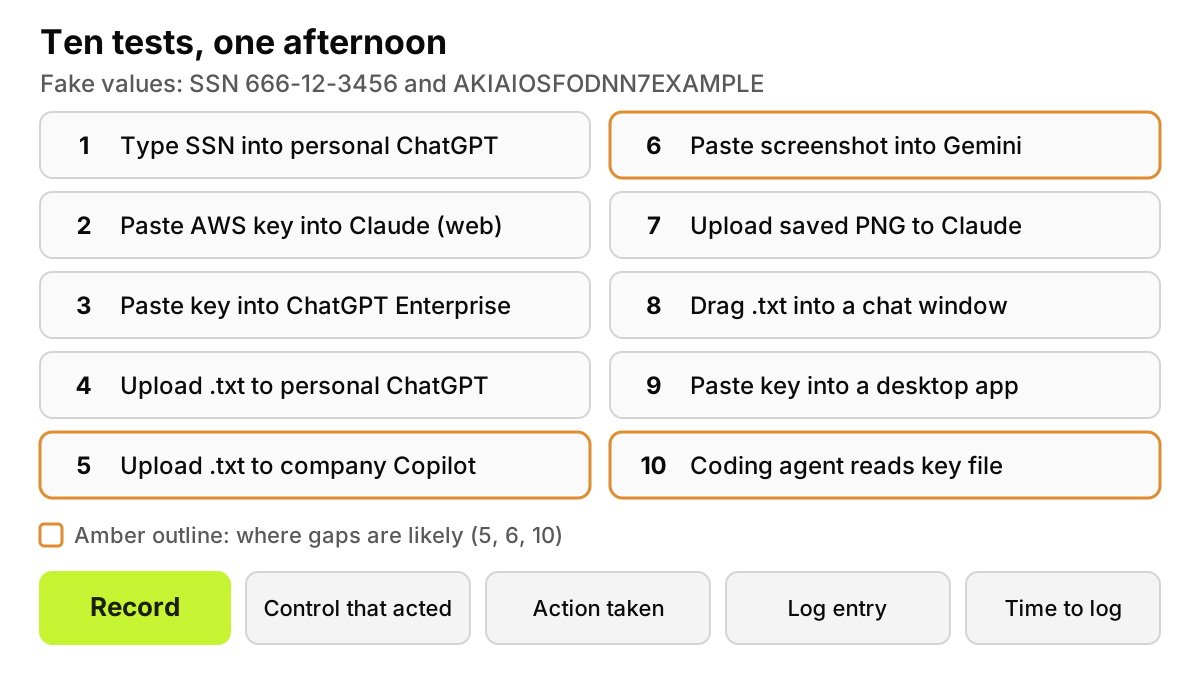
Use one managed laptop, a test personal account per AI tool, and two fake values. For the SSN, pick an area the SSA has never assigned (000, 666 and 900 to 999), such as 666-12-3456, and put "SSN" beside it: Microsoft's SSN definition only matches with a keyword like "SSN" within 300 characters. For the secret, use AWS's documented example key ID, AKIAIOSFODNN7EXAMPLE. If the SSN never fires anywhere, check whether your classifier ignores never-issued ranges.
Type "SSN 666-12-3456" into personal ChatGPT in the browser.
Paste AKIAIOSFODNN7EXAMPLE into Claude in the browser.
Paste the same key into the company's ChatGPT Enterprise workspace.
Upload a .txt file holding both values to personal ChatGPT.
Upload the same file to the company's Microsoft 365 Copilot.
Screenshot that file and paste the image into Gemini from the clipboard.
Save the screenshot as a PNG and upload it to Claude.
Drag the .txt file into a chat window.
Paste the key into the ChatGPT or Claude desktop app.
Ask a coding agent, in a throwaway repository, to read a file containing the key.
Record four things per case: which control acted, what it did (blocked, warned, redacted or allowed), whether a log entry shows the user, account and tool, and how long that entry took to appear. Expect surprises in cases 5, 6 and 10.
Figure 3. Run all ten before you write the policy and again after, and keep both result sheets.
Then turn the results into rules. Our AI acceptable use policy template is useful here because it gives you a place to state, channel by channel, which tools may receive files and images and which data must be redacted.
No control on a laptop stops someone photographing a screen with a phone or retyping a figure at home. Software also cannot decide which tools deserve a license, or which teams may upload customer files. It can make the approved path easy, catch the common channels before data leaves, and keep a record of each decision.
FAQ
Can DLP catch file uploads to ChatGPT and Claude, or only pasted text?
Both, in the browser, when the DLP runs on the device or in the browser. Purview endpoint DLP treats uploads to restricted domains and pastes to supported browsers as separate activities, and Chrome Enterprise Premium has File uploaded and Content pasted triggers. Typed text, desktop apps and coding agents are where coverage thins.
Does Zscaler block file uploads to ChatGPT or just log them?
Either; you choose. Zscaler documents an Uploading granular action for ChatGPT that you can Allow or Block, plus DLP rules with Allow or Block actions. The granular actions need SSL/TLS inspection of the app's traffic. An Allow rule with logging is the monitor-only setup.
Does Purview DLP scan files uploaded to Microsoft 365 Copilot?
No. Microsoft's Copilot DLP page says DLP "can't scan the contents of files that you upload directly into prompts" and only checks typed text. It can still keep Copilot from using labeled files and from answering prompts that contain sensitive information types.
What is local DLP for ChatGPT, Claude and Copilot?
Our term for a control on the employee's device, in the browser or beside the desktop app, that inspects content before it is encrypted and sent. It needs no decrypting proxy, and it can see which account is signed in, which a network control often cannot.
Can any DLP read text inside a pasted screenshot?
Some products document OCR for image files: Microsoft Purview on Windows and macOS endpoints, and Zscaler in a 2022 blog post. We could not confirm that any vendor reads a screenshot pasted from the clipboard without saving it first. Blocking image uploads by policy is the dependable control.