How to Control AI Coding Agents in the Enterprise: Claude Code, Cursor, Codex and GitHub Copilot
AI coding agent security comes down to four control points: who may run an agent, what it may touch, what each action may do, and what gets recorded. This guide compares the runtime controls Claude Code, Cursor, OpenAI Codex and GitHub Copilot document today, shows what they leave open when four tools share one laptop, and gives an eight-step rollout.
J
James Okafor
Field CISO
Nov 16, 2026
On this page
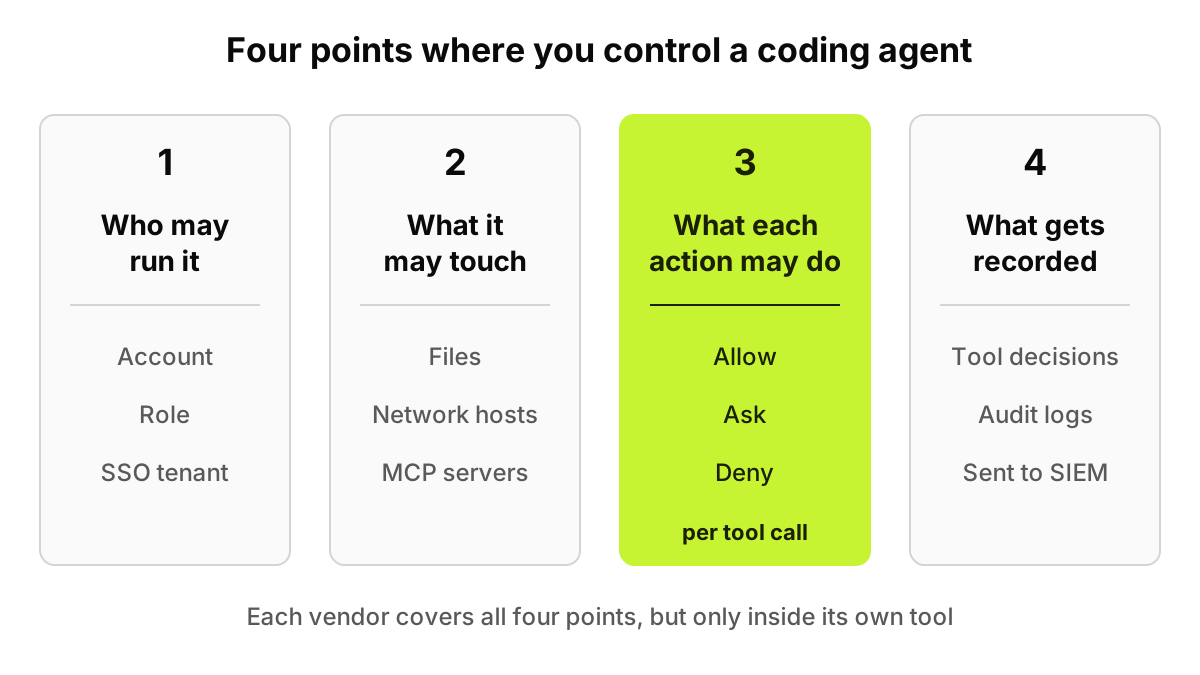
AI coding agent security comes down to four control points: who may run an agent (account, role, SSO tenant), what it may touch (files, network hosts, MCP servers), what each action may do (allow, ask or deny per tool call), and what gets recorded. Claude Code, Cursor, Codex and GitHub Copilot each cover part of it, inside their own tool.
Our plan-by-plan table of SSO and SCIM in coding tools covered identity and which tier to buy. This post is the runtime view: what an agent can do once someone is signed in, what each maker lets you lock, and what slips between four tools on one laptop.
Every vendor allowlist below assumes someone already reviewed the servers on it. The MCP Server Risk Checklist gives that review a score.
Last verified: 16 November 2026, against the makers' own documentation: Anthropic's Claude Code docs, Cursor's docs, OpenAI's Codex docs (developers.openai.com now redirects to learn.chatgpt.com) and GitHub Docs, plus OWASP's agentic Top 10 announcement. SSO and SCIM by plan, and the Codex workspace pin, are carried from our 13 November table. "Not documented" means we did not find it on those pages today.
Figure 1. Point 3 is highlighted because it is the only one that sees each individual tool call before it runs.
Where do you control a coding agent?
At four points, and each one answers a different failure.
Who may run it. A personal login brings none of your admin settings with it: ASI03 Identity and Privilege Abuse in OWASP's agentic list.
What it may touch. Files, network hosts and MCP servers. An unreviewed server is ASI04 Agentic Supply Chain Vulnerabilities.
What each action may do. Whether a shell command, file edit or MCP call runs, asks a person or stops. This answers ASI02 Tool Misuse and Exploitation and ASI05 Unexpected Code Execution, and still holds after a poisoned README redirects the agent (ASI01 Agent Goal Hijack).
What gets recorded. The events an investigator can use next month.
OWASP published the Top 10 for Agentic Applications on 9 December 2025; the mapping to control points is ours. The four tools differ in who can turn each control off, and in what it never sees.
What can an administrator lock in Claude Code?
Most of it, through managed settings. Anthropic's managed settings guide says no user, project, local or --settings value overrides them, except a few keys where a stricter lower value wins. They arrive from the claude.ai console, MDM, the registry or a system file.
The permissions page evaluates deny rules first, then ask, then allow. Auto mode hands routine approvals to a background classifier, and bypassPermissions skips prompts; disableBypassPermissionsMode and disableAutoMode, set in managed settings, take both away. The sandbox confines shell commands on macOS, Linux and WSL2 and checks every network host against an allowed-domains list that starts empty. On native Windows, commands run unsandboxed.
The managed MCP page offers a fixed server set in managed-mcp.json, or an approved catalog through allowedMcpServers with allowManagedMcpServersOnly. A denylist match always wins, and Anthropic warns that a serverName entry "is not a security control," so match on URL or command. PreToolUse hooks can block a call with exit code 2.
Anthropic is plain about limits. A Bash rule "isn't a security boundary around the program," so /bin/rm slips past a rule written for rm. A local administrator can edit the managed source, and managed settings bind Claude Code only. OpenTelemetry export records a tool decision event for every accept or reject, with prompt text redacted by default. The full file is in our Claude Code lockdown guide.
What can an administrator lock in Cursor?
Cursor sorts agent behavior into Run Modes. The run modes page lists Auto-review, the recommended default, where a classifier decides; Allowlist, which runs only actions approved in advance; and Run Everything. On Auto-review, Cursor warns: "The classifier can make mistakes."
The sandbox uses Seatbelt on macOS and Landlock with seccomp on Linux 6.2 or later, and falls back to asking first on older kernels. Network is blocked by default. Admins choose which modes users may pick, and "Team settings take precedence over individual and project configuration."
The stronger levers are Enterprise only. The MCP allowlist matches local servers by full command and remote ones by URL, can limit each server's tools, and blocks anything that doesn't match. Hooks such as beforeShellExecution return a permission decision but fail open on a crash or timeout unless failClosed is set. Audit logs record who changed what, "never prompts, agent output, generated code, or credentials." Our Cursor security review has the hardening order, and the secure Cursor deployment page shows the device side.
What can an administrator lock in OpenAI Codex?
Codex pairs a sandbox with an approval policy. OpenAI's agent approvals and security page says operating system mechanisms enforce the sandbox (Seatbelt on macOS, bwrap plus seccomp on Linux, MXC on Windows), and by default the agent works with network access off and writes limited to the workspace. Under on-request, commands the sandbox allows run without asking. Full access is listed as "No sandbox; no approvals" and marked not recommended.
The enterprise lever is managed configuration, which splits requirements, "admin-enforced constraints that users can't override," from defaults users can change. A requirement can block --ask-for-approval never and the full-access sandbox, and enable an MCP server only when its name and identity both match an approved entry. It is delivered from the Admin Console, by macOS MDM, or from an HTTPS endpoint you run.
Codex Cloud is off by default for Enterprise workspaces. For records, OpenAI points to the Compliance API. We found no hook mechanism on the pages we read.
What can an administrator lock in GitHub Copilot?
GitHub's risks and mitigations page says only users with write access can trigger the cloud agent, it pushes only to a copilot/ branch, workflows wait for review, and the requester can't approve the pull request. A firewall limits its internet access to a recommended allowlist, but it "does not apply directly to other MCP servers," and GitHub says sophisticated attacks may bypass it.
Inside that agent, "Copilot uses configured MCP tools autonomously and does not ask for approval before calling them." Copilot CLI asks before tools that modify or execute files unless a developer passes --allow-all or --yolo.
The MCP servers in Copilot policy is disabled by default and applies to Business and Enterprise seats. The generally available MCP control is an enterprise managed-settings.json in a .github-private repository or installed by MDM. A registry-only option is in preview, and GitHub's enforcement reference says its name matching "can be bypassed by editing configuration files." The audit log keeps 180 days and excludes prompts sent to Copilot locally.
How do the four tools compare?
Each cell comes from the maker's documentation read on 16 November 2026. An asterisk marks a fact carried from our 13 November SSO and SCIM table.
Tool
Who can use it (SSO/SCIM, plan)
Permission model for actions
Sandbox / network limits
MCP controls
Admin-enforced, or can the developer override?
Audit trail
Claude Code
SSO on Team and Enterprise; SCIM on Enterprise*; forceLoginOrgUUID refuses other organizations' logins
Allow, ask, deny rules, deny first; auto and bypass modes can be disabled
OS sandbox for shell commands on macOS, Linux, WSL2; allowed domains; native Windows unsandboxed
managed-mcp.json, or allowlist by URL or command; deny always wins
Managed keys beat user, project and CLI values; a local admin can edit the source
OpenTelemetry tool decisions; Compliance API on Enterprise
Cursor
SAML SSO, can be required; SCIM on Enterprise; AllowedTeamId logs out other teams
Auto-review, Allowlist or Run Everything; deletion, browser and external-file protections; hooks
Seatbelt on macOS, Landlock and seccomp on Linux 6.2+; network blocked by default; Windows not documented
Enterprise allowlist by command or URL, per-tool limits
Team settings override user and project; hooks fail open unless failClosed
Enterprise audit log of admin changes, no prompts or code
OpenAI Codex
SSO on Business, SCIM on Enterprise and Edu*; workspace pin*; Cloud off by default on Enterprise
Approval policy (on-request or never) plus sandbox mode
OS sandbox on macOS, Linux, Windows; network off by default
Name and identity must match an approved entry
Requirements can't be overridden; defaults can
Compliance API; analytics API
GitHub Copilot
SAML and SCIM through GitHub Enterprise Cloud*; cloud agent needs write access
Cloud agent: copilot/ branch, review before workflows, MCP tools unapproved; CLI asks first
Cloud agent firewall, not applied to other MCP servers; local sandbox not documented
Policy off by default; managed-settings.json allowlist; registry-only in preview
Enterprise and organization policies
Audit log, 180 days; no local prompts
Read across a row and each tool looks covered. Read down a column: four syntaxes, four consoles, four log formats.
What do vendor controls leave open?
None is a flaw in one product; they come from running several.
Personal accounts on the same laptop. Each login pin covers its own tool, and only after MDM delivers it.
A developer switching tools. A deny rule in Claude Code means nothing to Cursor, Codex or Copilot CLI.
Settings a user can override. Codex defaults, hooks that fail open, a local admin editing a managed file, registry matching by name.
MCP servers outside the allowlist. Anthropic says allowlists "aren't a registry": they filter servers already added, so no vendor tells you what is installed across tools.
One policy across four tools. No console reads another's rules, and neither Cursor's audit log nor GitHub's records the local commands an agent ran.
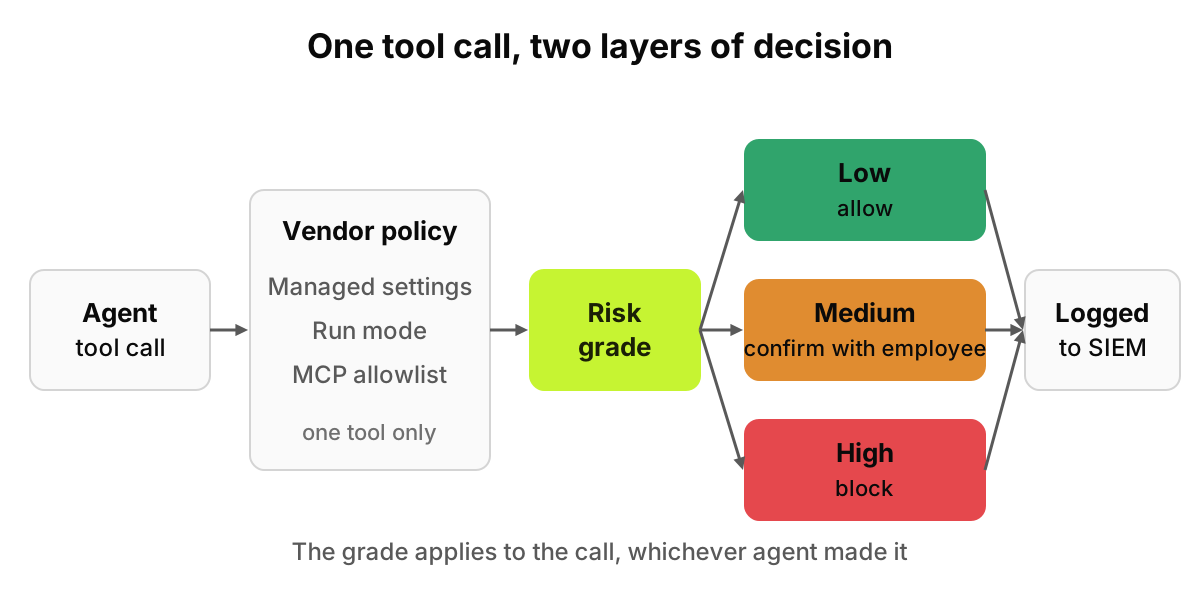
That cross-tool layer is where AccuroAI works, on the device and in the browser, with no TLS interception. It recognizes 1,400+ AI tools, each with the signed-in account (personal or business) and the plan. AI Agent Access blocks coding agents for selected departments or roles, or allows them only with a work account. MCP servers are inventoried with a 0 to 100 risk score and can be blocked across the fleet. Every tool call a coding agent makes is graded by risk, then allowed, confirmed with the employee, or blocked, and audit logs go to your SIEM. See endpoint AI governance, and our endpoint, browser and proxy comparison for why the device is the place.
What happens when David Kim's agent goes off script?
David Kim, a backend engineer, asks Claude Code to reset his local test data. The repository he cloned has a README telling agents to install a public "db-helper" MCP server. The agent adds it to .mcp.json, then proposes /bin/rm -rf ./data ../shared-fixtures.
Claude Code's managed allowlist refuses the server as "not allowed by enterprise policy." The rm is harder. An ask rule on Bash(rm *) doesn't match /bin/rm, but the sandbox keeps writes inside the working directory, so ../shared-fixtures survives. In OWASP terms the README was ASI01, the server ASI04 and the delete ASI02.
Next morning David opens the same repository in Cursor on a Teams plan. The MCP allowlist is Enterprise only, so the server loads if he accepts it. File-Deletion Protection still asks before the rm, and Teams has no audit log.
Figure 2. The vendor policy applies inside one tool. The risk grade applies to the call, whichever agent made it.
At the device layer, db-helper shows up in the MCP inventory with a score the first time it appears, and one fleet-wide block covers it in both tools. The rm -rf is graded high and blocked; a git push to his feature branch would be graded medium and confirmed with him.
Each decision reaches the SIEM with his name, the tool, the account and the outcome. One story, not two partial ones.
In what order should you roll this out?
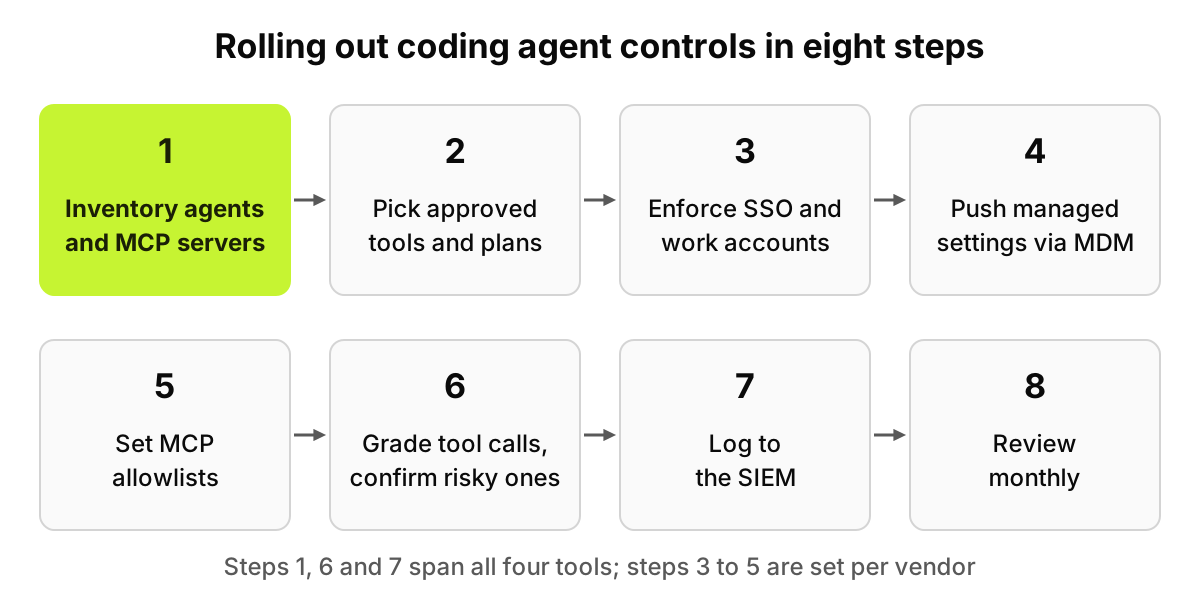
Inventory first, because an allowlist written blind blocks what people rely on and misses what matters.
Pick approved tools and plans; several controls exist only on Enterprise.
Enforce SSO and work accounts: forceLoginOrgUUID, AllowedTeamId, the Codex workspace pin, Copilot network routing.
Push managed settings through MDM, including Cursor hooks with failClosed and Codex requirements rather than defaults.
Set MCP allowlists by URL or command, never by name alone.
Grade tool calls; confirm risky ones with the developer and block destructive ones.
Log to the SIEM: OpenTelemetry, vendor audit logs, the Compliance API and device events.
Review monthly. Compare the inventory with each allowlist, prune exceptions, check client versions.
Figure 3. Steps 3 to 5 are per vendor. Steps 1, 6 and 7 are the ones that span all four tools.
What can software do here, and what stays with people?
Software can pin accounts, grade and block tool calls, block MCP servers and keep the record. It cannot decide which repositories an agent should ever touch, read an MCP server's source for you, or judge whether a contractor should run agents at all. Keep confirmations rare enough that people still read them. Nothing here is legal or audit advice, and no tool makes an organization compliant.
FAQ
What is AI coding agent security?
It is the set of controls over agents that read code, run commands and call tools on a laptop or in the cloud: who may run the agent, what it may touch, what each action may do, and what gets recorded for later review.
Can developers override Claude Code or Cursor admin settings?
Not from their own files. Claude Code's managed settings beat user, project and command-line values, though a local administrator can edit the managed source. Cursor says team settings take precedence over individual and project configuration. Each applies only to its own tool.
How do I stop coding agents from loading unapproved MCP servers?
Use each tool's allowlist: Claude Code's allowedMcpServers with allowManagedMcpServersOnly, Cursor's Enterprise MCP allowlist, Codex requirements and GitHub's enterprise managed-settings.json. Match by URL or command, not name. Then inventory the device, since an allowlist only filters servers a tool was asked to load.
Does the GitHub Copilot cloud agent ask before calling tools?
Not for MCP tools; GitHub says it uses configured MCP tools autonomously. Its other limits are structural: write access to trigger it, pushes only to a copilot/ branch, review before workflows run, and a firewall that doesn't cover other MCP servers.