Shadow AI Discovery: Four Methods Compared (SSO Logs, CASB, Browser, Endpoint)
Shadow AI discovery can look in four places, and each sees a different slice: identity-provider logs see federated sign-ins, network logs see domains, a browser layer sees accounts and prompts, and an endpoint agent sees desktop apps, coding agents and local MCP servers. Most programs need two. This guide compares the four methods on coverage, rollout effort, time to a first inventory and privacy, then gives a 30-day plan.
A
Anita Krishnan
Head of Research
Nov 18, 2026
On this page
Shadow AI discovery can look in four places, each seeing a different slice. Identity-provider logs see only apps federated with your SSO. Network and CASB logs see domains, and prompts only where traffic is decrypted. A browser layer sees in-tab prompts, accounts and plans. An endpoint agent sees desktop apps, coding agents and local MCP servers. Most programs need two.
Last verified: 18 November 2026, against RFC 9849, the Model Context Protocol specification (version 2026-07-28, transports and stdio pages), the OWASP Pinning Cheat Sheet, Claude Code's MCP documentation and three Claude Help Center articles, all read at the source. OpenAI's help center did not resolve for us today, so no ChatGPT account detail is stated as fact. The comparison and the time estimates are our own assessment.
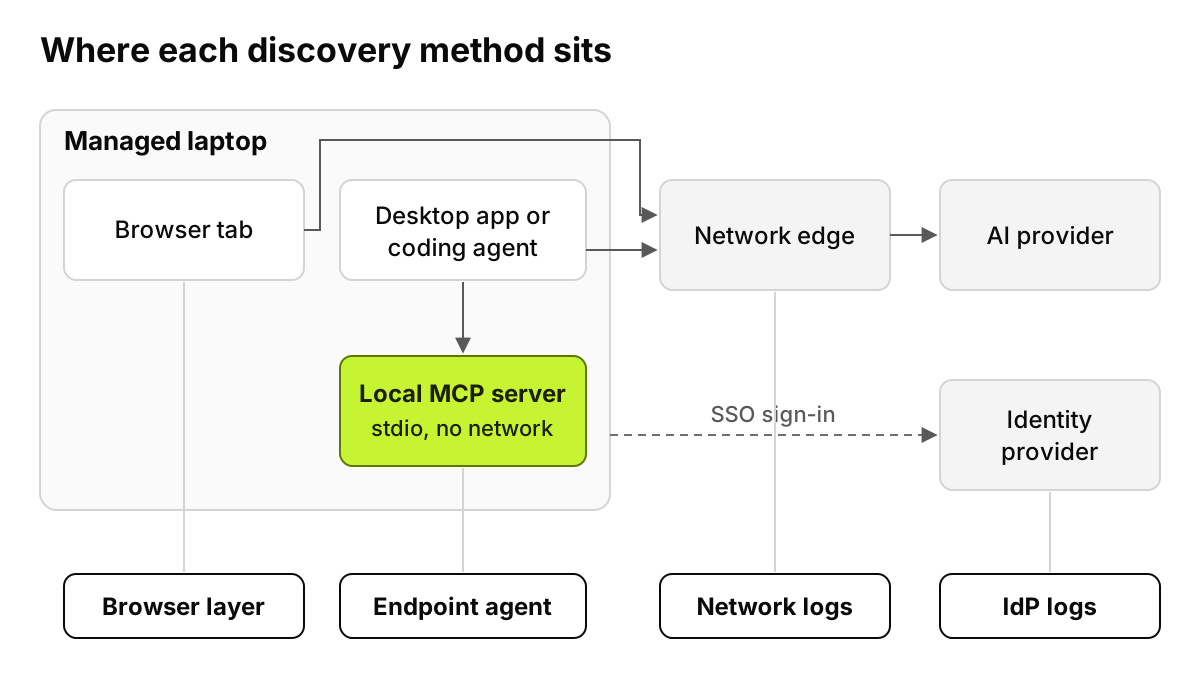
Figure 1. A method sees what passes its position. The local MCP server never passes three of them.
Why does the method decide what you find?
Every AI interaction leaves traces in a few places. A sign-in may touch your identity provider. The work happens in a browser tab or a desktop app. Traffic may or may not cross a network you control. Each method reads one of those places and reports only what reached it.
So two teams can run discovery on one company and return lists that barely overlap. Neither may find the coding agent a developer installed last Tuesday. Below, each method gets five questions: how it works, what it sees, what it misses, time to a first result, and privacy footprint.
What can SSO and identity-provider logs find?
How it works. Your identity provider records each sign-in to an app federated with it, and most keep a list of OAuth consent grants: third-party apps an employee let into company mail, files or calendars. Export both and filter for AI vendors.
What it sees. Who signed in to which federated AI tool, and when. The grant list adds AI note-takers and assistants connected to work accounts, where surprises often hide.
What it misses. Anything not federated, which for shadow AI is most of it. A personal ChatGPT login made with a personal email never asks your identity provider for anything. Even a federated tool can have a personal account beside the work one: Anthropic's help center says both can share one email address, and that "A blue checkmark shows which account you're currently using." Your logs see only the organization side, and Anthropic's SSO guide says verifying your domain "by itself will not impact existing users' ability to access our products."
Time and effort. Fast. A first list in about a day, if retention covers a useful window.
Privacy footprint. Low: sign-in metadata the identity team already holds.
The limit is that this method only finds tools whose plans support SSO at all. The Enterprise AI Tool Controls Matrix helps here because it lists SSO, SCIM and audit API support for 26 AI tool plans, so you know in advance which tools could ever appear in your sign-in logs.
What do CASB, proxy and firewall logs find?
How it works. Log-based discovery matches firewall, proxy or DNS logs against a catalog of known apps. Inline inspection sits in the traffic path and, if it decrypts TLS, reads requests as well as counting them.
What it sees. Which AI domains are reached, how often, from where, and roughly how much data went up. With decryption and maker support, more: Anthropic's tenant restrictions let a proxy inject a header of allowed organizations, with "TLS Inspection: Required", for "members of Enterprise plans and Console organizations." Our guide to blocking personal AI accounts covers those controls per maker.
What it misses.
Laptops off the network, unless their traffic is routed through a client you installed.
The account, since personal and business sessions share a domain.
Pinned apps. OWASP tells developers not to allow-list interception proxies, so a pinned app usually lands on the exemption list.
Some hostnames. RFC 9849, Encrypted Client Hello, published in March 2026, "protects the SNI and other potentially sensitive fields." The log may show only that a client "is connecting to a particular service provider", such as a hosting provider rather than the AI site. The RFC notes managed enterprises may disable ECH by group policy.
Local MCP servers. The MCP specification defines stdio as "newline-delimited messages over the standard streams of a client-launched subprocess." Nothing crosses a network.
Time and effort. Days for log-based discovery, if the catalog is current. Inline decryption is a project of months, with an exemption list to manage forever.
Privacy footprint. Low for logs. High for decryption, which reads everything in its path, AI or not. Our AI security vs DLP vs CASB vs SSE post covers where network controls stop.
What does a browser layer find?
How it works. An extension force-installed by policy, or a managed browser, watches the AI sites employees open.
What it sees. The AI tool, the signed-in account (personal or business), the plan, and the prompts, pastes and uploads in the tab, on any network.
What it misses. Desktop apps, terminals and IDEs. Unmanaged browsers. Windows where policy keeps the extension from running.
Time and effort. Hours after browser policy reaches devices. Low effort if you already push that policy through MDM.
Privacy footprint. Medium. It can see page content, so write down what it records and tell employees first.
What does an endpoint agent find?
How it works. Software on each managed laptop, usually pushed by MDM, reads what is installed and configured.
What it sees. Desktop AI apps and their versions, CLI coding agents, AI IDEs, local model runtimes, and MCP servers in configuration files. Those files sit in known places. Claude Code's documentation says local and user-scoped MCP servers are stored in ~/.claude.json and project servers in .mcp.json at the project root, and that "Stdio servers run as local processes on your machine." Only an agent on the machine sees that. Our shadow MCP post lists where else those configs hide.
What it misses. Unmanaged laptops, BYOD and phones.
Time and effort. Hours to days, depending on how fast devices check in. Medium effort: a package, a push, a pilot group.
Privacy footprint. Medium. Device-level access needs a written scope.
What about expense reports, procurement and surveys?
Run them, with modest expectations. Card statements find paid plans, often the best candidates to license. An anonymous survey finds tools nothing logs, and sometimes why people chose them. All are slow, and none sees a free plan used quietly. Treat them as a cross-check, not a fifth method.
How do the four methods compare?
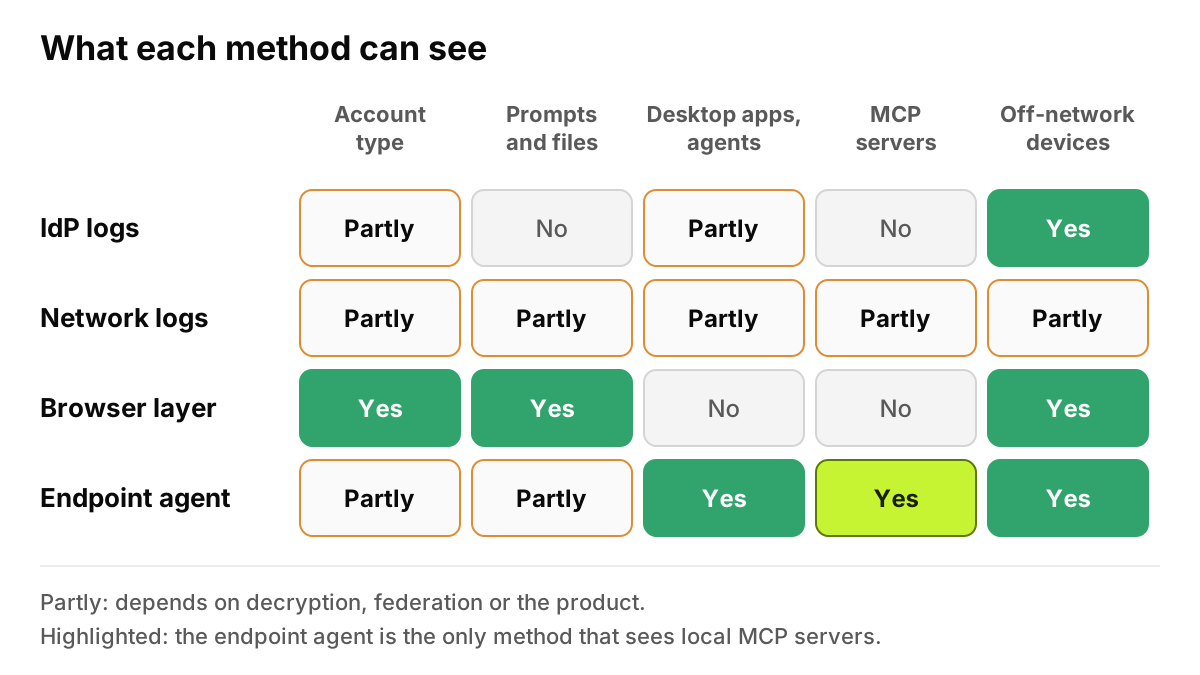
Products vary inside each category, so test yours against each row.
Method
What it sees
Personal vs business account?
Prompts and files?
Desktop apps and coding agents?
MCP servers?
Off-network / remote devices?
Rollout effort
Time to first inventory
SSO / identity-provider logs
Federated sign-ins and OAuth grants
Partly: only the business side
No
Partly: sign-ins only, if federated
No
Yes, for federated sign-ins
Low: export and filter
About a day
Network: CASB, proxy, firewall logs
Domains, volumes, network addresses
Partly: with decryption and maker support
Partly: only where decrypted
Partly: pinned apps are usually exempt
Partly: remote HTTP servers on its path; never stdio
Partly: only if routed through it
Low for logs; high for decryption
Days (logs)
Browser layer
AI sites, account, plan, in-tab activity
Yes
Yes, in managed browsers
No
No
Yes, on managed browsers
Low with browser policy
Hours
Endpoint agent
Installed apps, agents, configs, processes
Partly: depends on the product
Partly: depends on the product
Yes
Yes: config files and processes
Yes, on managed devices
Medium: MDM push
Hours to days
The time column is our estimate for a company already running the underlying tooling.
Figure 2. No row is all green. Browser and endpoint fill each other's gaps; identity and network logs reach devices you do not manage.
Which methods should you combine?
Our view, by situation.
Mostly browser-based workforce: browser layer first, plus a quarterly review of OAuth grants.
Developer-heavy company: endpoint first, because coding agents and MCP servers live there, then browser.
Heavy BYOD: SSO on every licensed tool and network logs for traffic you route, then the browser layer wherever you manage a browser profile. Write down what you cannot see.
Regulated: browser and endpoint for the evidence trail, identity logs for access reviews, network logs as an independent cross-check. Two methods agreeing is a better answer to an auditor than one.
For where to block or redact rather than where to look, see endpoint vs browser vs proxy. That is the control view; this is the discovery view.
What would each method catch in one team?
Michael Brooks works in finance. He uses ChatGPT in Chrome under a personal login, and the Claude desktop app signed in to the company organization through SSO. David Kim, a developer on his team, runs Claude Code with two MCP servers: a local filesystem server over stdio and a remote one over Streamable HTTP.
Identity-provider logs show Michael's SSO sign-in to Claude, and David's if he used SSO too. Nothing about the personal ChatGPT account or either MCP server.
Network logs show OpenAI and Anthropic domains while laptops are on the office network or VPN, but not which ChatGPT account. They may log the remote MCP server's host, since each Streamable HTTP message is a POST to one endpoint. The stdio server produces no traffic.
The browser layer catches the personal ChatGPT account and its plan, at home or in the office. It sees neither desktop app nor Claude Code.
The endpoint agent lists the Claude desktop app and version on Michael's laptop, and on David's finds Claude Code and both MCP servers in its config files.
No single method found all four items. Browser plus endpoint did.
What does a 30-day discovery plan look like?
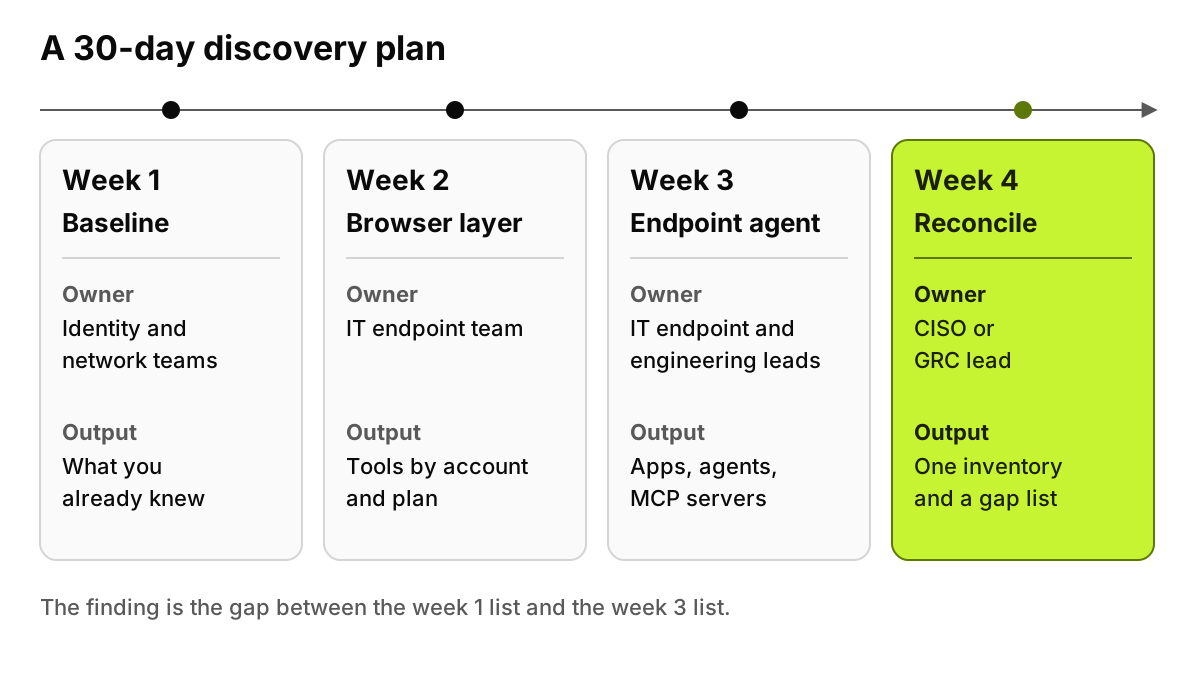
Week 1, baseline. Owner: identity and network teams. Export AI sign-ins and OAuth grants, filter network logs, pull expense lines. Output: what you already knew.
Week 2, browser. Owner: IT endpoint team. Force-install the browser layer for a cross-functional pilot group. Output: tools by account type and plan.
Week 3, endpoint. Owner: IT endpoint team with engineering leads. Push the agent to developers and the team with the most sensitive data. Output: desktop apps, coding agents and MCP servers, each tied to a device and a person.
Week 4, reconcile. Owner: CISO or GRC lead. Merge the lists, mark which method found each item, and make the first allow, redact and block decisions. Output: one inventory, a gap list per method, a monthly review date.
The gap between the week 1 list and the week 3 list is the number to take to leadership. It measures what your existing tools could not see.
Figure 3. Each week produces one output. Week 4 compares them, and the difference is the finding.
What can discovery software do, and where does it stop?
Discovery software counts what reaches it. None of the four methods sees a personal phone, a home computer or a photo of a screen; policy, training and a good approved tool reach those.
Software also cannot decide what the inventory means. Whether a personal account is ever acceptable, or whether finance may draft text in a free tool, is for security, legal and the business to settle. Discovery gives that conversation facts instead of guesses.
Where does AccuroAI fit?
AccuroAI covers two of the four methods, the browser and managed devices, with no TLS interception. It recognizes 1,400+ AI tools there, each with the signed-in account, personal or business, and the plan, and its SaaS discovery lists non-AI apps beside them with a 0 to 100 app risk score. On devices it keeps an MCP server inventory, each server with its own 0 to 100 risk score. Rollout through the MDM you already run takes under 30 minutes.
AccuroAI does not do network discovery, does not read identity-provider logs, and does not see unmanaged phones. SSO coverage and OAuth grant reviews stay with the identity team; domain blocks and unmanaged devices stay with the network team. The shadow AI discovery feature page shows the browser and device inventory in detail.
FAQ
Can SSO logs find shadow AI?
Partly. They find sign-ins to AI tools federated with your identity provider and, through OAuth grants, third-party AI apps connected to work accounts. They cannot find personal accounts made with a personal email, or tools that never ask your identity provider for anything, which is most of what people mean by shadow AI.
Does a CASB detect ChatGPT personal accounts?
From logs alone, no, because personal and business sessions reach the same domain. With TLS decryption and a tenant control the AI maker supports, a network layer can tell them apart or block one. That needs decryption on every path, and off-network laptops fall outside it unless routed through it.
Is shadow AI discovery monitoring employees?
It can be scoped narrowly. Finding which tools and accounts are in use is different from reading what people type. Decide what each method records, who can see it and how long it is kept, and tell employees before rollout. Works councils and privacy law may add rules, so involve your DPO early.
How long does shadow AI discovery take?
A first list from identity and network logs takes days if the data exists. Browser and endpoint layers show results within hours of reaching devices, and a reconciled inventory across methods takes about a month in the plan above. After that it is a monthly review, not a project.
Which discovery method should we start with?
The logs you already hold, because they cost nothing and set a baseline. Then add the layer closest to where your people use AI: the browser for web-heavy teams, the endpoint for developers. The gap between the two lists shows what was invisible.
This is practitioner guidance on discovery methods, not legal advice on employee monitoring.